web
You’re offline. This is a read only version of the page.
close
Skip to main content

Notifications

Announcements

No record found.

Community site session details

Community site session details

Session Id :
Microsoft Dynamics AX (Archived)

AX 2012 _callInsertLogic in insertUpdate()

(0) ShareShare
ReportReport
Posted on by

I'm new to AX and I'm currently working on using DIXF to import data into the ForecastSales table.  I did this by way of creating a custom entity from a wizard based on the ForecastSales table.  The following is an example of a row I attempted to import.

AllocateMethod 1
Currency USD
ModelId <some_model>
StartDate 2016-01-15
EndDate 2016-01-21
InventDimId <some_dim>
InventQty 10
ItemId <some_id>
Report 0
Amount 100
Freq 1
FreqCode 1
SalesPrice 10
SalesUnitId ea
Active 1
PriceUnit 1

It appears, however, that when I import the row only the forecast definition record was created, and neither a corresponding exploded forecast record nor corresponding row in the ForecastInvent table was created.

Based on my research and looking at the X++ codes I believed that the issue was that the doInsert() method was being run instead of insert() in the insertUpdate() method.  After looking at the insertUpdate() method I saw the following code:

if (_callInsertLogic)
{
_target.insert();
}
else
{
_target.doInsert();
}

Seeing this I thought that perhaps all I needed to do was check the "Run business logic in insert or update method" and then everything should work.
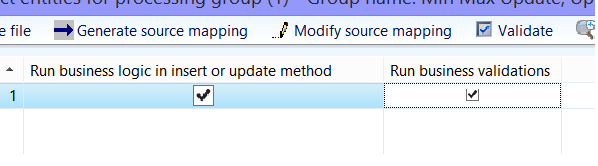
callInsertLogic.png

That, however, did not work.  Perhaps I am missing something here?  How do I get the class to run insert() instead of doInsert()?

*This post is locked for comments

I have the same question (0)
  • Community Member Profile Picture
    on at

    I should also note that out of the interest of not breaking any features I'm really trying to avoid solution that is simply replacing the .doInsert() with .insert() or removing the conditional statement and forcing .insert() all the time.

  • Community Member Profile Picture
    on at

    My suggestion is before you change anything in Code , make sure you are following the right steps.  Below two links might be helpful  for you .

    dynamicsaxtipoftheday.com/.../import-data-using-the-data-import-export-framework

    community.dynamics.com/.../113276

  • Community Member Profile Picture
    on at

    Thank you for your quick response, Ms. Kirodiwal.  The steps outlined in the first link was quite similar to the procedure I followed from the AX documentation (although a lot more clear and detailed).    I did, however, follow the steps in that link again and it still resulted in only the Definition record being created -- and I should note that based on the import all the fields in the "Allocation" window is basically filled, and all that is required is to hit "Create lines" for AX to generate the Exploded records and corresponding records in ForecastInvent.


    I'm actually a bit confused by the second link.  The Verified Answer by Brandon Wiese seemed to confirmed my initial thought (and I quote): In other words, a single "inside AX" insert into ForecastSales can result in many records in both ForecastSales and ForecastInvent, but all of it is fully automatic. -- but Keane D'Cunha later mentioned the need of a custom method, although I do not think that is entirely necessary.


    To test my hypothesis, I've went ahead and override the insertUpdate() method in DMFForecastSalesEntityClass (the custom entity I created) and replaced: 

    else
    {

    if (_callInsertLogic)
    {
    _target.insert();
    }
    else
    {
    _target.doInsert();
    }

    }

    with simply:

    else

    {

    _target.insert();

    }

    compile, repeat the process, and now when I insert one definition row, AX also generated one exploded row in ForecastSales and one row in ForecastInvent (or if I change Freq = 0, then one definition row will generate 7 exploded rows and 7 corresponding rows in ForecastInvent).


    I am, however, unable to identify a way to set _callInsertLogic = true to avoid tinkering with the code, although it would appear that I could fall back on this solution if needed.

  • Community Member Profile Picture
    on at

    In case anyone is interested, I've decided to go ahead and implement the workaround in the post above, but when I did that I ended up running into another issue that is now posted in a new topic (although presented in a more general manner) here:

    community.dynamics.com/.../187231

  • Verified answer
    Community Member Profile Picture
    on at

    Interestingly, while researching another issue I've came across the solution to this issue mentioned by Andre here:  community.dynamics.com/.../109284

    Specifically, while I checked the box for Run business logic in insert or update method in the Processing Group, I failed to check the same box in the Entity Structure window under the Target Entities.  Once I made sure that those boxes are checked at both locations the import worked as expected where the Forecast line (exploded/allocated forecast record) was properly created when importing the Forecast header (forecast definition record).

    As a test, I've also tried importing with only one of the boxes checked at a time, and neither of the attempts worked.  The import only worked as expected when both boxes are checked.

  • Brandon Wiese Profile Picture
    17,788 on at

    You absolutely need both records checked.  We discovered this in another thread also.

    community.dynamics.com/.../478259

Under review

Thank you for your reply! To ensure a great experience for everyone, your content is awaiting approval by our Community Managers. Please check back later.

Helpful resources

Quick Links

Responsible AI policies

As AI tools become more common, we’re introducing a Responsible AI Use…

Neeraj Kumar – Community Spotlight

We are honored to recognize Neeraj Kumar as our Community Spotlight honoree for…

Leaderboard > 🔒一 Microsoft Dynamics AX (Archived)

#1
Martin Dráb Profile Picture

Martin Dráb 4 Most Valuable Professional

#1
Priya_K Profile Picture

Priya_K 4

#3
MyDynamicsNAV Profile Picture

MyDynamicsNAV 2

Last 30 days Overall leaderboard

Featured topics

Product updates

Dynamics 365 release plans



