web
You’re offline. This is a read only version of the page.
close
Skip to main content

Notifications

Announcements

No record found.

Community site session details

Community site session details

Session Id :
Microsoft Dynamics AX (Archived)

Count or sum table values on report

(0) ShareShare
ReportReport
Posted on by

Hi Everyone,

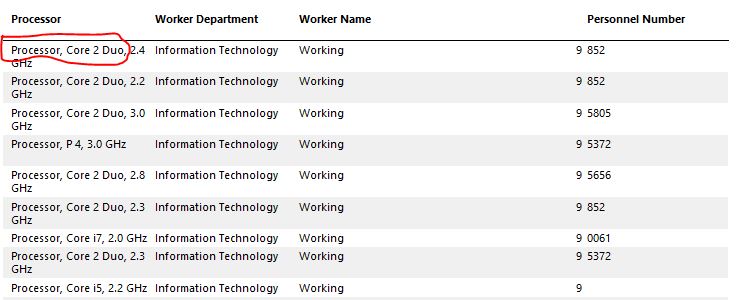
Can anybody tell me how do i sum the specific values of the table from database.

Actually, i want to count/sum (using sum expression) the value "Processor, Core 2 Duo" from column Processor regarding of full value.

Please see the image :
sum-if-proc.JPG

thanks in advance

regards

Maqbool Ahmed

*This post is locked for comments

I have the same question (0)
  • Sohaib Cheema Profile Picture
    49,438 User Group Leader on at

    First of if you want to make your life easy, break information into smallest pieces when it comes to saving records in table. If  "Processor, Core 2 Duo" is really a distinct value, keep it in a different column.

    once you can fix data in your base table, you can simply Group by in SSRS

  • Community Member Profile Picture
    on at

    I break the data into other field using =Right(Parameters!User.Value, Len(Parameters!User.Value) - InStr(Parameters!User.Value, "p"))  

    but Sum expression is not reading Processor,Core 2 Duo OR "rocessor, Core 2 Duo but full value like Processor, Core 2 Duo,2.3 ghz

    thanks for the reply i think need more help

    thank you

  • Sohaib Cheema Profile Picture
    49,438 User Group Leader on at

    Have you added a group node downwards in SSRS report? and an expression on your GroupBy? as you want to group by substring

  • Community Member Profile Picture
    on at

    Group by option is not available as i m using precision design reports of ax.

    Any alternate ?

  • Gautam Profile Picture
    3,945 on at

    As Sohaib told, just put group on Processor field and for sum you can use expression like this Sum(<field value>,"your group name of processor")

    Thanks

  • Community Member Profile Picture
    on at

    ok thanks

    let me try and post back

  • Gautam Profile Picture
    3,945 on at

    In Tablix , select the row where you have written expression , right click that very row you will get option "Add group"

    Thanks

  • Community Member Profile Picture
    on at

    Sorry to posting back late.

    I have tried the suggested solution but gives me the error can you please see the attached word file to see what i am doing wrong ?

    thank you for you time and help

    if cant see the attachment then please use this link : https://drive.google.com/file/d/0B4R0UhXcXclwQjhWcXh2aDdaY3M/view

  • Community Member Profile Picture
    on at

    Thanks for your help. i am able to count the values by using : =iif(Right(Fields!TECHINFO1.Value, Len(Fields!TECHINFO1.Value) - InStr(Fields!TECHINFO1.Value,  " "))="P 4, 3.0 GHz","1","0")

    but unable to sum values how to embed sum expression in it.

    this is the last think i stuck  any help would be highly appreciated : )

  • Community Member Profile Picture
    on at

    Thanks for your help also . i am able to count the values by using :

    =iif(Right(Fields!TECHINFO1.Value, Len(Fields!TECHINFO1.Value) - InStr(Fields!TECHINFO1.Value,  " "))="P 4, 3.0 GHz","1","0")

    but unable to sum values how to embed sum expression in it.

    this is the last think i stuck  any help would be highly appreciated : )

Under review

Thank you for your reply! To ensure a great experience for everyone, your content is awaiting approval by our Community Managers. Please check back later.

Helpful resources

Quick Links

Responsible AI policies

As AI tools become more common, we’re introducing a Responsible AI Use…

Neeraj Kumar – Community Spotlight

We are honored to recognize Neeraj Kumar as our Community Spotlight honoree for…

Leaderboard > 🔒一 Microsoft Dynamics AX (Archived)

#1
Priya_K Profile Picture

Priya_K 4

#1
Martin Dráb Profile Picture

Martin Dráb 4 Most Valuable Professional

#3
Ali Zaidi Profile Picture

Ali Zaidi 2

Last 30 days Overall leaderboard

Featured topics

Product updates

Dynamics 365 release plans



