web
You’re offline. This is a read only version of the page.
close
Skip to main content

Notifications

Announcements

No record found.

Community site session details

Community site session details

Session Id :
Microsoft Dynamics AX (Archived)

Closing Fiscal Calendar till April and continue the existing 2019 calendar till December

(0) ShareShare
ReportReport
Posted on by 287

Hi all, 

We have Fiscal Calendar 5-4-4 , we are planning to extend the Period 3 from 3/30/2019 to 4/8/2019 and do Full Close in 4/9/2019 and use the same Fiscal calendar and do Year end Close at December.  
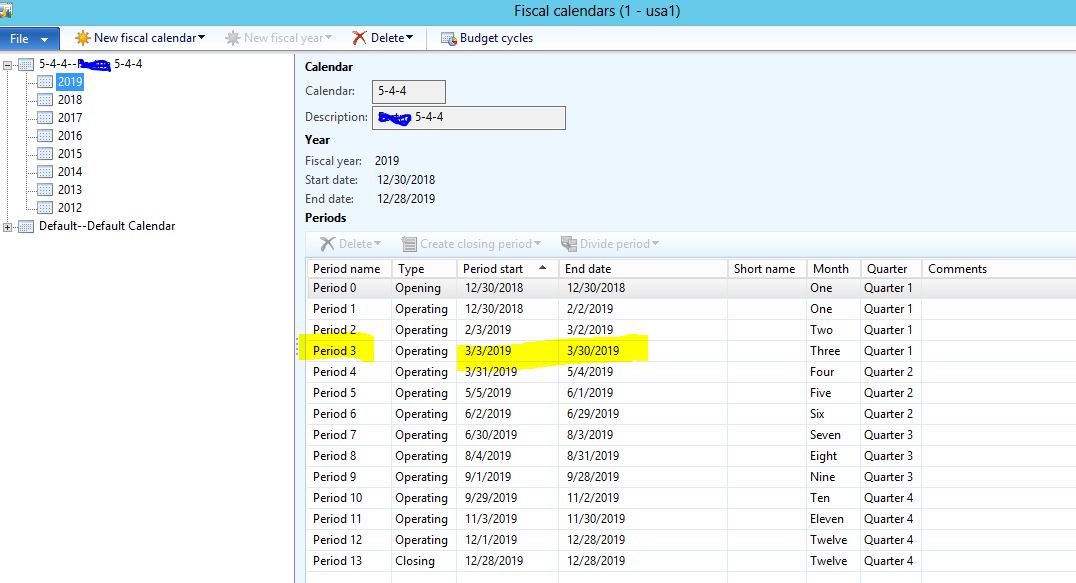
6761.image1.JPG

To Extend MArch month from 3/30/2019 t0 4/8/2019. I deleted the Period 4 and then clicked Divide period and extended Period 3 till April 4th 2019 as shown below.
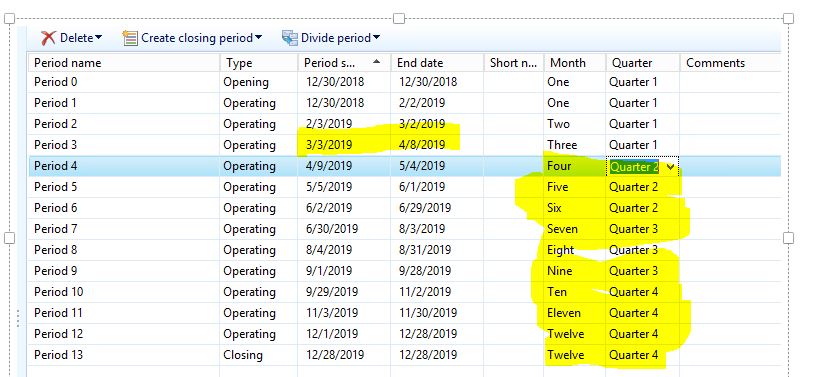
4213.image2.JPG

How to close period on April 4/9/2019 ?

Can we close till April and use the same calendar for remaining periods and do year end close on December?

Does making changes in period causes any impact ? 

I think making changes in period must happen before any transaction posted to that date in the periods. Am i right? 

This is a shared calendar for 13 legal entities, I am scared to do changes in PROD. 

Please help me and suggest a best option as soon as possible. we do have 4 days time left.

Thanks, 

Banu.

*This post is locked for comments

I have the same question (0)
  • André Arnaud de Calavon Profile Picture
    300,915 Super User 2025 Season 2 on at

    Hi Banu,

    I'm not able to understand the exact scenario. Do you have to only switch one week around March/April? The year was already starting in week 1? Or is there a change in the length of a current/prior year? Actually you can make changes afterwards, but then you need to run recalculation jobs. What exactly do you mean with a "Full close"? Is this an additional year end procedure?

  • Ludwig Reinhard Profile Picture
    Microsoft Employee on at

    Hi Banu,

    What I understand is that you want to have the fiscal year ended at 04/08/2019 and then start with a completely new fiscal year that runs from 04/09/2019 until 12/31/2019. Is that correct?

    Do you still want to continue with the 4-4-5 accounting or do the accounting on a monthly basis starting from 04/09/2019?

    Best regards,

    Ludwig

  • BanuReddy Profile Picture
    287 on at

    Hi Ludwig, 

    Thanks for your response. 

    What I understand is that you want to have the fiscal year ended at 04/08/2019 and then start with a completely new fiscal year that runs from 04/09/2019 until 12/31/2019. Is that correct?

    Yes, you are correct. We are planning to end fiscal year at 4/8/2019 and then start new year from 4/9/2019 until 12/31/2019.   We want to continue using the existing calendar(2019) itself. 

    Do you still want to continue with the 4-4-5 accounting or do the accounting on a monthly basis starting from 04/09/2019?

    Sorry Ludwig, i dont know what is 4-4-5 accounting. We want to do accounting on a monthly basis starting from 4/9/2019. 

    Thanks, 

    Banu.

  • BanuReddy Profile Picture
    287 on at

    Hi Andre,

    Thanks for your response. one of our client is handing over their company to another company. Therefore we are planning to  close the year end on April 8th and create new opening from April 9th till december and again we will do year end on December again. First time we are planning to do two year end close. We have not tried this before.

  • BanuReddy Profile Picture
    287 on at

    Hi all,

    Let me explain the secanio clearly . Once we do year end close , We can get financial statements, P & L , balance sheets reports. Now In my case we need such reports starting from Jan 1st to April 8th. Is there any possibility to get that reports . To get these report  , we thought we must do year end close on April and start new calendar from April to December and go year end close at december . Please suggest us any alternative options .

    Thanks in advance .

    Thanks,

    Banu

  • Verified answer
    Ludwig Reinhard Profile Picture
    Microsoft Employee on at

    Hi Banu,

    Andre created a great post on how to change a fiscal calendar year.

    kaya-consulting.com/ax-2012-change-fiscal-calendar-to-a-shifted-year

    You can apply the concepts described there for your scenario.

    In regards to reporting:

    You can define a from and to date value in the management reporter reports to cover a specific period you want to report on.

    Reporting should not be a problem in my opinion.

    If you are unsure, I would recommend that you do the change in a demo/test environment first and check out the reports.

    If you get stuck or need some additional help, please continue on this post and do not create a duplicate one ;-)

    Many thanks,

    Ludwig

  • BanuReddy Profile Picture
    287 on at

    Thanks for your response Ludwig. My company is not accepting to create new fiscal calendar. They want to extend the March period from 3/30/2019 to 4/5/2019 and continue the same calendar.  Just for reporting purchase only they were planning to close year end at the april. But now, we came to know for reports we can use management reporter to view financial statements, profit and loss , balance sheets . Does extending march period creates any impact. This time my question was different therefore i created new post.

  • BanuReddy Profile Picture
    287 on at

    Hi Ludwig and Andre,

    We extended the fiscal calendar period. As i mentioned above.

    We moved the prod data to test environment, changed the march period 3 from 3/3/2019 - 3/30/2019 to 3/3/2019 - 4/5/2019.

    Run recalculate batch job.

    We have not created any new calendar, we just modified the period date in existing calendar itself.

    We did couple of transaction like Timesheet, expense report, purchase orders, project invoice and intercompany transactions too for the date of 4/1/2019, 4/3/2019 and 4/5/2019. 

    Transactions posted without any issue. Then we did management reports and in the balance sheet april month transactions exists in period 3. This was our expectation and it worked. 

    Thanks for your time and support. I really appreciate your help on this. 

    Thanks, 

    Banu.

Under review

Thank you for your reply! To ensure a great experience for everyone, your content is awaiting approval by our Community Managers. Please check back later.

Helpful resources

Quick Links

Responsible AI policies

As AI tools become more common, we’re introducing a Responsible AI Use…

Neeraj Kumar – Community Spotlight

We are honored to recognize Neeraj Kumar as our Community Spotlight honoree for…

Leaderboard > 🔒一 Microsoft Dynamics AX (Archived)

#1
Martin Dráb Profile Picture

Martin Dráb 4 Most Valuable Professional

#1
Priya_K Profile Picture

Priya_K 4

#3
MyDynamicsNAV Profile Picture

MyDynamicsNAV 2

Last 30 days Overall leaderboard

Featured topics

Product updates

Dynamics 365 release plans



