web
You’re offline. This is a read only version of the page.
close
Skip to main content

Announcements

News and Announcements icon
Community site session details

Community site session details

Session Id :
Finance | Project Operations, Human Resources, ...
Unanswered

"Nuisance" Message Upon Saving an Asset

(0) ShareShare
ReportReport
Posted on by

Hi:

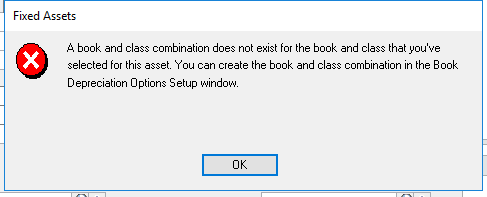
In the latest version of GP, we receive the message shown below upon saving an asset.  It is more of a "nuisance" than an error.  The asset does get saved successfully and even depreciated accurately.

Indeed, the Book Class setup is "there".

So, how do we get rid of this message?

Thank you!

John
3286.test.png

Categories:
I have the same question (0)
  • Leng Papio Profile Picture
    855 on at

    How many asset book and asset classes do you have?

    You need to create a combination of all that exists in your FA system, otherwise you will always get that message.

    The asset you mentioned got saved and got depreciated correctly, because the book and class it was assigned to is configured in your system... the source of the message is most likely the combination you are not using.

    So say, you have 2 books, and you have 5 classes.. you need to set up all those combinations; regardless of whether your accounting thinks it needs to be used or not in the current assets of the company.

    An alternative will be to remove all classes or books that you are not using (and most likely not setup currently).

  • Community Member Profile Picture
    on at

    Maybe, but this isn't the case in the production GP 2013 environment.

    This is only happening in the test environment containing the latest GP.

    Why?

    John

  • Leng Papio Profile Picture
    855 on at

    test or live, FA will function as designed. and that is how it is designed. you need to make sure that there is a combination of all existing books and classes in there..

    since it is test, most likely someone may have created a test book or a test class.. they need to either remove it or make a book-class setup against it.

  • Community Member Profile Picture
    on at

    But, it's the same data in both environments and therefore the same book and class combinations.  The version is the only difference.  

    Could this simply be a new message indicative of the latest version?  Perhaps, it's simply telling the user to go to Asset Book after adding the asset.  Where is that window that the message talks about?  It doesn't exist.

    John

Under review

Thank you for your reply! To ensure a great experience for everyone, your content is awaiting approval by our Community Managers. Please check back later.

Helpful resources

Quick Links

Season of Sharing Community Challenge Winners!

Congratulations to our community stars!

Women in Power Builds Momentum

Expanding mentorship, skilling, and AI innovation

Congratulations to the July Top 10 Community Leaders

These are the community rock stars!

Leaderboard > Finance | Project Operations, Human Resources, AX, GP, SL

#1
André Arnaud de Calavon Profile Picture

André Arnaud de Cal... 271 Super User 2026 Season 2

#2
Martin Dráb Profile Picture

Martin Dráb 264 Most Valuable Professional

#3
Subra Profile Picture

Subra 243 Super User 2026 Season 2

Last 30 days Overall leaderboard

Product updates

Dynamics 365 release plans
