web
You’re offline. This is a read only version of the page.
close
Skip to main content

Announcements

News and Announcements icon
Community site session details

Community site session details

Session Id :
Dynamics 365 general forum

Copy Sandbox to new Sandbox environment

(0) ShareShare
ReportReport
Posted on by 5

Is there a way to copy a Sandbox environment to a new Sandbox environment. 

We would like to make a new Sandbox environment from an existing environment. Is that possible. 

Thanks!

Categories:
I have the same question (0)
  • Suggested answer
    Priyesh Profile Picture
    7,396 User Group Leader on at

    Yes, you can do this by temporarily making the source Sandbox environment as Production environment from the Dynamics 365 Admin Center.

    Once you set the Type to Production for the source environment, you can either chose to do a full copy (metadata with data) or Minimal Copy (metadata only, w/o data)...you can copy over from the temporarily made Production to the Sandbox environment you wanted to copy to.

    Here's how you can edit the type of the environment -

    1. Select edit on the source environment (which is currently Sandbox)
    switchInstanceType.png

    2. Switch Instance Type to Production as shown below

    switchInstanceType.png

    3. Once you save and confirm, you'll see a Copy button here (I don't have it since I have only 1 instance on my trial). You can click on that and then those what type of copy you want to do, also to which Sandbox you want to do it.
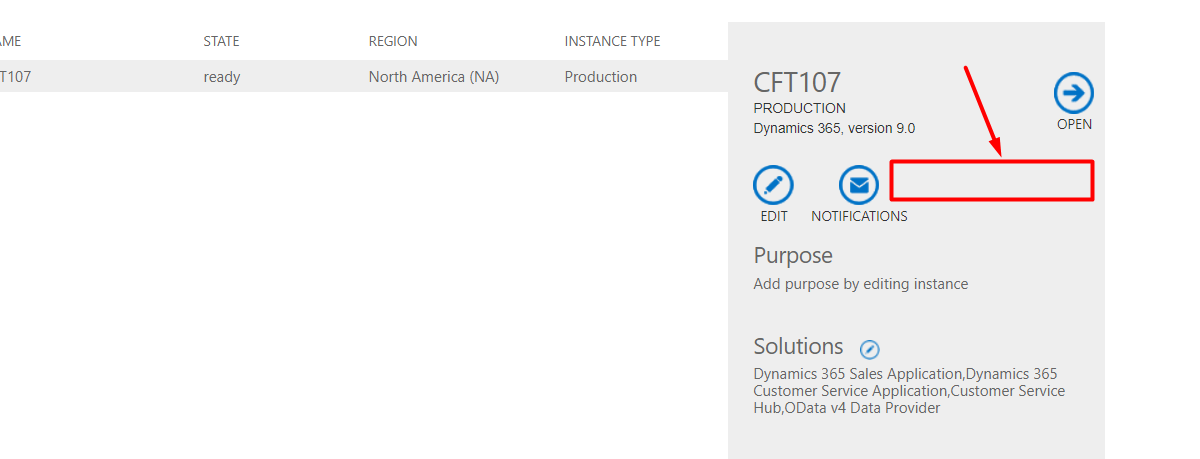
    invisibleCopyButton.png

    Hope this helps.

    Note: If this helped you, please mark my answer as verified.

  • Suggested answer
    RaviKashyap Profile Picture
    55,410 Moderator on at

    Hi,

    You don't need to change it to prod, the copy option is available for Sandbox instances as well. Follow the below link for Copy instance-

    docs.microsoft.com/.../copy-instance

    Hope this helps.

  • Verified answer
    Johnny Gong Profile Picture
    6,482 Moderator on at

    Hi Partner,

    Sure. You could buy an additional Instance under your original tenant and copy the existing Instance no matter it is Prod or Sandbox. While the target Instance must be Sandbox. The following screenshot would help.

    C2.PNG

    C2.PNG

    Hope the above would help.

    Regards

    Johnny 

  • Priyesh Profile Picture
    7,396 User Group Leader on at

    Hi Ravi,

    Yes correct. Just confirmed! It can copy to any other Sandbox instance, not Production (for logical reasons).

  • Ikkenoespesielt Profile Picture
    5 on at

    Hi Johnny

    I am missing the "copy" button. I can see that you are in another region and running version 8.2. We are in region 4, and running version 9.0. 

    Sorry for the language, but I guess you can see it the missing "Copy" icon :-)

    crmonline.png

  • Ikkenoespesielt Profile Picture
    5 on at

    Hi again. 

    Thanks.... Now I got it working. I was not ware of that I had to have the target instance up and running!

  • RaviKashyap Profile Picture
    55,410 Moderator on at

    Hi Ole,

    If you have got this working then please close the thread by marking the suggestion as verified. This will help others facing the same/similar issue.

Under review

Thank you for your reply! To ensure a great experience for everyone, your content is awaiting approval by our Community Managers. Please check back later.

Helpful resources

Quick Links

November Spotlight Star - Khushbu Rajvi

Congratulations to a top community star!

Forum Structure Changes Coming on 11/8!

In our never-ending quest to help the Dynamics 365 Community members get answers faster …

Dynamics 365 Community Platform update – Oct 28

Welcome to the next edition of the Community Platform Update. This is a status …

Leaderboard > Dynamics 365 general

Last 30 days Overall leaderboard

Featured topics

Product updates

Dynamics 365 release plans
