web
You’re offline. This is a read only version of the page.
close
Skip to main content

Notifications

Announcements

No record found.

Community site session details

Community site session details

Session Id :
Customer experience | Sales, Customer Insights,...
Answered

Manually add attendee to event in external application

(0) ShareShare
ReportReport
Posted on by 35

Hi,

We would like to add event attendee via our external application, is it possible? any API we can call? we are using ASP.NET MVC

I have the same question (0)
  • Suggested answer
    cloflyMao Profile Picture
    25,210 on at

    Hi FlowerPi,

    Yes, event management is fully built with REST API, the sample event website by Microsoft is built with Angular, you could build your own event website from scratch with any front end framework you like.

    Official Angular website demo:

    https://docs.microsoft.com/en-us/dynamics365/marketing/developer/event-management-web-application

    API documentation:

    https://docs.microsoft.com/en-us/dynamics365/marketing/developer/using-events-api(Introduction)

    https://go.microsoft.com/fwlink/?linkid=2042224(PDF)

    In addition, you could also use "marketing forms for event registration" feature, which is a new feature from 2020 wave 1 release.

    It will automatically create a script, then just copy the code to your website, the marketing form for event registration will be injected by form-loader.js, it is fully JavaScript.

    https://docs.microsoft.com/en-us/dynamics365-release-plan/2020wave1/dynamics365-marketing/improved-event-management-experience

    https://docs.microsoft.com/en-us/dynamics365/marketing/event-forms

    Regards,

    Clofly

  • FlowerPi Profile Picture
    35 on at

    Hi Clofly

    Thanks for your reply, can you guide me which API is for add attendee? How to use it?

  • Suggested answer
    cloflyMao Profile Picture
    25,210 on at

    Hi FlowerPi,

    Here is a sample request to add attendee.

    Prerequisites:

    Disable CAPTCHA.

    URL:

    https://abcdefg.svc.dynamics.com/EvtMgmt/api/v2.0/events/{readableID}/registrations?emApplicationtoken=xxxx

    Please read this article for how to generate an Event API endpoint and get emApplicationtoken.( It authenticates your web application against the event management public API.)

    https://docs.microsoft.com/en-us/dynamics365/marketing/developer/register-web-application-events-api

    Method:POST

    Request payload:

    {
       "attendees":[
          {
             "firstName":"Cloyer",
             "lastName":"Mao",
             "email":"001web@test.org",
             "passId":"",
             "waitlisted":false,
             "autoRegister":false,
             "responses":[
    
             ],
             "attendeeSessions":[
    
             ]
          }
       ]
    }

    Result(JSON callback data)

    {
       "errorCode":null,
       "status":"Success",
       "errorMessage":null,
       "Message":null,
       "redirectUrl":null,
       "purchaseId":null
    }

    Status code for success is 200.

    You can also refer to page 10 of PDF documentation.
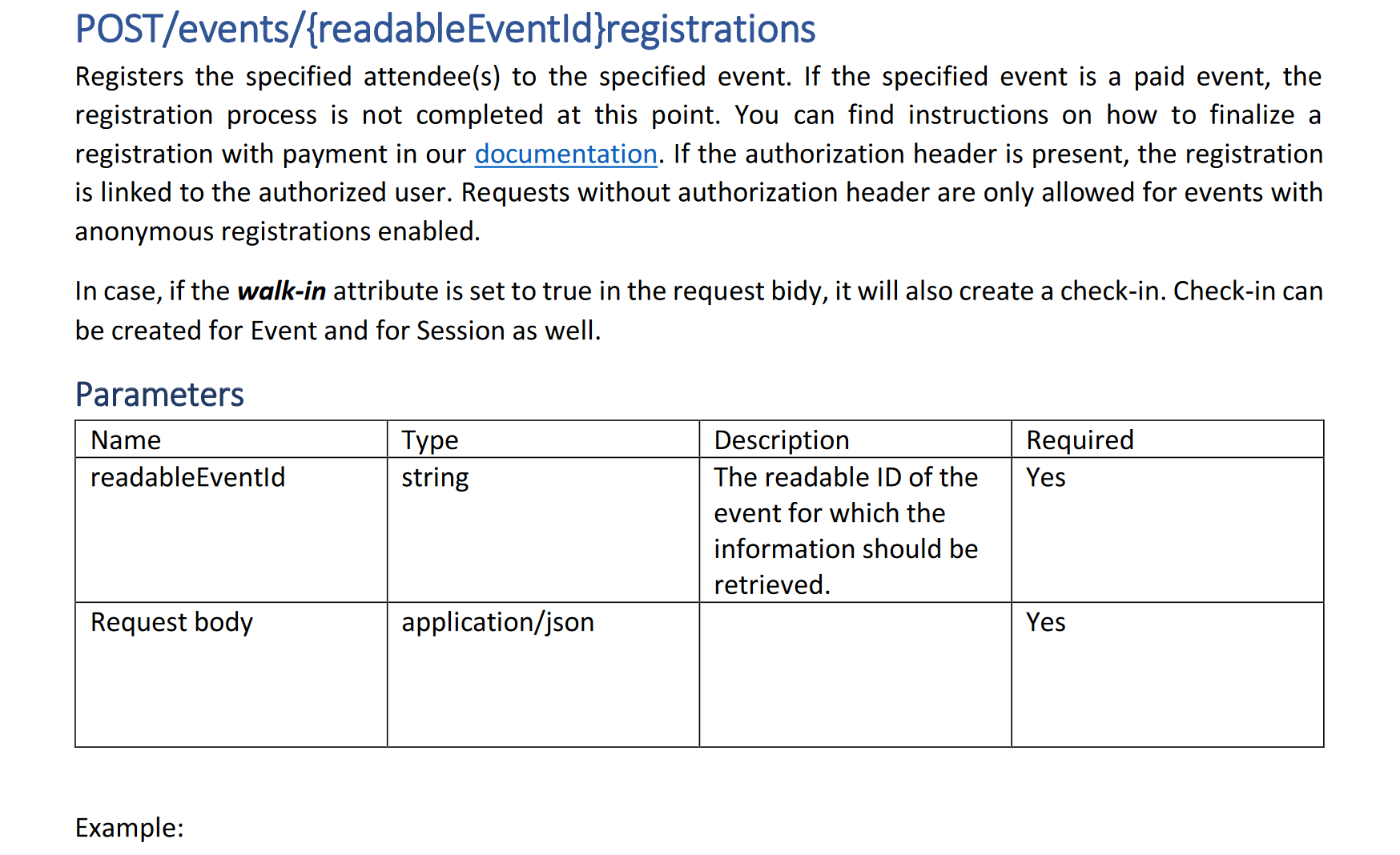
    pastedimage1595418637405v1.png

    Regards,

    Clofly

  • FlowerPi Profile Picture
    35 on at

    Hi Clofly,

    I have tried using your API and setup the Web Application already, but i still get 404, when call the API, any clues? Captcha also has been disbled.

  • cloflyMao Profile Picture
    25,210 on at

    Hi FlowerPi,

    How do you test the API?

    By JavaScript or C#?

    Regards,

    Clofly

  • FlowerPi Profile Picture
    35 on at

    Hi Clofly,

    Im using both method. Below is normal jquery method:


    pastedimage1595475118094v1.png

  • Verified answer
    cloflyMao Profile Picture
    25,210 on at

    Hi FlowerPi,

    We should call the API in a HTTP server.

    1. Install "Preview on Web Server" extension to your Visual Studio Code editor.(Or any other editor such as Atom or Sublime which supports HTTP server plugin.)

    pastedimage1595485435585v1.png

    2. The extension will run a live server at 8080 port of localhost, thus we register a web application which accepts requests from http://localhost:8080

    22418.JPG

    3. In JavaScript code, we need to stringify attendee data and set content type to application/json

    (I modified your code, the API will be called by clicking a button.)


    4. Run the HTML page in HTTP server mode.

    pastedimage1595485849980v2.png

    5. Result: now I have added an attendee to Dynamics Marketing with API directly.

    pastedimage1595485945012v3.png

    23.JPG

    Regards,

    Clofly

Under review

Thank you for your reply! To ensure a great experience for everyone, your content is awaiting approval by our Community Managers. Please check back later.

Helpful resources

Quick Links

Responsible AI policies

As AI tools become more common, we’re introducing a Responsible AI Use…

Neeraj Kumar – Community Spotlight

We are honored to recognize Neeraj Kumar as our Community Spotlight honoree for…

Leaderboard > Customer experience | Sales, Customer Insights, CRM

#1
Tom_Gioielli Profile Picture

Tom_Gioielli 70 Super User 2025 Season 2

#2
Gerardo Rentería García Profile Picture

Gerardo Rentería Ga... 43 Most Valuable Professional

#3
Daniyal Khaleel Profile Picture

Daniyal Khaleel 32 Most Valuable Professional

Last 30 days Overall leaderboard

Product updates

Dynamics 365 release plans
