web
You’re offline. This is a read only version of the page.
close
Skip to main content

Notifications

Announcements

No record found.

Community site session details

Community site session details

Session Id :
Customer experience | Sales, Customer Insights,...
Answered

Show activity records in parent entity timeline

(0) ShareShare
ReportReport
Posted on by 54

I am trying to show activity records with a regarding set to a child record within the timeline of the parent record. 

I have the following data structure:

pastedimage1583943825533v2.png

What I want to achieve is to show all activity records with a regarding set to a shop within the parent account timeline.

Therefore I changed the relationship between Shop and Account to Referential, with "Rollup view" to "Cascade all".

Unfortunately I don't find any emails with regarding set to a Shop within the timeline of the parent account...

I use a brand new Powerapps CDS instance for this.

I hope someone can help!

Thanks in advance,
Elowy.

I have the same question (0)
  • Suggested answer
    Madalina Toma Profile Picture
    on at

    Hello Elowy Groot,

    Thank you for contacting Dynamics community.

    Regarding your question I had tested the scenario and I am able to see the email over here:
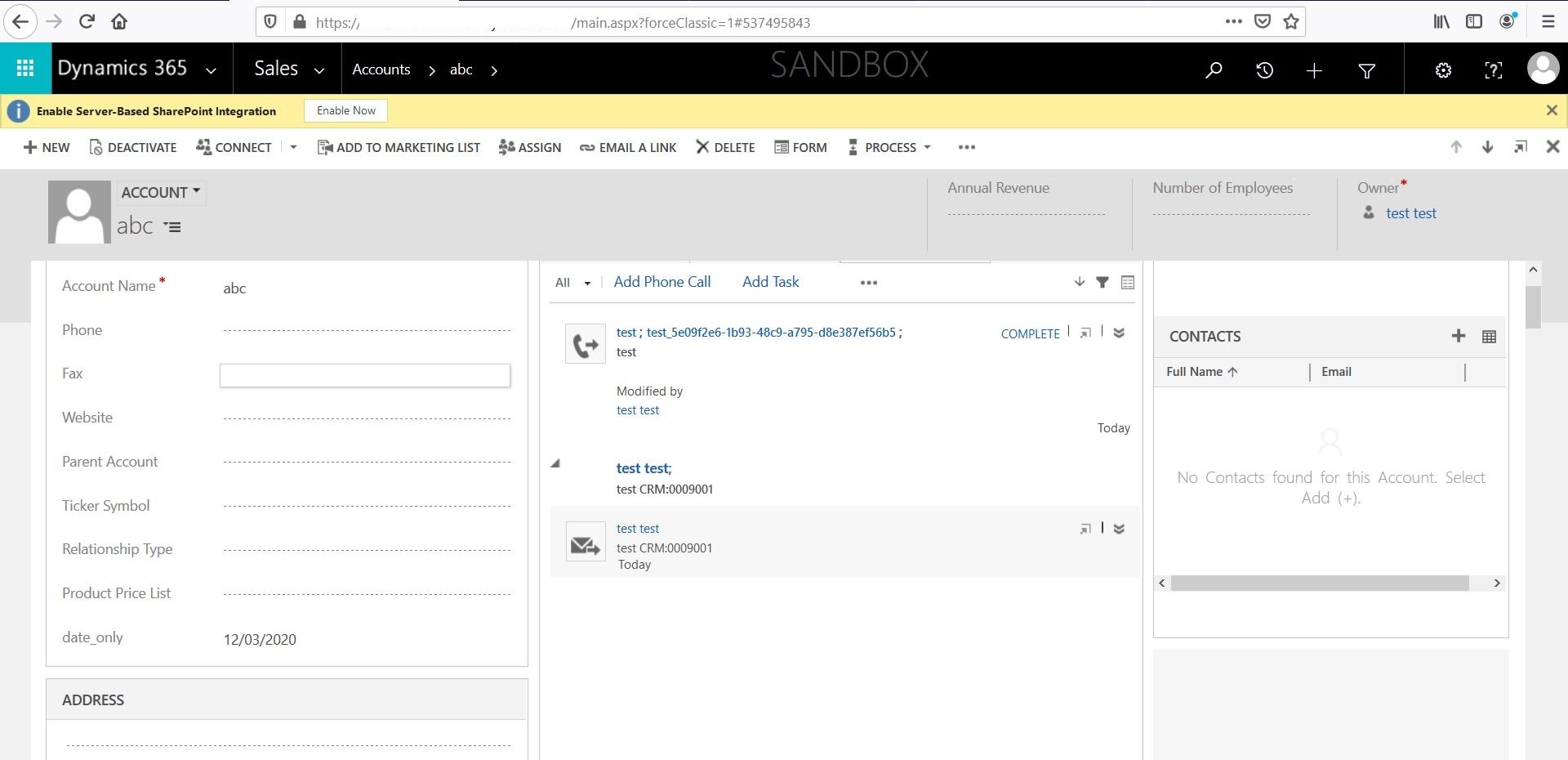
    3666.email_5F00_regarding.JPG

    To clarify what I've done:

    Other than setting the regarding to the abc account and creating the email from the custom entity, I've also enable those options for the source entity, in your case the Shop:
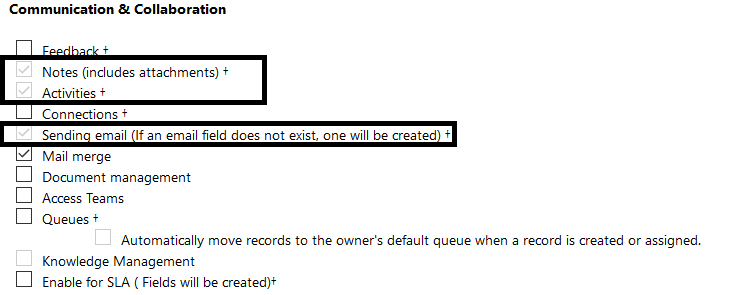
    pastedimage1584354375577v3.png

    The three of them are not mandatory as the first and second one will enable you to link the custom entity with note and email and you should only enable them while trying to create a custom relationship or let the system create a relationship with the two of them.

    The third one is not mandatory either, but as I worked with an email, that one is good to have for now.

    Please verify if you have it in the Activities tab instead of the one you had been looking into, this time around for the account form.

    Regarding the timeline itself, most precisely the social pane, this one here:
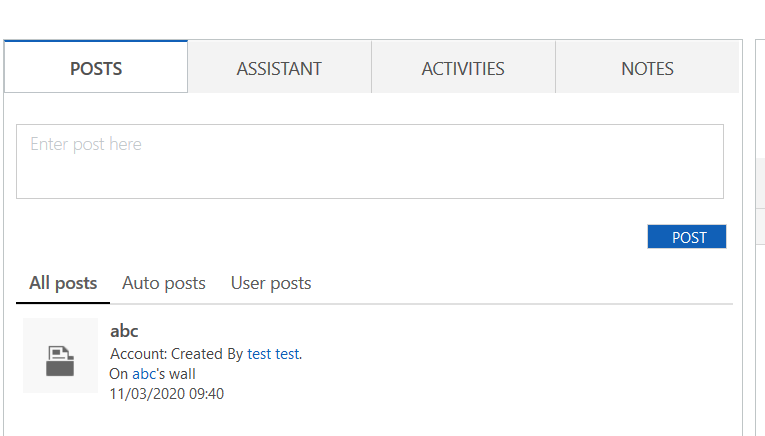
    pastedimage1584354567000v4.png

    The Post view is controlled, as far as I remember, by the Activity Feeds SDKs, those over here:
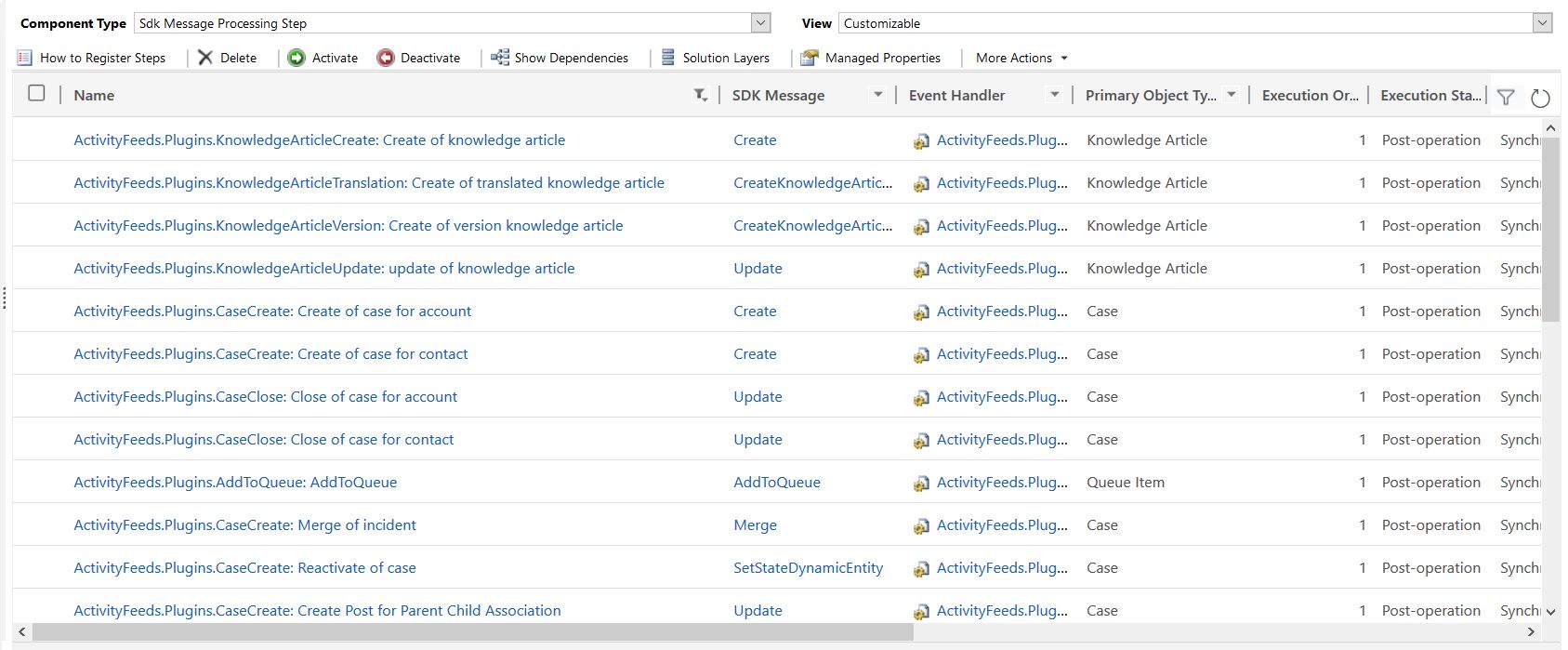
    6457.ActivityFeeds.JPG

    Which means those will only be updated in case the message on SDK Message column will be performed on the entity on the Primary Object Type code and we do not have them for all entities.

    Could you please verify if the email you mentioned is part of the Account Activities view?
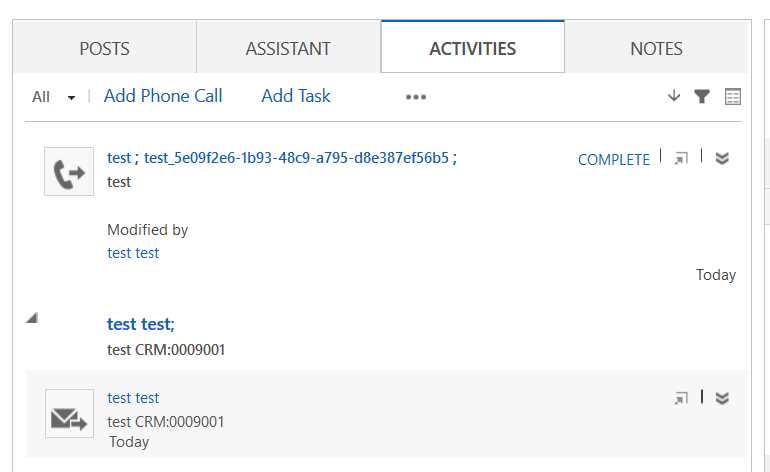
    pastedimage1584354911758v6.png

    Thank you!

  • Elowy GrootCRM Profile Picture
    54 on at

    Hello Madalina Toma,

    Thanks a lot for this answer and trying to replicate the problem.

    However, it seems that this doesn't solve the problem for me. My setting seem equal. I tried some scenario's with regarding but the activity record is always only shown with the record that it regards to.

    Could it be the used interface? I use the Timeline in the Unified interface (in a model driven app). Possibly that timeline component does not show the related activity records?

    Thanks again for responding,

    Elowy.

  • Madalina Toma Profile Picture
    on at

    Hello Elowy,

    I had tried to modify the relationship settings based on the suggestion you had initially on the thread above, but regardless of what I had tried the issue is not reproducible and I am not able to switch the "Rollup view" to "Cascade all" as it is in read-only for any type of relationship.

    Do you use an on premises environment, if yes what version do you have?

    Thank you!

  • Elowy GrootCRM Profile Picture
    54 on at

    Yes, I can change it. And I use the online version of Powerapps Model Driven apps (with a CE license, btw).

    Here is a screenshot of the relationship. It is in Dutch with some terrible translations. "Samenvouweergave" means "Rollup view". And "Filiaal" is the mentioned "Shop".

    Naamloos.png

  • Madalina Toma Profile Picture
    on at

    Hi Elowy,

    Thank you for the response.

    This is how it looks like on my side:

    8688.Capture.JPG

    On the other hand if I switch it to Cascade in order to be able to manually modify the settings, I have the following:

    4135.Capture2.JPG

    This is a screenshot of my version from the Unified interface perspective:

    pastedimage1584617559824v3.png

    Could you please provide your version and also confirm if you installed the Wave 1 preview in order to make sure the problem of changing the cascade behaviour is not the build?

    Thank you!

  • Elowy GrootCRM Profile Picture
    54 on at

    Thanks for all your effort.

    This is a screenshot of my version:

    pastedimage1584622475438v1.png

  • Madalina Toma Profile Picture
    on at

    Hello Elowy,

    Sorry for late response, I did not get the chance to reset my organization until today.

    I went back and removed the preview by resetting my organization.

    I am still not able to reproduce the issue, here's what I've got:

    572253.Capture.JPG

    5706.Capture2.JPG

    After disabling the update I was able to switch the referential cascading bit but the issue is not reproducible.

    pastedimage1585829495038v2.png

    This is the way I configured the relationship and the field:

    7167.email_5F00_regarding.JPG

    Additionally, it might be the case where you have multiple relationships of different types between account and shop, my recommendation is to verify if this is the case because as far as I remember there have been some problems with the way the system handles those situations when you have multiple relationships, if that's the case please verify their type and confirm if all of them are referential or not.

    Thank you!

  • Tobias H. Profile Picture
    240 on at

    Hi Elowy, I struggle with a similar issue and found a post in a Power Apps Community Forum, that says activity in pure CDS Apps is not possible.

    Link (see Page 2): powerusers.microsoft.com/.../336102

    Hope this is not true, would make the model-driven Power App less useful in my case.

    Greets Tobi

  • Elowy GrootCRM Profile Picture
    54 on at

    Hi Tobias and Madalina,

    Thanks for both your responses. I'm still wondering why I and Tobias seems to be the only one experiencing this problem

    Today I tried to reproduce this issue on a (older) pure D365 environment and a new Powerapps CDS environment. It seems that Tobias is right; the Rollup of the activities only work well in the D365 environment. Not in the Powerapps CDS environment.

    Weird indeed.

    Regards,
    Elowy

  • Suggested answer
    Madalina Toma Profile Picture
    on at

    Hi Tobias and Elowy,

    Thank you for pointing to that.

    I will recommend one of you to raise a case to us and try to investigate this issue better.

    What I can imagine right now is the fact that CDS environment does not have all the out of the box internal solutions for the Dynamics 365 environment and this might be expected behaviour.

    Try to help me with one small check, do you have in a CDS organization the ActivityFeeds plugins, if not they might be responsible for this.

    Have a nice day,

    Madalina

Under review

Thank you for your reply! To ensure a great experience for everyone, your content is awaiting approval by our Community Managers. Please check back later.

Helpful resources

Quick Links

Responsible AI policies

As AI tools become more common, we’re introducing a Responsible AI Use…

Neeraj Kumar – Community Spotlight

We are honored to recognize Neeraj Kumar as our Community Spotlight honoree for…

Leaderboard > Customer experience | Sales, Customer Insights, CRM

#1
Tom_Gioielli Profile Picture

Tom_Gioielli 108 Super User 2025 Season 2

#2
Jimmy Passeti Profile Picture

Jimmy Passeti 50 Most Valuable Professional

#3
Gerardo Rentería García Profile Picture

Gerardo Rentería Ga... 49 Most Valuable Professional

Last 30 days Overall leaderboard

Product updates

Dynamics 365 release plans
