web
You’re offline. This is a read only version of the page.
close
Skip to main content

Notifications

Announcements

No record found.

Community site session details

Community site session details

Session Id :
Microsoft Dynamics AX (Archived)

Error while Creating a new Label in the existing label file

(0) ShareShare
ReportReport
Posted on by 895

Hi,

I am using AX 2012 R2 CU7.

I have a scenario wherein I am creating a new label. I have crossed checked the label file exists in the system and there are many labels already been used using that label file.

Now I am trying to create a new label in the same label file. However, when i am clicking on NEW button in label editor, I am getting the below error:
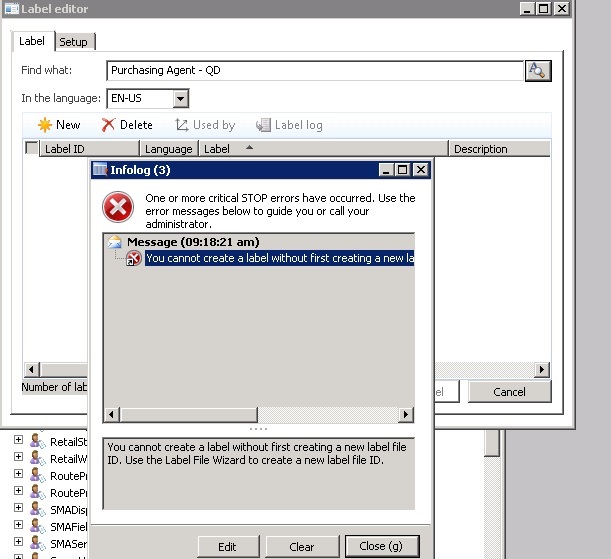
Error_5F00_1.jpg

I have checked the label File ID lookup hold the correct label file name in which I am trying to create this new label file.

I am confused as in why I am getting this weird error.

Would appreciate for your help.

Sincerely,

Muneeb

*This post is locked for comments

I have the same question (0)
  • Iulian Cordobin Profile Picture
    8,201 on at

    How are you checking that you have the label file selected? On the setup tab, you have in the Label file ID something selected?

  • Iulian Cordobin Profile Picture
    8,201 on at

    4061.labels.PNG

  • Muneeb Profile Picture
    895 on at

    Yes, correct. The Label File ID is selected inside the Setup tab. Moreover, there are many labels in that label file that are already in use.

  • Iulian Cordobin Profile Picture
    8,201 on at

    If you go to AOT, in the Labels node, do you see a node for the Label Id file you want to use?

  • Muneeb Profile Picture
    895 on at

    Yes, I do see.

  • Martin Dráb Profile Picture
    237,855 Most Valuable Professional on at

    What if you click the Edit button and look at the code throwing the error? It should at least make clearer what exactly failed.

  • Suggested answer
    Dick Wenning Profile Picture
    8,705 Moderator on at

    first off all, is there only One AOS, multiple AOS and label editing is $%%$#%$

    second look on the AOS server

    C:\Program Files\Microsoft Dynamics AX\60\Server\XXXXXX\bin\Application\Appl\Standard

    there are files ending on ald check with notepad the status.

  • Muneeb Profile Picture
    895 on at

    Hi,

    Yes, its a standalone system with single AOS & DB on the system.

    I have cross checked the .ald file exist on the above path and there are many labels already defined inside.

    Furthermore, when I am clicking on the EDIT button on the error pop up window, I am switching to the code as shown in the below snapshot.

    Error_5F00_2.jpg

    Sincerely,

    Muneeb

  • Martin Dráb Profile Picture
    237,855 Most Valuable Professional on at

    I'm sorry, but I don't have AX 2012 on hand right now, so I can't do the debugging for you. Look into SysLabel::defaultModuleId() by yourself.

  • Muneeb Profile Picture
    895 on at

    OK. Thank you.

    Let me try to get deeper.

    -Muneeb

Under review

Thank you for your reply! To ensure a great experience for everyone, your content is awaiting approval by our Community Managers. Please check back later.

Helpful resources

Quick Links

Responsible AI policies

As AI tools become more common, we’re introducing a Responsible AI Use…

Neeraj Kumar – Community Spotlight

We are honored to recognize Neeraj Kumar as our Community Spotlight honoree for…

Leaderboard > 🔒一 Microsoft Dynamics AX (Archived)

#1
Priya_K Profile Picture

Priya_K 4

#1
Martin Dráb Profile Picture

Martin Dráb 4 Most Valuable Professional

#3
Ali Zaidi Profile Picture

Ali Zaidi 2

Last 30 days Overall leaderboard

Featured topics

Product updates

Dynamics 365 release plans



