web
You’re offline. This is a read only version of the page.
close
Skip to main content

Notifications

Announcements

No record found.

Community site session details

Community site session details

Session Id :
Customer Service forum

Review field locked on Review tab of knowledge article BPF

(0) ShareShare
ReportReport
Posted on by

Hi folks, I'm running into an issue with reviewing a knowledge article.

The review field is locked for me and there is no option to reject the article from the ribbon. I can approve from there but ideally would like the review field opened for editing.

This is how its looking for me:
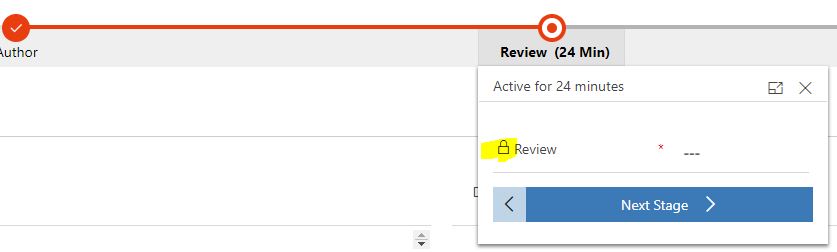
locked-review-field.JPG

Any ideas? I'm following the exact steps as laid out by tutorials/youtube.

Categories:
I have the same question (0)
  • LeoAlt Profile Picture
    16,331 Moderator on at

    Hi partner,

    Please check your instance follow the below points:

    1.Did you have any custom js code locked this field in the knowledge article form?

    2.Did you have any business rules locked this field in the form?

    3.Did you have any custom workflow locked this filed?

    I've tested in my instance and the availability of this field could not be affected by the article status.

    If the issue still exists, you could use workflow or js to force a update to this "review" field.

    Hope it helps.

    Best Regards,

    Leo

  • Community Member Profile Picture
    on at

    Hi Leo, 

    1.Did you have any custom js code locked this field in the knowledge article form?

    2.Did you have any business rules locked this field in the form?

    3.Did you have any custom workflow locked this filed?

    - No. this is the first time we have used the knowledge article functionality. The field is locked and changing the status reason to any other the other values does not affect this. 

    I would be reluctant to start adding custom workflows or javascript to the form as it should just work out of the box?

  • Community Member Profile Picture
    on at

    I have since logged a support ticket with Microsoft. I'll add their solution to this thread when the issue is resolved.

  • Suggested answer
    e.safarzadeh@outlook.com Profile Picture
    5 on at

    Hi

    You should add "Append" and "AppendTo" permission to "Queue" Entity in security role

  • Suggested answer
    Hasret Sengul Taskin Profile Picture
    10 on at

    Hello, the issue is the security your user has does not have privilege to publish the knowledge articles. Because publishers should review then publish the article.

    pastedimage1655285907519v1.png

Under review

Thank you for your reply! To ensure a great experience for everyone, your content is awaiting approval by our Community Managers. Please check back later.

Helpful resources

Quick Links

November Spotlight Star - Khushbu Rajvi

Congratulations to a top community star!

Forum Structure Changes Coming on 11/8!

In our never-ending quest to help the Dynamics 365 Community members get answers faster …

Dynamics 365 Community Platform update – Oct 28

Welcome to the next edition of the Community Platform Update. This is a status …

Leaderboard > Customer Service

Last 30 days Overall leaderboard

Featured topics

Product updates

Dynamics 365 release plans
