web
You’re offline. This is a read only version of the page.
close
Skip to main content

Notifications

Announcements

No record found.

Community site session details

Community site session details

Session Id :
Customer experience | Sales, Customer Insights,...
Answered

Strange differences between FetchXml using RetrieveMultiple as opposed to xrmToolbox

(0) ShareShare
ReportReport
Posted on by 95

My very simple FetchXml query just needs three attributes from the contact entity:


If I run this in xrmToolbox's FetchXml tester, the results are:

">
  
    Abraham McCormick
    10
    cv11 6ur
    {25A17064-1AE7-E611-80F4-E0071B661F01}
  

However, running the exact same query through RetrieveMultiple, I get:
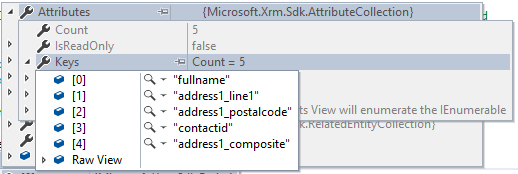
7128.x.png

Where did address1_composite come from? What might I be doing wrong?

I have the same question (0)
  • Verified answer
    a33ik Profile Picture
    84,331 Most Valuable Professional on at

    Hello,

    address1_composite is the compilation of your address1_x fields. I'm not sure why it behaves differently. If you don't need that field you can just go through collection and remove it.

  • Suggested answer
    Johao Larios Profile Picture
    1,795 on at

    Hello there,

    I think it is because how the addresses field works. Could you share the query that you are using in the retrieve multiple ?

    However, as mentioned by Andrew, this should not affect you.

    regards,

  • Chevva Profile Picture
    95 on at

    Thanks for your feedback.

    It's the exact same query that I included, i.e. querying fullname, address1_line1 & address1_postalcode.

    I can easily remove address1_composite from the collection (which is what I assume xrmToolbox is doing as it's not appearing in its results) but the generic FetchXml routine at the core of my process needs to handle any user-defined query. In this case the logic blindly concatenates the results into a CSV string, which doesn't look too good!

    Interestingly, if I simply query address1_composite on its own, I receive address1_composite, address1_line1, address1_postalcode and contactid

    I don't want contactid either, which I assume is included in the results because it appears in the filter condition?

  • Suggested answer
    Johao Larios Profile Picture
    1,795 on at

    Yes, you are right. They will always appear as you mentioned.

    Regards,

  • Chevva Profile Picture
    95 on at

    Yes, no alternative other than to filter out the results, excluding everything that wasn't explicitly requested by an <attribute name"xxx"/>

Under review

Thank you for your reply! To ensure a great experience for everyone, your content is awaiting approval by our Community Managers. Please check back later.

Helpful resources

Quick Links

Responsible AI policies

As AI tools become more common, we’re introducing a Responsible AI Use…

Neeraj Kumar – Community Spotlight

We are honored to recognize Neeraj Kumar as our Community Spotlight honoree for…

Leaderboard > Customer experience | Sales, Customer Insights, CRM

#1
Tom_Gioielli Profile Picture

Tom_Gioielli 170 Super User 2025 Season 2

#2
#ManoVerse Profile Picture

#ManoVerse 70

#3
Jimmy Passeti Profile Picture

Jimmy Passeti 50 Most Valuable Professional

Last 30 days Overall leaderboard

Product updates

Dynamics 365 release plans



