web
You’re offline. This is a read only version of the page.
close
Skip to main content

Notifications

Announcements

No record found.

Community site session details

Community site session details

Session Id :
Customer experience | Sales, Customer Insights,...
Answered

Enable link to company logo in workflow email message

(0) ShareShare
ReportReport
Posted on by 467

Hi All,

I am using using D365 Online.

I am using workflow email message to send email once case record is created. I could able to send email properly

How to enable link to company logo in workflow email message,if I click the logo in the received mail I want to open company website

Regards,

Babu

I have the same question (0)
  • chikhaleankush Profile Picture
    547 on at

    In your workflow email add below lines. Make sure you upload image as webresource and then you can get url of your image and that can be added under src="{Add you image here}"

    The only think is that the image must be available online.


    Signature


    Links for Ref

    Link1

    Link2


  • Narendra Sunkara Profile Picture
    467 on at

    Hi,

    Thanks for your reply

    I have included following in my workflow email message body area near my signature, uploaded/added my image as GIF in the web resource. But it is showing as it ease with tags in the email received. I don't know what went wrong.

    <a href="company website url"><img border="0" alt="Signature" src="image url,uploaded to web resource as GIF Format" width="100" height="100"></a>

    Please help me

    Regards,

    Babu

  • Suggested answer
    cloflyMao Profile Picture
    25,210 on at

    Hi Babu,

    You could do it by following way:

    1. Create a HTML page, add <a> tag to surround an image element.

    pastedimage1587629542893v1.png


    2. Open page in browser, select whole image with cursor:

    pastedimage1587629576923v2.png

    3. Paste it to email content:

    pastedimage1587629661768v3.png

    We will copy whole HTML element, including both outer hyperlink and inner image.

    It could work from my Gmail test, a new tab will be opened for linked page.

    pastedimage1587629755343v4.png

    In addition, I suggest you host company logo on portal as a web file,

    because web resource is internal files of our Dynamics 365 environment, not sure whether customers could see it directly in email delivered for them.

    Regards,

    Clofly

  • Narendra Sunkara Profile Picture
    467 on at

    Hi Clofly,

    Thanks for your reply

    Do I need to create HTML file in CRM or in any editor is fine

    Please confirm

    Regards,

    Babu

  • cloflyMao Profile Picture
    25,210 on at

    Hi Babu,

    You won’t need to save the HTML file in CRM.

    Just keep it on desktop or any folder is ok,

    and edit it with Visual Studio Code. :)

    Regards,

    Clofly

  • Narendra Sunkara Profile Picture
    467 on at

    Hi Clofly,

    I don't have my logo or other social media images in any websites.

    Hence don't have urls for images.

    How can I able to use my images downloaded from outlook email signatures

    Regards,

    Babu

  • Verified answer
    cloflyMao Profile Picture
    25,210 on at

    Hi Babu,

    You could save it on Portal as web file, because it has public visibility.

    1. Create a web file record, set Parent Page to Home,

    then we can visit the image via portal Url/Partial Url

    e.g: xxx.powerappsportals.com/company-logo

    pastedimage1587692849238v6.png

    2. Upload company logo as note file:

    pastedimage1587692980796v7.png

    3. Publish the web file:

    pastedimage1587693026330v8.png

    4. Check whether our logo is available after publish:

    pastedimage1587693092584v9.png

    5. Add it to img element in HTML file

    pastedimage1587693132856v10.png

    6. Select whole image by cursor, press ctrl + c to copy element.

    pastedimage1587693224347v11.png

    7. Paste it to content of sending email step by ctrl + v

    pastedimage1587693278595v12.png

    Result: everything is same:

    we can find company logo URL and its attached link by inspector.
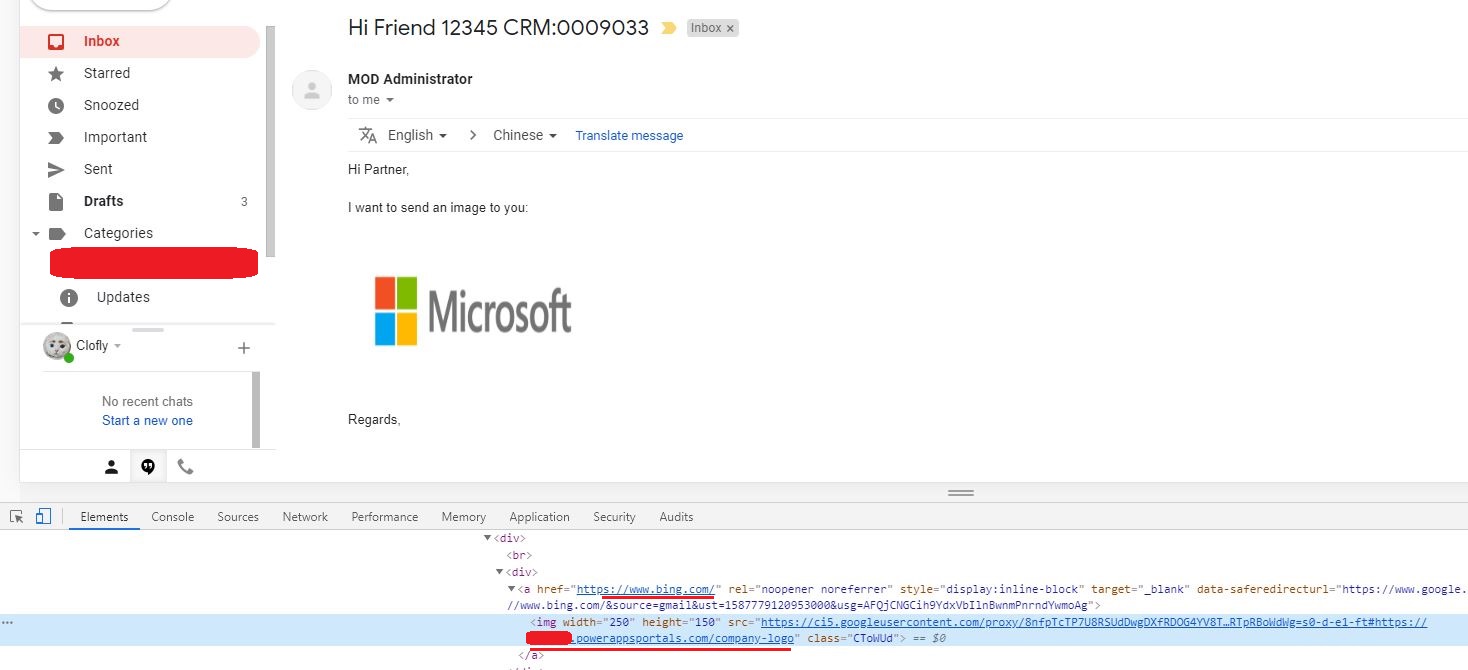
    final.JPG

    In addition, you could modify width and height attribute of img to get a proper size for logo.

    Regards,

    Clofly

  • Narendra Sunkara Profile Picture
    467 on at

    Hi Clofly,

    That worked

    Thank you

    Regards,

    Babu

Under review

Thank you for your reply! To ensure a great experience for everyone, your content is awaiting approval by our Community Managers. Please check back later.

Helpful resources

Quick Links

Responsible AI policies

As AI tools become more common, we’re introducing a Responsible AI Use…

Neeraj Kumar – Community Spotlight

We are honored to recognize Neeraj Kumar as our Community Spotlight honoree for…

Leaderboard > Customer experience | Sales, Customer Insights, CRM

#1
Tom_Gioielli Profile Picture

Tom_Gioielli 83 Super User 2025 Season 2

#2
Gerardo Rentería García Profile Picture

Gerardo Rentería Ga... 49 Most Valuable Professional

#3
#ManoVerse Profile Picture

#ManoVerse 40

Last 30 days Overall leaderboard

Product updates

Dynamics 365 release plans