web
You’re offline. This is a read only version of the page.
close
Skip to main content

Notifications

Announcements

No record found.

Community site session details

Community site session details

Session Id :
Microsoft Dynamics AX (Archived)

Data import/export framework (aka: DMF) import troubles.

(0) ShareShare
ReportReport
Posted on by 570

Hi all,

I have some strange behaviour while importing data into a simple custom table while using the Import/Export framework, let me explain:

I've created a simple custom table in ax which holds 1 field and will store categories, the structure of the table is as shown below:

Step1: Create the Custom table
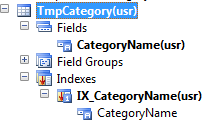
5305.SC_5F00_MigObject.png

To be sure that each row will hold unique values for the category, i've created an unique index on the table and i've set the index as primary and clusterd index for the table. 

Step2: Create the migration entity:

Next with the entity creation wizard from the import/export data framework, i've created a custom migration entity (which results in creation of a migration logic class, a query and a staging table), as shown below:

1731.SC_5F00_Target.png

Result is a small migration object which holds de staging table, a query to fill the target-entity and a migration-logic class. As we will not do any fancy things here, the code is as-is.

Step3: Create the Target-Entity:

8204.SC_5F00_Process.PNG

The objects from the wizard are used to compose our target entity. The target entity will be the source for our processing group (as i will explain next ...)

Step4: Create the Processing Group:
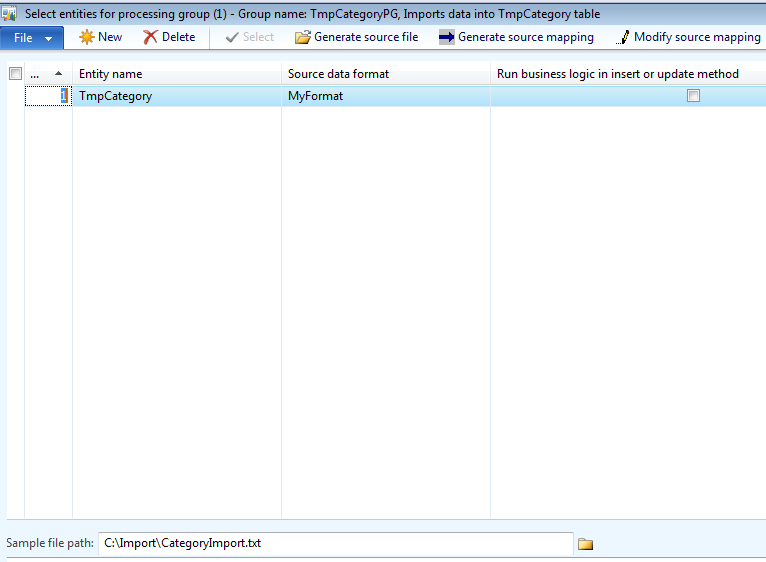
7181.SC_5F00_ImportFile.PNG

In my case, i've created a processinggroup TmpCategoryPG which maps to the TmpCategory target-entity.

The Sample file path is set to a file called CategoryImport.txt , which contents is as mentioned below:
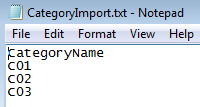
3731.SC_5F00_Stage.PNG

For demo purpose ... very simple, just holding category names going from C01 until C03.

Step 5: Get staging data:

0268.SC_5F00_CopyToTarget.PNG

Step6: Copy to target:

8637.SC_5F00_History.PNG

Hm ... this should be '3' created '0' updated instead of '1" created '2' updated, as my TmpCategory was empty before loading.

Step7: Check import history:

1638.SC_5F00_Final.PNG

Well ... 3 items were imported, but when I look at the target table, i see that only the last record was inserted. If i look again at the import message, i believe that the import tool first inserted the first row (C1) then updated the first row (C1) with the second (C2) and finally updated the second (C2) with the third (C3).


Somebody any clue here ? --> to summarize : TmpCategory was empty, import datatable holds 3 records C1,C2,C3, the first record is inserted, next the first is updated with the second, next the second is updated with the 3rd, which results in creation of 1 record (C3) instead of 3 records (C1,C2,C3).

Thx for any response :)

Greetz,

Emmanuel Nuyttens

*This post is locked for comments

I have the same question (0)
  • Verified answer
    André Arnaud de Calavon Profile Picture
    301,035 Super User 2025 Season 2 on at

    Hi Emmanuel

    Please check what indexes are created on your staging table. There must be one which identifies the unique key.

  • Verified answer
    Florian Hopfner Profile Picture
    2,461 on at

    Also check that you have a table relation between your staging table and the target table. Otherwise the framework cannot determine if a staging record already exists in the target table or not. This could cause the behavior you described.

  • EmNu1971 Profile Picture
    570 on at

    Hi,

    Ok, thx, this worked for me ! :-)

    Next steps gave me the right resolution:

    Step1: Create relation from staging to target:

    3343.SC_5F00_TmpCategory.PNG

    Step2: Import data from staging to target:

    Step3: Check target table in AOT:

    Grtz,

    Emmanuel Nuyttens

  • yasu Profile Picture
    on at

    thank u so much .. I was able to solve my problem .............

Under review

Thank you for your reply! To ensure a great experience for everyone, your content is awaiting approval by our Community Managers. Please check back later.

Helpful resources

Quick Links

Responsible AI policies

As AI tools become more common, we’re introducing a Responsible AI Use…

Neeraj Kumar – Community Spotlight

We are honored to recognize Neeraj Kumar as our Community Spotlight honoree for…

Leaderboard > 🔒一 Microsoft Dynamics AX (Archived)

#1
Priya_K Profile Picture

Priya_K 4

#1
Martin Dráb Profile Picture

Martin Dráb 4 Most Valuable Professional

#3
Sukrut Parab Profile Picture

Sukrut Parab 2 Moderator

Last 30 days Overall leaderboard

Featured topics

Product updates

Dynamics 365 release plans
