I need to build a query from X that would work a little like this SQL statement:
SELECT T1.TEXTVALUE,T3.TXT FROM ECORESVALUE T1
	CROSS JOIN ECORESENUMERATIONATTRIBUTETYPEVALUE T2
	CROSS JOIN DLVTERM T3
		WHERE T2.ATTRIBUTETYPE=68719479842
		AND   T1.RECID=T2.VALUE
		AND   T3.DATAAREAID=N'usmf'
		AND   T1.TEXTVALUE=T3.CODE
		GROUP BY T1.TEXTVALUE,T3.TXT
		ORDER BY T1.TEXTVALUE,T3.TXT
Now I was able to make the Query in the AOT, but when I try from code it does not work.
The Query looks like this: ( I will add the query xml file later in this post)
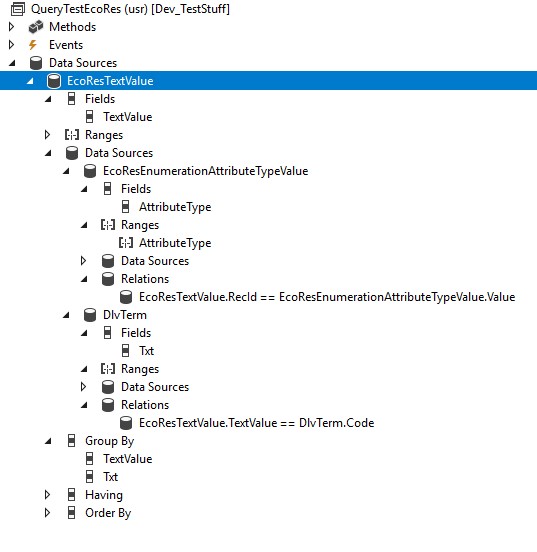
Now I have made this class, to test the AOT query, and try to build a query from code that does the same thing.
class QueryTestEcoRes
{
    public static void main(Args _args)
    {
        QueryTestEcoRes queryTestEcoRes = new QueryTestEcoRes();

        changecompany('usmf')
        {
            queryTestEcoRes.TestQuery2();
            queryTestEcoRes.TestQuery3();
        }
    }

    private void TestQuery2()
    {
        Query       query       = new Query(queryStr(QueryTestEcoRes));
        SysQueryRun queryRun    = new SysQueryRun(query);

        info('Running TestQuery2');

        str queryString = query.toString();
        str querySQL    = query.getSQLStatement();

        Counter numResults = 0;
        while (queryRun.next())
        {
            EcoResTextValue ecoResTextValue = queryRun.get(tableNum(EcoResTextValue));
            DlvTerm         dlvTerm = queryRun.get(tableNum(DlvTerm));
            numResults  ;
            if(numResults <= 15)
            {
                info(strFmt('%1,%2',ecoResTextValue.TextValue,dlvTerm.Txt));
            }
        }
        info(strFmt('Query returned %1 results',numResults));
    }

    private void TestQuery3()
    {
        Query query = new Query();
        info('Running TestQuery3');

        QueryBuildDataSource qbdsTextValue = query.addDataSource(tablenum(EcoResTextValue));
        qbdsTextValue.addGroupByField(fieldNum(EcoResTextValue, TextValue));
        qbdsTextValue.orderMode(OrderMode::GroupBy);

        QueryBuildDataSource qbdsAttributeTypeValue = qbdsTextValue.addDataSource(tablenum(EcoResEnumerationAttributeTypeValue));
        qbdsAttributeTypeValue.joinMode(JoinMode::InnerJoin);
        qbdsAttributeTypeValue.addLink(fieldNum(EcoResTextValue, RecId), fieldNum(EcoResEnumerationAttributeTypeValue, Value));
        qbdsAttributeTypeValue.addRange(fieldnum(EcoResEnumerationAttributeTypeValue, AttributeType)).value('68719479842');

        QueryBuildDataSource qbdsEnumSourceTable = qbdsTextValue.addDataSource(tableNum(DlvTerm));
        qbdsEnumSourceTable.joinMode(JoinMode::InnerJoin);
        qbdsEnumSourceTable.addLink(fieldNum(EcoResTextValue, TextValue), fieldNum(DlvTerm, Code));
        qbdsEnumSourceTable.addGroupByField(fieldNum(DlvTerm, Txt));

        str queryString = query.toString();
        str querySQL    = query.getSQLStatement();

        SysQueryRun queryRun = new SysQueryRun(query);
        Counter numResults = 0;
        while (queryRun.next())
        {
            EcoResTextValue ecoResTextValue = queryRun.get(tableNum(EcoResTextValue));
            DlvTerm         dlvTerm = queryRun.get(tableNum(DlvTerm));
            numResults  ;
            if(numResults <= 15)
            {
                info(strFmt('%1,%2',ecoResTextValue.TextValue,dlvTerm.Txt));
            }
        }
        info(strFmt('Query returned %1 results',numResults));
    }
}
So the method TestQuery2 runs the AOT query, and i get the result that i want, but in the method TestQuery3 i try to make the same query using code, but when I get to this line, "QueryBuildDataSource qbdsEnumSourceTable = qbdsTextValue.addDataSource(tableNum(DlvTerm))", the query seems to break.
(If I look at the value of query in the debugger, it has the value="{Query object 14d8fc20}" and something seems to go wrong.
To test this in a standard D365FO have made a class to generate some test data, since DlvTerm is not really the table I am doing this on, but I just made this example to use for testing since it gives me the same error.
class QueryEcoResData
{
    public static void main(Args _args)
    {
        QueryEcoResData queryEcoResData = new QueryEcoResData();

        changecompany('usmf')
        {
            queryEcoResData.createData();
        }
    }

    private void createData()
    {
        Random                              random = new Random();
        EcoResAttributeType                 ecoResAttributeType = EcoResAttributeType::findByName('Terms of delivery');
        EcoResEnumerationAttributeTypeValue ecoResEnumerationAttributeTypeValue;
        EcoResTextValue                     ecoResTextValue;
        DlvTerm                             dlvTerm;

        if(!ecoResAttributeType.RecId)
        {
            ecoResAttributeType.clear();
            ecoResAttributeType.initValue();
            ecoResAttributeType.Name = 'Terms of delivery';
            ecoResAttributeType.DataType = AttributeDataType::Reference;
            ecoResAttributeType.insert();
        }


        int ordinalNumer = 1;
        int rndCopys = 1;
        while select dlvTerm
        {
            rndCopys = (random.nextInt() mod 4) 1;
            while(rndCopys >= 1)
            {
                ecoResTextValue.clear();
                ecoResTextValue.initValue();
                ecoResTextValue.InstanceRelationType    = 1383;
                ecoResTextValue.TextValue               = dlvTerm.Code;
                ecoResTextValue.insert();

                ecoResEnumerationAttributeTypeValue.clear();
                ecoResEnumerationAttributeTypeValue.initValue();
                ecoResEnumerationAttributeTypeValue.AttributeType   = ecoResAttributeType.RecId;
                ecoResEnumerationAttributeTypeValue.OrdinalNumber   = ordinalNumer;
                ecoResEnumerationAttributeTypeValue.Value           = ecoResTextValue.RecId;
                ecoResEnumerationAttributeTypeValue.insert();

                ordinalNumer  ;
                rndCopys--;
            }
        }
    }

}
And finally here is the xml for the AOT Query
QueryTestEcoRes
classDeclaration
[Query]
public class QueryTestEcoRes extends QueryRun
{
}
EcoResTextValue
EcoResEnumerationAttributeTypeValue
EcoResEnumerationAttributeTypeValue
AttributeType
AttributeType
AttributeType
AttributeType
68719479842
QueryDataSourceRelation1
RecId
EcoResTextValue
Value
DlvTerm
Txt
Txt
QueryDataSourceRelation1
TextValue
EcoResTextValue
Code
TextValue
TextValue
TextValue
EcoResTextValue
TextValue
Txt
DlvTerm
Txt







