web
You’re offline. This is a read only version of the page.
close
Skip to main content

Notifications

Announcements

No record found.

Community site session details

Community site session details

Session Id :
Finance | Project Operations, Human Resources, ...
Answered

Lookup Filtering on x++

(0) ShareShare
ReportReport
Posted on by 65

I am a beginner at d365 finance and operations. I have service and sub-service lookup fields in a form. This field's data sources have a one-to-many relationship with a foreign key. When I select a record in the service field, I want to see only sub-services that belong to the selected 'service' record in the 'sub-services lookup field. I need a lookup filtering for this with X but I do not know-how. I would be really appreciated it if someone can help me with this.

Here is my code but I really confused all the tables and fields name and I probably write the wrong names in the wrong places.

//My main form that includes lookup fields is inventSite

// Control names of lookup fields are InvenSite_ServiceRefRecId and InventSite_SubServiceRefRecId

//The name of the form that includes service and subservice records is Service

// the table that includes subservice records is SubService

Here is my Service form;
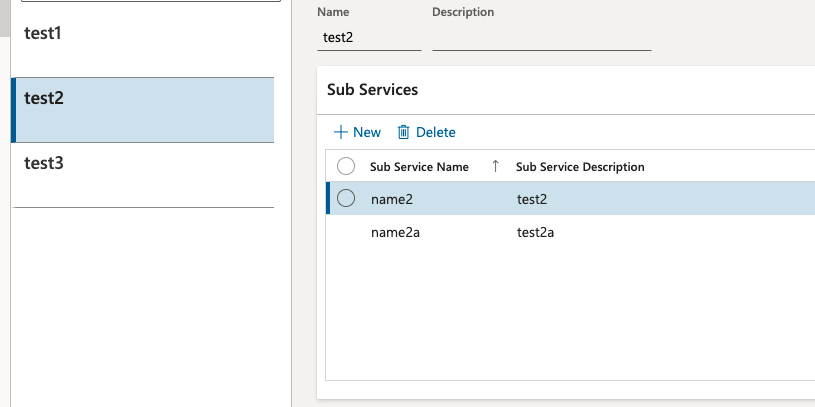
6663.Screen-Shot-2021_2D00_05_2D00_22-at-15.07.15.png

And here is my code;

[FormControlEventHandler(formControlStr(InventSite, InventSite_SubServiceRefRecId), FormControlEventType::Lookup)]
   public static void InventSite_SubServiceRefRecId_OnLookup(FormControl sender, FormControlEventArgs e)
   {
       SysReferenceTableLookup sysRefTableLookup;
       Query query = new Query();
       QueryBuildDataSource qbds;

       FormRun formRun;
       FormControl formCtrl;
       ServiceName serviceName;
       FormControlCancelableSuperEventArgs ce = e as FormControlCancelableSuperEventArgs;

       sysRefTableLookup = SysReferenceTableLookup::newParameters(tableNum(Service), sender);
       qbds = query.addDataSource(tableNum(Service));
       formRun = sender.formRun();

        
       formCtrl = formRun.design().controlName(formControlStr(InventSite, InventSite_SubServiceRefRecId));
       serviceName = formCtrl.valueStr();

       qbds.firstOnly(true);
       qbds.addRange(fieldNum(Service, ServiceName)).value(queryValue(serviceName));

       sysRefTableLookup.parmQuery(query);
       sysRefTableLookup.addLookupfield(fieldNum(Service, ServiceName));
       sysRefTableLookup.addLookupfield(fieldNum(Service, ServiceDescription));
        
       sysRefTableLookup.performFormLookup();

       ce.CancelSuperCall();
   }

Thank you. Best Regards..

I have the same question (0)
  • Suggested answer
    Martin Dráb Profile Picture
    237,878 Most Valuable Professional on at

    You said that you want filtered subservice, but you're selecting Service records. That sounds wrong to me.

    Also, I suspect that ServiceName field doesn't actually contain RecIds. Selecting just the first record doesn't look correct either.

    I think you want something like this:

    [FormControlEventHandler(formControlStr(InventSite, InventSite_SubServiceRefRecId), FormControlEventType::Lookup)]
    public static void InventSite_SubServiceRefRecId_OnLookup(FormControl sender, FormControlEventArgs e)
    {
    	SysReferenceTableLookup tableLookup = SysReferenceTableLookup::newParameters(tableNum(Service), sender);
    	
    	Query query = new Query();
    	QueryBuildDataSource subServiceDs = query.addDataSource(tableNum(SubService));
    	
    	InventSite inventSite = sender.dataSource().cursor();
    	qbds.addRange(fieldNum(SubService, ServiceRecId)).value(queryValue(inventSite.ServiceRecId));
    
    	tableLookup.parmQuery(query);
    	tableLookup.addLookupField(fieldNum(SubService, OneField));
    	tableLookup.addLookupField(fieldNum(SubService, AnotherField));
    
    	tableLookup.performFormLookup();
    
    	FormControlCancelableSuperEventArgs ce = e as FormControlCancelableSuperEventArgs;
    	ce.CancelSuperCall();
    }

    You'll need to update field names to match your actual situation.

  • YCeren Profile Picture
    65 on at

    Thank you very much for your answer and help I organized the code but It 'Failed to execute query because no root data source on the form matches the root datasource on the query.' I really need this is to work. I added SubService table to form datasource Why I keep getting this error?

    [FormControlEventHandler(formControlStr(InventSite, InventSite_SubServiceRefRecId), FormControlEventType::Lookup)]
        public static void InventSite_SubServiceRefRecId_OnLookup(FormControl sender, FormControlEventArgs e)
        {
            SysReferenceTableLookup tableLookup = SysReferenceTableLookup::newParameters(tableNum(Service), sender);
            Service_WM Service;
            FormRun formRun =  sender.formRun();
            FormControl formCtrl;
            Query query = new Query();
        
    
            QueryBuildDataSource qbds = query.addDataSource(tableNum(SubService));
            
            InventSite inventSite = sender.formRun().dataSource("InventSite").cursor();


            qbds.addRange(fieldNum(SubService, RecId)).value(queryValue(inventSite.ServiceRefRecId));
    
            tableLookup.parmQuery(query);
            tableLookup.addLookupField(fieldNum(SubService, SubServiceName));
            tableLookup.addLookupField(fieldNum(SubService, SubServiceDesc));
    
            tableLookup.performFormLookup();
    
            FormControlCancelableSuperEventArgs ce = e as FormControlCancelableSuperEventArgs;
            ce.CancelSuperCall();
        }

  • Verified answer
    Martin Dráb Profile Picture
    237,878 Most Valuable Professional on at

    Which line of code is throwing the error? I think the problem is that SysReferenceTableLookup::newParameters() still refers to Service, not SubService (if I'm right that you want to use SubService instead of Service, which you didn't confirm).

    By the way, please never hard-code any object names (such as "InventSite") if you can avoid it. I think that my approach (sender.dataSource().cursor()) is easier, but if you have to find a datasource by name, use formDataSourceStr(). These methods validate that the object exists and they also allow finding the usage through cross-references.

  • YCeren Profile Picture
    65 on at

    Yes, you were right. I noticed that mistake and fixed it. it is working. Thank you very much for your help. Much appreciated.

Under review

Thank you for your reply! To ensure a great experience for everyone, your content is awaiting approval by our Community Managers. Please check back later.

Helpful resources

Quick Links

Responsible AI policies

As AI tools become more common, we’re introducing a Responsible AI Use…

Neeraj Kumar – Community Spotlight

We are honored to recognize Neeraj Kumar as our Community Spotlight honoree for…

Leaderboard > Finance | Project Operations, Human Resources, AX, GP, SL

#1
Martin Dráb Profile Picture

Martin Dráb 646 Most Valuable Professional

#2
André Arnaud de Calavon Profile Picture

André Arnaud de Cal... 529 Super User 2025 Season 2

#3
Sohaib Cheema Profile Picture

Sohaib Cheema 285 User Group Leader

Last 30 days Overall leaderboard

Product updates

Dynamics 365 release plans
