web
You’re offline. This is a read only version of the page.
close
Skip to main content

Notifications

Announcements

No record found.

Community site session details

Community site session details

Session Id :
Microsoft Dynamics AX (Archived)

What field in AX is linked to username and userID when creating new user? Sys adm>user>create new user?

(0) ShareShare
ReportReport
Posted on by

What field in AX is linked to username and userID when creating new user? Sys adm>user>create new user?

I'm trying to accomplish this task below based on answer to above question:

1. We've created custom forms and every form has a field name Tested/Setup By.

2. How do I auto populate system user name into this Tested/Setup By field when a user opens up a form?

3. For example, If I log into AX as "xyz" then I would like my username "xyz" to populate on this field when I make an entry on the form.

4. Do I need to drag the userinfo table as one of the datasource and set a join relationship to the other datasource? What methods do I write?

5. Purpose of this is so that we can keep track of who(users) is entering the form. Somehow ax system username needs to populate on this custom form's field.

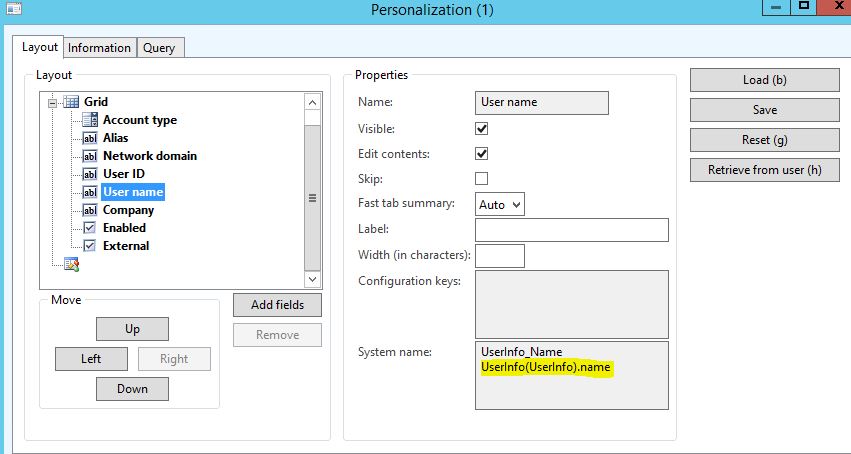
6. See image below and do let me know if I need to be more clear in explaining this.

- Thanks in advance!

UserInfo_5F00_Table.JPG

*This post is locked for comments

I have the same question (0)
  • André Arnaud de Calavon Profile Picture
    300,896 Super User 2025 Season 2 on at

    Hi Lhamo,

    You can use the statement "curuserid()" to retrieve the current user in x++ logic.

    You can place code on several points. I'm not sure what you exactly want to achieve. E.g. the run() method can be used to retrieve the user ID and fill a field.

    You don't have to add the UserInfo table as datasource on the forms.

  • Community Member Profile Picture
    on at

    Thanks Andre!

    What if I want to display full name on that Tested/Setup by field? Is it "curUserName()"?

    I'm placing this method on initValue() of form datasource level.

    Thank You!

  • Verified answer
    André Arnaud de Calavon Profile Picture
    300,896 Super User 2025 Season 2 on at

    Hi Lhamo,

    To display the name, you can use the method SysUserInfo::currentUserDisplayName();

    Or you can use the next statement, based on a stored userId in a table:

    select Name from userInfo
    where userInfo.Id == table.userID;


    You can then use "userInfo.Name" in your code to return the name of the user.

  • Community Member Profile Picture
    on at

    Thank you so much!!

    I set it to initVal() method of form's  DS.

    table.testerID = SysUserInfo::curUserDisplayName();

    after the super call.

    Thanks again!

  • Martin Dráb Profile Picture
    237,795 Most Valuable Professional on at

    Also consider if using the user directly is the optimal approach. The worker (e.g. employee) linked to the physical user is often used in cases this. You store RecIds of HcmWorker records and use reference groups to replace RecIds with user-friendly values such as names.

  • Martin Dráb Profile Picture
    237,795 Most Valuable Professional on at

    By the way, I noticed that instead of an identifier, you're saving the name to your table. This would cause data inconsistency if name changed in the UserInfo table. Saving the ID and merely displaying the name from UserInfo table would be a more robust solution.

    (Assuming you don't utilize workers as suggested above.)

  • Community Member Profile Picture
    on at

    Thanks Martin for more information.

    My intend is to display full system's username on a custom form I've build. Nothing has been changed in userinfo table. I simply want to display system username into the field. Since it's a custom form with custom table(datasource), I've set myTable.myField = SysUserInfo::curUserDisplayName();. When i run it after compile the form displays my full name in the field testerId.  Please do let me know of the approach I've taken & if there is a better way. Thanks in advance!

  • André Arnaud de Calavon Profile Picture
    300,896 Super User 2025 Season 2 on at

    Hi Lhamo,

    Concerns from Martin and also me are the fact that you are probably storing a name in a table. This is not common practice. You should store an ID or foreign key in a table and just

    display the name depending on the ID using e.g. a display method or a reference group.

    It is not clear to me if the name is saved in a table or if it is just temporary for that form instance. If it is temporary you can ignore our comments.

    Also Martins comment about using a worker can be considered. If you are talking about a tester, I think the user ID would be still valid and maybe better than using the worker. Probably a tester will not have a related worker setup. If there is always a relation setup between the user and a worker, the worker might be easier as you can then store the worker Record ID and use a reference group on your form.

Under review

Thank you for your reply! To ensure a great experience for everyone, your content is awaiting approval by our Community Managers. Please check back later.

Helpful resources

Quick Links

Responsible AI policies

As AI tools become more common, we’re introducing a Responsible AI Use…

Neeraj Kumar – Community Spotlight

We are honored to recognize Neeraj Kumar as our Community Spotlight honoree for…

Leaderboard > 🔒一 Microsoft Dynamics AX (Archived)

#1
Martin Dráb Profile Picture

Martin Dráb 4 Most Valuable Professional

#1
Priya_K Profile Picture

Priya_K 4

#3
MyDynamicsNAV Profile Picture

MyDynamicsNAV 2

Last 30 days Overall leaderboard

Featured topics

Product updates

Dynamics 365 release plans