web
You’re offline. This is a read only version of the page.
close
Skip to main content

Notifications

Announcements

No record found.

Community site session details

Community site session details

Session Id :
Microsoft Dynamics NAV (Archived)

Version 5.0 SP1 Moving from 2003 Server to 2012 Server

(0) ShareShare
ReportReport
Posted on by

We have an old server (MS Server 2003 that has been acting up). We are trying to move this application over to a MS Server 2012 and SQL Server 2012. I can get the application to talk to the DB, but I have to do the following each time in order to get it to work, and I need help.

1) I get the following error:
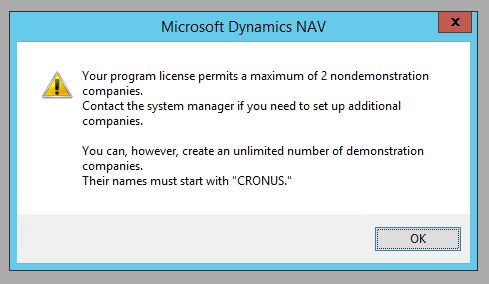
Microsoft-Dynamics-error.JPG

2) I then have to click "OK"

3) Go to Open Database

OpenDB.JPG

4) log back in and go tools|License Information = Change

5) Browse out to our fin.fif click open

6) repeat step 3

7) Log back in

8) Now I'm in and can see current DB on the new server...and companies

9) If I close out of it and go back the license doesn't hold up.

10) Is there a reference file that points back to the license file?

*This post is locked for comments

I have the same question (0)
  • Verified answer
    Suresh Kulla Profile Picture
    50,243 Super User 2025 Season 2 on at

    If you use Change option it is only for that session you need to upload the license.  Please refer this link for more information

    community.dynamics.com/.../how-to-upload-license-file-into-dynamics-nav

  • Verified answer
    Tharanga Chandrasekara Profile Picture
    23,118 on at

    Agreed with Suresh.

    Change license will only work for one session. As soon as you close your session license will change back. Therefore you need to upload the license to DB. Follow the link suresh shared with you.

  • Community Member Profile Picture
    on at

    Suresh, Thank you so much for the detailed information however I do not have the development DISK. How do I obtain it? Or is there another way?

  • Suggested answer
    Suresh Kulla Profile Picture
    50,243 Super User 2025 Season 2 on at

    What you do mean by development DISK ? The option to upload is available next to the change button which you are using to change license.  For 5.0 version there is not specific development DISK.

  • Community Member Profile Picture
    on at

    Hi Suresh my option to upload is greyed out. Do I need to be logged in as SA? And if so what should be the user mapping in SQL Server for Navision DB? For my user sa User Mapping is blank. See below for my errors. And thank you for your help I truly appreciate itdbproperties.JPG

    dbproperties.JPG

  • Suggested answer
    Suresh Kulla Profile Picture
    50,243 Super User 2025 Season 2 on at

    You need be server admin or even you can try with db owner permission.

  • Community Member Profile Picture
    on at

    I am logged into the new server as "Administrator". In SQL Management Studio I am DBowner. Is there a table the file gets uploaded to? I can try copying the file into the DB table?

  • Suggested answer
    Suresh Kulla Profile Picture
    50,243 Super User 2025 Season 2 on at

    Change youserlf as server admin and try.

    The license is stored in Master Database in the $ndo$srvproperty table and based on your NAV DB Settings that is if  Save License in database is  set to true then it will save the license file in $ndo$dbproperty table in NAV Database.

  • Community Member Profile Picture
    on at

    dberror.JPG

    What should it say in the license field?

  • Suggested answer
    Suresh Kulla Profile Picture
    50,243 Super User 2025 Season 2 on at

    You cannot update that using SQL Server, you need to upload using the action.

Under review

Thank you for your reply! To ensure a great experience for everyone, your content is awaiting approval by our Community Managers. Please check back later.

Helpful resources

Quick Links

Responsible AI policies

As AI tools become more common, we’re introducing a Responsible AI Use…

Neeraj Kumar – Community Spotlight

We are honored to recognize Neeraj Kumar as our Community Spotlight honoree for…

Leaderboard > 🔒一 Microsoft Dynamics NAV (Archived)

Last 30 days Overall leaderboard

Featured topics

Product updates

Dynamics 365 release plans



