web
You’re offline. This is a read only version of the page.
close
Skip to main content

Notifications

Announcements

No record found.

Community site session details

Community site session details

Session Id :
Microsoft Dynamics AX (Archived)

Item %1 Allocation Failure when Reporting as Finished from Mobile Device.

(0) ShareShare
ReportReport
Posted on by 175

Hi All, 

I've been stuck on this issue for quite sometime and hoping there may be an answer out there.

The client I'm working with makes coffee. The first of the routes for this process is a one operation process of Roasting the beans to a certain spec and then putting them in a Bin. The raw material Green coffee pick works just fine creating the work to move the green coffee and put it at the appropriate Roaster Resource when I release the production. I can start the production no problem, but when I report as finished, the work created is missing a PUT location.

I've setup the location directive to query the specific route used in the production and place in one of 10 Bin locations (LocProfile=ProdBIN, LP copntrolled). Each time I report as finish, the items are available for Pick at the correct Roaster Location but then have no PUT location. 

I've read through the work history log and I consistently get an allocation failure, which as far as I've read is attributed to location directives. The work template (RST to OUTPUT) succeeds however. I'm wondering if this is an issue with the batch tracking information on the finished good? But I'm at my wits end with this one!

Location Directive:
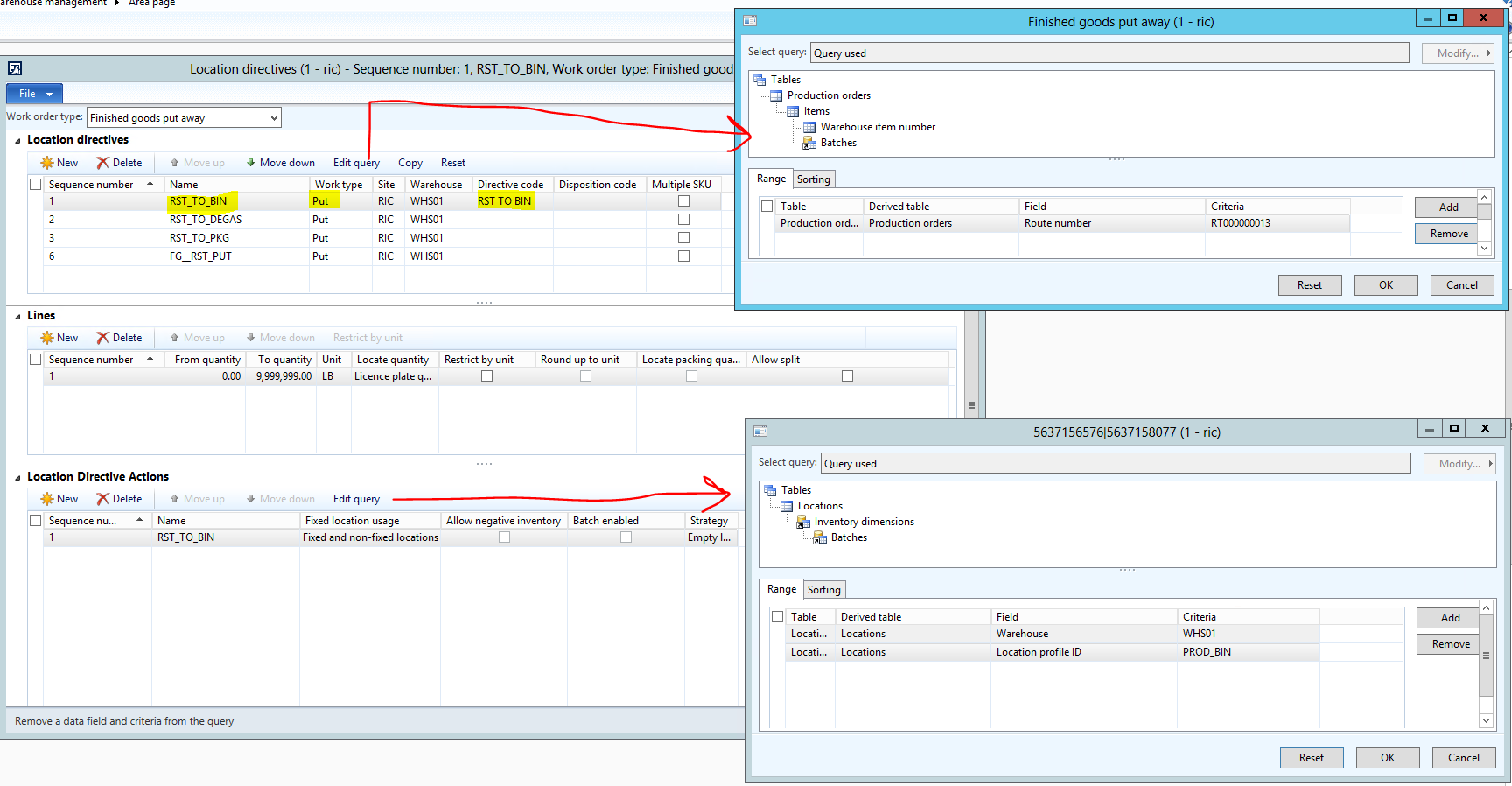
6521.Location-Directive.PNG

I've used the Directive code to link to the following work template:
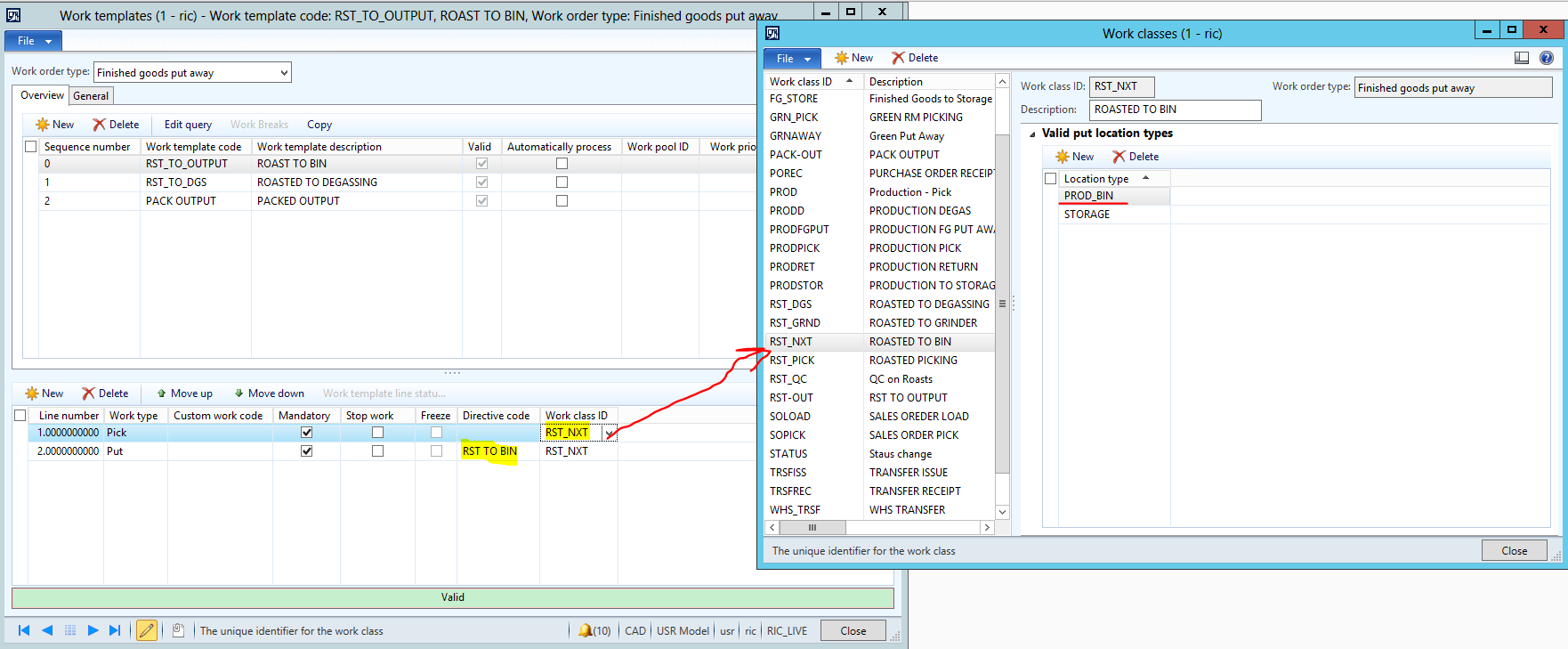
0245.Work-Template.PNG

And finally here is the mobile device menu item setup I'm using to report as finished:
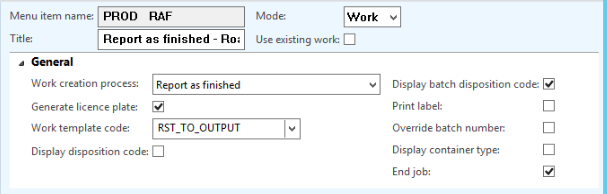
mobile.PNG

I've tried about 100 different variations in gettign this to work properly, but I've yet to find one that works properly in sending the finished roast from the RST ouput to the Bin Location. 

Any help would be appreciated.

*This post is locked for comments

I have the same question (0)
  • Guy Terry Profile Picture
    28,924 Moderator on at

    Hi Simon,

    Try ticking 'Batch enabled' on the Location Directive Action (as, if you say, your produced items are Batch tracked).

  • Simon Bradford  Profile Picture
    175 on at

    Hi Guy,

    I'm unable to activate the batch enabled tick box on the line. I believe this is because you can only use the Batch Enabled on "pick" work types and not on "put". At least this would coincide with the infolog you receive if you try and enable any of the batch strategies on the action directive line for put away work:

    error-for-batch.PNG

    I've gone through the effort of switching to a Report as Finished and Put action on the Mobile Device to allow manual input of the BIN location for the put and this works with all related batch information being written in properly so I don't think the batch info is the issue.

    This shouldn't need to be a manual process of inputting locations though. In all the demo scripts I've gone through from Microsoft side, AX happily chooses and suggests a location.

    Happy to try any other ideas you have or send more info if needed.

    Really appreciate the help! This one is bugging me so much now! If we can sort out the way these are supposed to work properly, I'll happily right the blog article to avoid others having to go through this pain and suffering!

    Thanks,

    Simon

  • Verified answer
    Guy Terry Profile Picture
    28,924 Moderator on at

    Oops, sorry, I better try to come up with a much better answer!

    Can't get into my test environment right now, but can we try to simplify the example and then add bits back in?

    On the location directive header, can you remove the Directive code and 'Reset' the query so it is empty. As it's the first one in the list, it'll get used.

    On the location directive line, can you remove the 'Unit' and set the Locate quantity to 'None'.

    On the location directive action, can you remove the Strategy and reset the query (this will let it find any location, but we're just testing).

    On the Work template, reset the query, check you've nothing set on the 'General' tab and remove the Directive code from the Put line.

    On the work class, remove all the Valid location types.

    Hopefully, that will work, and you can then add things back in one by one until it breaks!

  • Verified answer
    Simon Bradford  Profile Picture
    175 on at

    Hi Guy, 

    Ok, well I've finally got this working as expected. The key and thank you for the suggestion! Was to bring these back to absolute simplicity on both the Work Template as well as the Location Directives and Mobile Device Menu.

    The settings that worked: 

    Location Directives are the LOOK FOR, in this case the specific route used when Reporting as Finished.

    Location Directive Actions are the WHERE TO PUT, in this case only locations with Profile ID = PROD_BIN and don't require a strategy to function properly.

    Success-work-template.PNG

    For the work template, this needs to remain cleared. Any additional information you add here, such as Directive codes or queries (even if they match the criteria used on the location directives) seems to foul up Allocations and results in a blank "Put" location when the work is created. It also seems that the "Valid Put Location types" results in the same issue. 

    Work Template:

    Success-work-template.PNG

    And Finally the Mobile Device Menu:

    Entering a work template code here works fine but is not required. Even when left blank, the work creates properly with the resource output location as the Pick and the correct Output location as the Put.

    Success-Mobile-Device.PNG

    Moral of the story with these I think, is that the Directions for where to Pick/Put should be defined only in the location directives. Repeating those instructions into the Work Template or Work Class ID for valid Put locations just ends up confusing the issue and creating Allocation issues. 

    Thanks you so much for your help in this! It's a huge weight off my mind to be able to demonstrate this to a client and I hope a learning experience for both of us! 

    Cheers,

    Simon

Under review

Thank you for your reply! To ensure a great experience for everyone, your content is awaiting approval by our Community Managers. Please check back later.

Helpful resources

Quick Links

Responsible AI policies

As AI tools become more common, we’re introducing a Responsible AI Use…

Neeraj Kumar – Community Spotlight

We are honored to recognize Neeraj Kumar as our Community Spotlight honoree for…

Leaderboard > 🔒一 Microsoft Dynamics AX (Archived)

#1
Priya_K Profile Picture

Priya_K 4

#1
Martin Dráb Profile Picture

Martin Dráb 4 Most Valuable Professional

#3
Ali Zaidi Profile Picture

Ali Zaidi 2

Last 30 days Overall leaderboard

Featured topics

Product updates

Dynamics 365 release plans
