web
You’re offline. This is a read only version of the page.
close
Skip to main content

Notifications

Announcements

No record found.

Community site session details

Community site session details

Session Id :
Customer experience | Sales, Customer Insights,...
Suggested Answer

unsaved changes after calling a form

(0) ShareShare
ReportReport
Posted on by 160

Hi all,

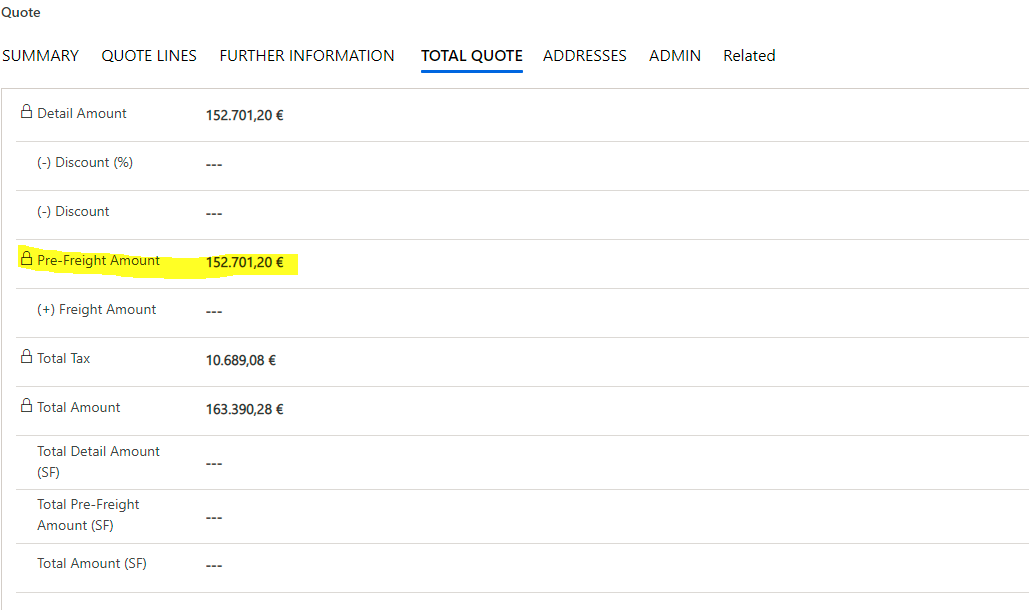
 I have following JavaScript on Quote Form and I have added it on Change of "Pre-Freight Amount" and Onload and On Save on the Form: The code calculate the Total tax and Total Amount, if a Discount is added:

function CalculateTax(executionContext){

    var formContext = executionContext.getFormContext();
    var preFreight = formContext.getAttribute('totalamountlessfreight').getValue();
    var tax = formContext.getAttribute("tv_tax").getText();
    var total = formContext.getAttribute('tv_totalamounts').getValue();
    var total_tax = formContext.getAttribute("tv_totaltax").getValue();

    var percent = parseFloat(tax);
debugger;
    
    if (tax != "" && tax != null){

        var Discount = preFreight * percent/100;
        
        formContext.getAttribute("tv_totaltax").setValue(parseFloat(eval(Discount)));
        formContext.getAttribute('tv_totaltax2').setValue(Discount);
        var Amount = preFreight + formContext.getAttribute("tv_totaltax").getValue();
        formContext.getAttribute('tv_totalamounts').setValue(Amount);
        formContext.getAttribute('totalamount').setValue(Amount);

    }
    else {
        formContext.getAttribute("tv_totaltax").setValue(parseFloat(eval(0)));
        formContext.getAttribute('tv_totaltax2').setValue(0);
        

    }


}
pastedimage1605088917510v1.png

But after changing the Discount amount in Discount percent or Discount field, the changes remains unsaved on the Form.

could somebody tell me, what could be the reason of that?

Many Thanks

I have the same question (0)
  • Joana Pinto Profile Picture
    740 on at

    Hi,

    First, do you really need to call that js on those 3 events? It isn't enough to call on onLoad and onChange?

    Second, you are not saving the form actually. You are just setting the value. So I think you need to do a formContext.data.save() to see your changes saved.

  • Suggested answer
    Gilmeyer Profile Picture
    on at

    Hi,

    Please use docs.microsoft.com/.../save after running your logic so that it gets saved.

Under review

Thank you for your reply! To ensure a great experience for everyone, your content is awaiting approval by our Community Managers. Please check back later.

Helpful resources

Quick Links

Responsible AI policies

As AI tools become more common, we’re introducing a Responsible AI Use…

Neeraj Kumar – Community Spotlight

We are honored to recognize Neeraj Kumar as our Community Spotlight honoree for…

Leaderboard > Customer experience | Sales, Customer Insights, CRM

#1
Tom_Gioielli Profile Picture

Tom_Gioielli 137 Super User 2025 Season 2

#2
#ManoVerse Profile Picture

#ManoVerse 57

#3
Jimmy Passeti Profile Picture

Jimmy Passeti 50 Most Valuable Professional

Last 30 days Overall leaderboard

Product updates

Dynamics 365 release plans
