web
You’re offline. This is a read only version of the page.
close
Skip to main content

Notifications

Announcements

No record found.

Community site session details

Community site session details

Session Id :
Microsoft Dynamics AX (Archived)

How to generate memory dumps & analyze AOS crash.

(1) ShareShare
ReportReport
Posted on by 3,006

Hi all,

We are experiencing AOS crash for particular users, while accessing a form in AX.

I've read some docs & following the article How to troubleshoot AOS crash.

I'm new here, so please reply whether I'm doing in correct way.

1. opened  ReportArchive folder in  "C:\ProgramData\Microsoft\Windows\WER\"

2. There is a "WER" file with date & time, Is it the file I need to make it Zip & analyze in LCS?
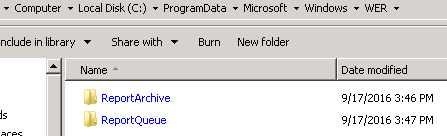
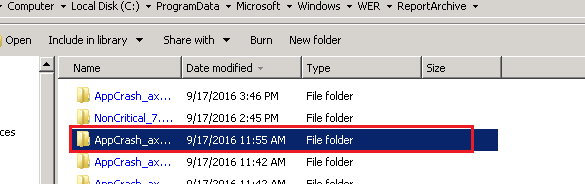
1_2D00_folders.PNG

2-_2D00_-File-folder.PNG

WER file:

3_2D00_WER-file.PNG

Appreciate your response...

*This post is locked for comments

I have the same question (0)
  • Verified answer
    Vilmos Kintera Profile Picture
    46,149 on at

    You need .DMP files, I typically use DebugDiag to capture them. The steps are explained on this blog entry, and on the referred site:

    community.dynamics.com/.../how-to-troubleshoot-aos-crash-using-crash-and-dump-analysis-tool-from-lcs

  • krishna.rao@dax Profile Picture
    3,006 on at

    Hi Vilmos Kintera,

    Appreciate your response.

    I have been following the same article, which you referred. I have administrator privileges.

    In Registry I didn't find the key 'Local dumps' in my server machine, But I found

    some files which I showed in initial post. It make bit confuse, so asked there.

    Please find the below screen shots, where registry key"Local dumps" not available.

    ServerConfiguration.PNGServerConfiguration.PNG

    EventViewer_5F00_ApplicationErrorLog.PNG

    Could you please tell me, why in my server machine I didn't find the register key

    'Local dumps'(you can see in the blog)?

  • Verified answer
    Mea_ Profile Picture
    60,284 on at

    Hi Krishna,

    You need to create this key and all entries as per blog article. After that you will get dump file on next crash.

  • krishna.rao@dax Profile Picture
    3,006 on at

    Hi Ievgen,

    Thank you so much..

    I've created register key entered values as specified(find the screenshot).

    dump file is not created. I didn't find in the folder "log"

    RegisterKey_5F00_server.PNG

    Please assist..


  • Verified answer
    Mea_ Profile Picture
    60,284 on at

    hm, you have extra space in "LocalDumps" and other keys. Can you please check all of them for typo ?

  • krishna.rao@dax Profile Picture
    3,006 on at

    Well, appreciate your guidance.

    I thought it's not mandatory to create with the same characters, specified in the blog.

    BTW, Now I'm going to do the changes & update here.

    (Note: I've created two keys Local dumps & under this another key 'AX32Serv.exe'.)

  • krishna.rao@dax Profile Picture
    3,006 on at

    Hi Ievgen & Vilmos.

    Appreciate your needful help.

     Now the system generated dump file(screen shot).

    DumpFilegenerated_5F00_usingWER.PNG

     going to analyze the dump file with the tool "Debug Diagnostic".

    I'll update soon, once the process has been completed.

  • krishna.rao@dax Profile Picture
    3,006 on at

    DebugDiag tool generated an analysis report. It has some errors & warnings.

    To resolve these, may I need to compile application & generate CIL...etc.

    1.DebugDiagReport_5F00_4.png

    2.  DebugDiagReport_5F00_2.png

    3. DebugDiagReport_5F00_3.png 

    4.    DebugDiagReport_5F00_4.png 

    5.DebugDiagReport_5F00_5.png    

    6. DebugDiagReport_5F00_6.png

    Kindly give your valuable suggestions, after checking above report.

    Thank you so much..

  • Verified answer
    Mea_ Profile Picture
    60,284 on at

    Hi Krishna,

    You need to uploaded dump file to LCS, you can find details in that blog article, LCS will produce AX specific report with additional details.

  • krishna.rao@dax Profile Picture
    3,006 on at

    Hi Ievgen,

    Thank you so much for your time.

    I will have to look into LCS. It may take time, since our report head is not available.

    BTW, still welcome if someone has suggestions based on the DebugDiag report.

Under review

Thank you for your reply! To ensure a great experience for everyone, your content is awaiting approval by our Community Managers. Please check back later.

Helpful resources

Quick Links

Responsible AI policies

As AI tools become more common, we’re introducing a Responsible AI Use…

Neeraj Kumar – Community Spotlight

We are honored to recognize Neeraj Kumar as our Community Spotlight honoree for…

Leaderboard > 🔒一 Microsoft Dynamics AX (Archived)

#1
Martin Dráb Profile Picture

Martin Dráb 4 Most Valuable Professional

#1
Priya_K Profile Picture

Priya_K 4

#3
MyDynamicsNAV Profile Picture

MyDynamicsNAV 2

Last 30 days Overall leaderboard

Featured topics

Product updates

Dynamics 365 release plans

