web
You’re offline. This is a read only version of the page.
close
Skip to main content

Notifications

Announcements

No record found.

Community site session details

Community site session details

Session Id :
Microsoft Dynamics AX (Archived)

Color the column based on previous and current value in SSRS report

(0) ShareShare
ReportReport
Posted on by

Hello Folks,

I have a challenge in achieving the following task

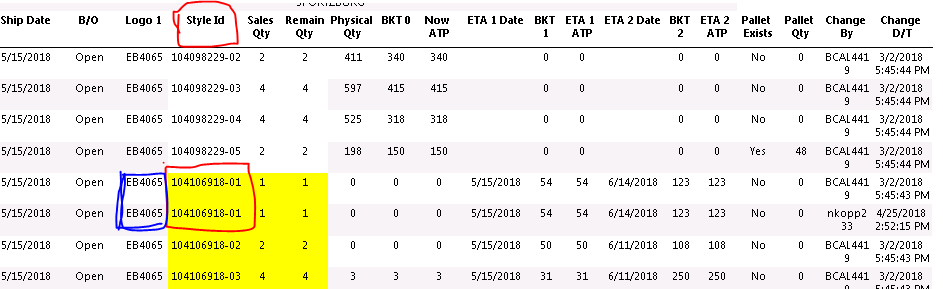
I have a SSRS report developed using RDP class. I need to color one of the column based on the field value of previous record and current record. I am new to SSRS reports, any help would be highly appreciated.

Please see the below image of the report, i need to compare the value of style id column(highlighted with red) and if there is a same value for style id in the next record, then Logo1 fields should be colored ( for both the records, highlighted with blue ink)
PacHold.PNG

Thanks in Advance.

Have a Great Day!

*This post is locked for comments

I have the same question (0)
  • Douglas Noel Profile Picture
    3,905 on at

    Hi,

    can't you use a expression based on  comparing the current against the previous row?

    stackoverflow.com/.../ssrs-comparing-current-row-to-previous-row

    Regards Douglas

  • Community Member Profile Picture
    on at

    Hello Douglas,

    Thanks for your response, using the Previous() can I also color the previous record column or only the current record column ?

  • Verified answer
    Douglas Noel Profile Picture
    3,905 on at

    Damned,

    for sure, it will work only for the current row.

    Due to the lack of the opposite next function, and use some combination of both, maybe another possible way is creating a flag in the records during creation of the temptable data during creation, considering the next record in the query (and after query is finished, to set the flag for the last) and evaluating this flag for colouring of the current record in ssrs.

    But you need some fixed order of data in selection/creation of temp table and the order from the dataset.

    Another way is using an ascending rownumber field within the temptable and simulate next through a lookup of the next record by this rownum+1

    sorry, didn't consider the colouring of the first row :-(

    Regards Douglas

  • Community Member Profile Picture
    on at

    Thanks Douglas, Adding a flag during data creation is what I thought as an alternative if the coloring cant be achieved from the report side functions. Thanks for directing me towards this

Under review

Thank you for your reply! To ensure a great experience for everyone, your content is awaiting approval by our Community Managers. Please check back later.

Helpful resources

Quick Links

Responsible AI policies

As AI tools become more common, we’re introducing a Responsible AI Use…

Neeraj Kumar – Community Spotlight

We are honored to recognize Neeraj Kumar as our Community Spotlight honoree for…

Leaderboard > 🔒一 Microsoft Dynamics AX (Archived)

#1
Martin Dráb Profile Picture

Martin Dráb 4 Most Valuable Professional

#1
Priya_K Profile Picture

Priya_K 4

#3
MyDynamicsNAV Profile Picture

MyDynamicsNAV 2

Last 30 days Overall leaderboard

Featured topics

Product updates

Dynamics 365 release plans
