web
You’re offline. This is a read only version of the page.
close
Skip to main content

Announcements

News and Announcements icon
Community site session details

Community site session details

Session Id :
Customer experience | Sales, Customer Insights,...
Answered

Power Automate | Get contactID from marketing form submission to perform an field update

(0) ShareShare
ReportReport
Posted on by 641

Hey,

is it possible to receive the contactID from a dynamics marketing form submission? I would like to perform an update action (update few fields) after the contact submitted a dynamics marketing from but I was unable to get the specific contact with GET Record by ID, since I did not find a proper ID field.

Best regards

Post

I have the same question (0)
  • Petr Jantac Profile Picture
    Microsoft Employee on at

    Hello,

    Do you use the outbound marketing forms or the new real-time marketing forms?

    Thank you,

    Petr

  • Verified answer
    Leah Ju Profile Picture
    Microsoft Employee on at

    Hi latfio,

    In the marketing form submission entity, there is one field named matched contact, which store the guid of the contact.
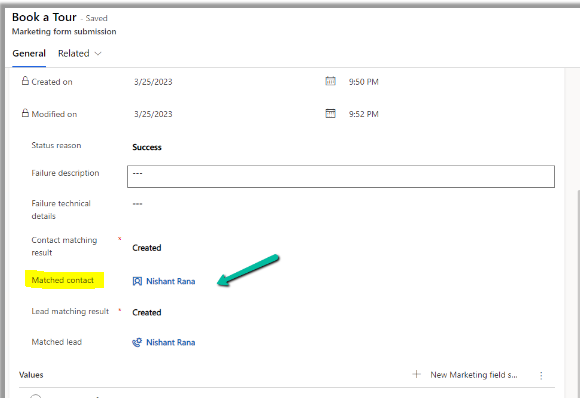
    pastedimage1682392998128v1.png

    So you can use it in the power automate:

    pastedimage1682393356279v3.png

    However, if you use a "marketing form submission added" as a trigger, don't follow it up by directly using the get contact, why?

    When a Form Submission is received, it doesn’t link it to a Contact and/or Lead at the same time that it is created.

    Processes then run to look for existing records(s) first, and then try to link, or create new records. So, we can’t just run our flow and send out an email all in one go, believe me, I tried.

    We need to wait until the records are found and matched or created and matched.

    Refer to the following link to check to make sure a Contact or Lead has been linked to the Form submission:

    https://meganvwalker.com/create-email-notification-d365-form-submittions/ 

  • mneumayer Profile Picture
    641 on at

    Hey Leah,

    thank you for the extensive description and explanation it helps a lot!

    Best regards

Under review

Thank you for your reply! To ensure a great experience for everyone, your content is awaiting approval by our Community Managers. Please check back later.

Helpful resources

Quick Links

Season of Sharing Community Challenge Launch!

Jump in, show your community spirit, and win prizes!

Women in Power Builds Momentum

Expanding mentorship, skilling, and AI innovation

Congratulations to the May Top 10 Community Leaders

These are the community rock stars!

Leaderboard > Customer experience | Sales, Customer Insights, CRM

#1
Hamza H Profile Picture

Hamza H 140 Super User 2026 Season 1

#2
Nagaraju_Matta Profile Picture

Nagaraju_Matta 128

#3
Abhilash Warrier Profile Picture

Abhilash Warrier 70 Super User 2026 Season 1

Last 30 days Overall leaderboard

Product updates

Dynamics 365 release plans



