web
You’re offline. This is a read only version of the page.
close
Skip to main content

Notifications

Announcements

No record found.

Community site session details

Community site session details

Session Id :
Customer experience | Sales, Customer Insights,...
Answered

Empty FileAs field in outlook contacts for Dynamics 365 Contacts

(0) ShareShare
ReportReport
Posted on by 107

Hi community,

After successful synchronization of dynamics 365 contacts to outlook contacts, the clients noticed that the FileAs field is empty on outlook only for dynamics 365 contacts.
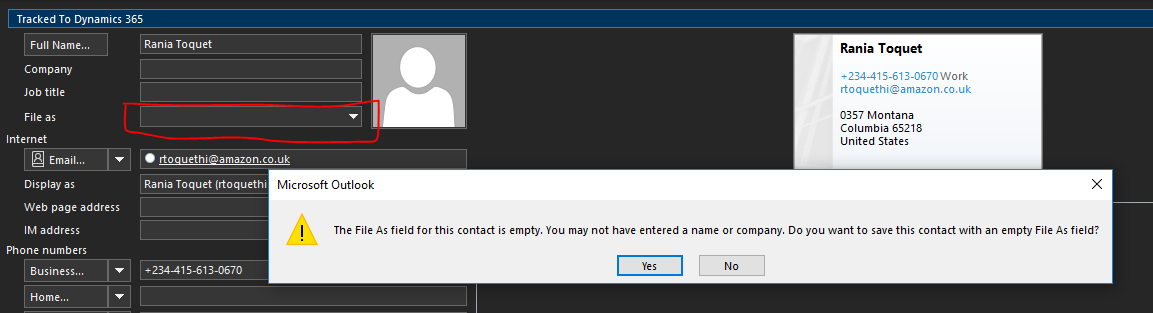
pastedimage1617114029189v1.png

And when the client tries to save, a warning message pops up.

The client is unable to search and filter dynamics crm records effectively based on empty FileAs field.

Any help is much appreciated.

I have the same question (0)
  • Verified answer
    LuHao Profile Picture
    40,892 on at

    Hi Jide,

    Please check following items.

    1. What is the range of users affected by this issue? Is it a single user or the entire organization?

    2. If it is a single user, he/she can open the sync fields of contact in the personal settings and see if there is any 'Synchronization Direction' is wrong.

    pastedimage1617173267810v1.png

    pastedimage1617173288253v2.png

    3. If it is the entire organization, open the environment settings and see if the 'Full Name Display Order' is different from the file as format in Outlook.

    pastedimage1617173469544v3.png

  • Jide Bantale Profile Picture
    107 on at

    Hi Lu,

    Thanks for the response.

    This worked for me especially when creating new contacts.

    How do I update the FileAs field existing outlook contacts that are synchronized with D365 Contacts?

    I have tried to update a random field (mobile phone number) on D365 Contact record and I notice the update (mobile phone number) is sent to Outlook contacts but the FileAs field is still empty.

Under review

Thank you for your reply! To ensure a great experience for everyone, your content is awaiting approval by our Community Managers. Please check back later.

Helpful resources

Quick Links

Responsible AI policies

As AI tools become more common, we’re introducing a Responsible AI Use…

Neeraj Kumar – Community Spotlight

We are honored to recognize Neeraj Kumar as our Community Spotlight honoree for…

Leaderboard > Customer experience | Sales, Customer Insights, CRM

#1
Tom_Gioielli Profile Picture

Tom_Gioielli 81 Super User 2025 Season 2

#2
Gerardo Rentería García Profile Picture

Gerardo Rentería Ga... 49 Most Valuable Professional

#3
#ManoVerse Profile Picture

#ManoVerse 40

Last 30 days Overall leaderboard

Product updates

Dynamics 365 release plans



