web
You’re offline. This is a read only version of the page.
close
Skip to main content

Notifications

Announcements

No record found.

Community site session details

Community site session details

Session Id :
Microsoft Dynamics AX (Archived)

AX email and Outlook

(0) ShareShare
ReportReport
Posted on by 6,609

Hello:

I've a situation where when we try to send email via a print form we're encounter an initial Outlook dialog asking for an Outlook profile. Although there is an option to set as default profile it doesn't work and will pop up again at the next print (email) request. 

3823.AXEmail002.jpg

Once I select a profile and then proceed, I then get this message...
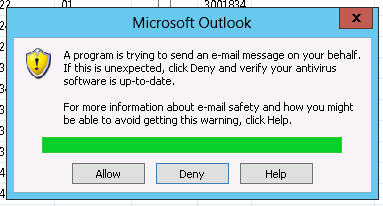
This happens with every attempt to email. Is there a way to avoid all these pop-ups? I assume it has to be a misconfiguration on our side as I've found very little on this issue. Any help would be appreciated. 

Thank you

*This post is locked for comments

I have the same question (0)
  • André Arnaud de Calavon Profile Picture
    301,075 Super User 2025 Season 2 on at

    Hi Kbanh,

    Do you have AX running on terminal services and/or Citrix? Is your default email program Outlook? Is Outlook installed locally or also remotely? Which version of AX are you using?

  • Verified answer
    Umesh Pandit Profile Picture
    9,315 User Group Leader on at

    Hi Kbanh,

    Please open the Outlook, (In my case I have Office 2013), go to File>Options>Trust Center>Trust Center Setting>Programmatic Access and Change the setting to Nerver! Check the screenshot for the same.

    [View:http://prntscr.com/40vonr:550:0]

    http://prntscr.com/40vonr

  • bankk Profile Picture
    6,609 on at

    Hi Andre,

    We're running Outlook on terminal services. Outlook is our default email client. And we're on AX 2012 R2.

    To be clear, the email does eventually get sent. It's the annoying pop ups which our users are complaining about.

    Thanks!

  • bankk Profile Picture
    6,609 on at

    Hi Umesh,

    I tried the steps you laid out on the remote Outlook client and it didn't appear to help. Everything in the description for Programmatic Access looks like this is where those warning can be disable but I'm wary of turning off the security altogether. Also, the local instances of Outlook on does not allow the Programmatic Access options to be changed (grayed out), only the remoteapp instance allows this change. I read yesterday that IMAP is used for report email and when it's use with remoteapps there are issues, although the details were not given.

    Thanks

  • André Arnaud de Calavon Profile Picture
    301,075 Super User 2025 Season 2 on at

    Hi Kbanh,

    Probably the user profile is not saved at the terminal server? You can ask this to a system administrator. Further the answer from Umesh should prevent the second pop-up. Also ask the system administrator if the policy can be changed.

  • bankk Profile Picture
    6,609 on at

    Thank you for your suggestions Andre. I'll research the Outlook profile, and the policy is locked down so I'll follow up on that also. I'll report back when I have answers.

  • bankk Profile Picture
    6,609 on at

    Hello,

    So I've made some progress although not completely satisfactory. First, I was able to follow Umesh's method and get rid of the "sending on behalf" pop up message so thank you for that. Secondly, I was able to verify that the Outlook profiles are indeed on the terminal server but they're not automatically detected when AX tried to email. What I did find though was if on my local machine I run the remoteapp version of Outlook and then attempt to send email through remoteapp AX, then it doesn't complain or ask for a profile selection. If I run my local Outlook, then AX will require I select a profile. I'm continuing to research but thought I might post an update.

    Thank you.

  • Community Member Profile Picture
    on at

    Hi there,

    We are getting this popup which we are not too fussed about. What we want to happen after clicking allow or deny is the new email popup box appear. Any advice will be much appreciated.

    Kind Regards

    Michael 

  • Community Member Profile Picture
    on at

    Hi,

    Did you ever resolve this"Choose Profile problem"? We have exactly the same problem (the other as well but that is resolved) as you and no matter what I do it doesn't stick. I am really out of ideas now..

    Regard,

    Robert

  • Community Member Profile Picture
    on at

    Not found how to generate the new email popup dialogue box. 

Under review

Thank you for your reply! To ensure a great experience for everyone, your content is awaiting approval by our Community Managers. Please check back later.

Helpful resources

Quick Links

Responsible AI policies

As AI tools become more common, we’re introducing a Responsible AI Use…

Neeraj Kumar – Community Spotlight

We are honored to recognize Neeraj Kumar as our Community Spotlight honoree for…

Leaderboard > 🔒一 Microsoft Dynamics AX (Archived)

#1
Martin Dráb Profile Picture

Martin Dráb 4 Most Valuable Professional

#1
Priya_K Profile Picture

Priya_K 4

#3
MyDynamicsNAV Profile Picture

MyDynamicsNAV 2

Last 30 days Overall leaderboard

Featured topics

Product updates

Dynamics 365 release plans



