web
You’re offline. This is a read only version of the page.
close
Skip to main content

Announcements

News and Announcements icon
Community site session details

Community site session details

Session Id :
Microsoft Dynamics CRM (Archived)

Outlook client won't set Regarding or Track - Mailbox isn't enabled message.

(0) ShareShare
ReportReport
Posted on by

Upgraded from CRM 2016 v8.1 to Dynamics 365 v8.2 last week.  Today I updated the CRM Outlook client from 2015 to 2016, then to Dynamics 365 version of the client.  When I go to track or set regarding, I get a popup message stating:

" You can't track this item because your mailbox isn't enabled."

Next thing I tried was Approve the Email and run the Test and enable.  Still nothing.  I opened up the Diagnostics wizard and the config.  Still not working. 

Has anyone else encountered this issue? 
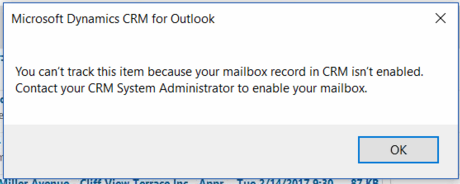
Issue-with-tracking.png

*This post is locked for comments

I have the same question (0)
  • Community Member Profile Picture
    on at

    Hi, Is the issue resolved we are using CRM Online and are having same issue

  • Suggested answer
    Dynamics_Alok Profile Picture
    1,746 on at

    Make sure that your Mailbox is Enable and try to read the Trace log of Outlook so that you can find more details about the same Error.

    Ref : https://support.microsoft.com/en-us/help/2862843/how-to-enable-global-and-advanced-logging-for-microsoft-outlook 

  • Community Member Profile Picture
    on at

    I uninstalled and reinstalled Dynamics 365 for Outlook app, it worked for me.

  • Suggested answer
    Fameeda Yaseen Profile Picture
    451 on at

    HI maustin,

    No need to do the reinstall activity. Simply test and enable your mail boxes from your CRM mail box configuration.  then Systems enable the disabled mail boxes and send them a test email.  if email going to client please inform them before running this step.

    Enabl-MailBox.PNG

    or you can check this blog to step by step resolution of this issue.

    https://community.dynamics.com/crm/b/templateletterincrm/posts/dynamics-365-outlook-client-track-email-button-is-not-working

    Thanks,

    Fahmeeda Yaseen

  • Suggested answer
    Fameeda Yaseen Profile Picture
    451 on at

    HI Neha,

    No need to do the reinstall activity. Simply test and enable your mail boxes from your CRM mail box configuration. Please see the screen for test and enable mail boxes.

    pastedimage1600083870094v1.png

Under review

Thank you for your reply! To ensure a great experience for everyone, your content is awaiting approval by our Community Managers. Please check back later.

Helpful resources

Quick Links

Season of Sharing Community Challenge Launch!

Jump in, show your community spirit, and win prizes!

Women in Power Builds Momentum

Expanding mentorship, skilling, and AI innovation

Congratulations to the May Top 10 Community Leaders

These are the community rock stars!

Leaderboard > 🔒一 Microsoft Dynamics CRM (Archived)

#1
ScottDurow Profile Picture

ScottDurow 2

#2
GJones Profile Picture

GJones 1

Last 30 days Overall leaderboard

Featured topics

Product updates

Dynamics 365 release plans



