web
You’re offline. This is a read only version of the page.
close
Skip to main content

Notifications

Announcements

Community site session details

Community site session details

Session Id :
Customer Service forum

SSRS Action Go to URL Not Working in SubReport

(0) ShareShare
ReportReport
Posted on by

Hi,

Can anyone help me out with my URL not linking in my SubReport?

I've followed the recommended steps:
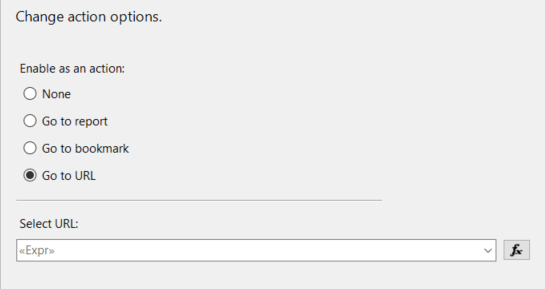
subreportbug.PNG

1. Right-Click my Text Box and select Text-Box Properties 

2. Click on Action, followed by Go To URL

3. In Select URL, I've set an expression for my hyper link:

      =Parameters!CRM_URL.Value & "?ID={"&Fields!ic_actual1_ic_actualid.Value.ToString()&"}&LogicalName=ic_actual"

4. The hyperlink works when the SubReport is ran on it's own. It redirects me to the right record.

5. The hyperlink does not work when the Main Report is ran with the embedded SubReport. I don't get an error, the hyperlink is simply not clickable. 

Any help would be greatly appreciated,

Thanks in advance. 

Categories:
I have the same question (0)
  • Verified answer
    PabloCRP Profile Picture
    1,088 on at

    Hi, tgribeauval,

    I think it might be happening because of the URL format parameter, in Main Report ensure that the parameter is established as string.

    answer2.png
    And then in your subreport, get the parameter and you can concatenate it with both symbols (& or +) as action URL pointing to your record,  also string
    answer2.png
    regards.
  • Community Member Profile Picture
    on at

    Hi Pablo,

    Thanks a lot of the answer.

    I don't quite picture what you have in mind.

    What do you precisely mean by URL Format Parameter? My URL is formatted in my SubReport, as such:

                                            =Parameters!CRM_URL.Value & "?ID={"&Fields!ic_actual1_ic_actualid.Value.ToString()&"}&LogicalName=ic_actual"

    The parameters I need to more my hyperlink are only available in my SubReport dataset.

    The only parameter I am passing from the main to the sub is the one I need to filter to the right information.

    Thanks again for the answer,

    Best regards

  • PabloCRP Profile Picture
    1,088 on at

    What I mean is that the parameter has to be a string, I had a similar problem and then when I wanted to click on the hyperlink nothing happened.

    Because my parameter was in  "Set Expression for HYPERLINK " as (yourorg.crm.dynamics.com) instead of =  "yourorg.crm.dynamics.com/" +  "Main. Aspx? etc =...  "Note that at the beginning the equal sign (=) was not present.

    what I would do is set the parameter to = parameters! CRM_URL. Value. ToString (). And then, wherever the action of the URL is, set the expression to = parameters! CRM_URL. Value. ToString () +  "? ID = { "+ Fields! Ic_actual1_ic_actualid. Value. ToString () +  "} & LogicalName = ic_actual " and that should work.

  • Community Member Profile Picture
    on at

    Hi Pablo,

    Thanks again for the reply.

    1. The parameter has to be a string. When you say parameter are you talking about the CRM_URL parameter that is being used for my hyperlink? if so,

    subreportbug01.PNG It's data type is set to text.

    2. what I would do is set the parameter to = parameters! CRM_URL. Value. ToString (). And then, wherever the action of the URL is, set the expression to = parameters! CRM_URL. Value. ToString () +  "? ID = { "+ Fields! Ic_actual1_ic_actualid. Value. ToString () +  "} & LogicalName = ic_actual " and that should work.

    a) Right-Click on the text-box I want to add a hyper-link to,

    b) Select text-box properties,

    c) Select Action, Go to URL and Set expression for: Hyperlink to --> 

    =Parameters!CRM_URL.Value.ToString & "?ID={"&Fields!ic_actual1_ic_actualid.Value.ToString()&"}&LogicalName=ic_actual"

    *** note that I added the .ToString after =Parameters!CRM_URL.Value

    Unfortunately, this does not fix my issue. Could you please precise to me, where I'm losing you in your explanation. 

    Thanks again for your time.

  • PabloCRP Profile Picture
    1,088 on at

    If that does not work please ensure that the parameter (Parameters!CRM_URL.Value.ToString) has value when you send it to the other form.

    otherwise, you won't be able to click the URL.

  • Community Member Profile Picture
    on at

    Hi Pablo,

    Thanks for the reply.

    I'd like to give you a little more context to make sure we understand each other.

    1. I built my two reports using the Report Builder in PowerApps

    2. I downloaded and imported my report .RDL files into my solution.

    3.  I inserted my subreport into my main report as follows:
    subreportbug03.PNG

    4. Right-Click on my SubReport --> Sub Report Properties --> Parameters :

    subreportbug02.PNG(this is the parameter my subreport needs to "report" the relevant information.)

    5. Here is a view of all my main report and sub report parameters: 

    mainreportbug1.PNGsubreportbug03.PNG

    6. They both have the CRM_URL parameter that contains:
    crmurlbug.PNG A null value.

    My main report hyperlinks consist of:

    1. =Parameters!CRM_URL.Value & "?ID={"&Fields!ic_assetid.Value.ToString()&"}&LogicalName=ic_asset"

    2.  =Parameters!CRM_URL.Value & "?ID={"&Fields!ic_forecast1_ic_forecastid.Value.ToString()&"}&LogicalName=ic_forecast"

    My sub report hyperlink consists of:

    1. =Parameters!CRM_URL.Value & "?ID={"&Fields!ic_actual1_ic_actualid.Value.ToString()&"}&LogicalName=ic_actual"

    ** My dynamic hyperlinks work for my main report, they link to the appropriate record. 

    ** They also work for my Sub Report but strictly when I run it on it's own. 

    ** It doesn't not work when I try to click a sub report hyperlink via my main report.

    I believe the problem stems from Step 4, if I understand correctly, I should pass something here from the main report to the sub report. 

    Thank you very more Pablo, much appreciated. 

  • PabloCRP Profile Picture
    1,088 on at

    Yeap, the subreport is OK, the parameters are each row of the dataset.   "Try and Error ", as I said, you have to make sure that the parameter is passed. 

    Main report

    res4.png

    You can test in report 2 (subreport) add a tag and validate if you pass the URL 

    res4.png

    as the image below the first row doesn't have a url and I can't click the Action "Go>", but in the other records the "Go>" label works.

    answ4.png

  • Community Member Profile Picture
    on at

    Hi Pablo,

    The issue was fixed. It was simply, as you mentioned in earlier responses, the URL was not being passed from the Main Report to the Sub Report.

    I solved the issue, for future individuals with similar issues, by:

    1. Right-Click Sub Report --> Sub Report Properties --> Parameters --> Add

    2. "Parameter1" = URL.Value

    Thanks for your time.

Under review

Thank you for your reply! To ensure a great experience for everyone, your content is awaiting approval by our Community Managers. Please check back later.

Helpful resources

News and Announcements

Season of Giving Solutions is Here!

Quick Links

November Spotlight Star - Khushbu Rajvi

Congratulations to a top community star!

Forum Structure Changes Coming on 11/8!

In our never-ending quest to help the Dynamics 365 Community members get answers faster …

Dynamics 365 Community Platform update – Oct 28

Welcome to the next edition of the Community Platform Update. This is a status …

Leaderboard > Customer Service

Last 30 days Overall leaderboard

Featured topics

Product updates

Dynamics 365 release plans
