web
You’re offline. This is a read only version of the page.
close
Skip to main content

Announcements

News and Announcements icon
Community site session details

Community site session details

Session Id :
Service | Customer Service, Contact Center, Fie...
Suggested Answer

I cant select Position Lookup Field value

(0) ShareShare
ReportReport
Posted on by 360

Hello All,

I have a problem at Position entity. I created lookup field. Reference entitiy is Position(CRM as is entity). When I want to select any value on UCI from lookup value, I cant select field but I can select on classic views. Please follow pictures.

1. Hub : 

0552.hub.png

2. Classic : 

8004.classic.png

Anyone knows this problem ? Can you support to me ? 

Thanks / Regards.

I have the same question (0)
  • Suggested answer
    Community Member Profile Picture
    on at

    Have you added the position entity to the Hub app?  That could be why its not showing any option to populate the field.

  • Community Member Profile Picture
    on at

    Tested it in my org, but that wasnt the case.  I can see records in both apps.

  • onurizgi Profile Picture
    360 on at

    Hi Mike,

    Thanks for your support. My dynamics project is onprimese. Interesting situation I cant understand :) I could not find any resources on the subject. The problem persists.

    Regards.

  • Community Member Profile Picture
    on at

    Hi Onur,

    It’s so strange, I have added the position lookup field in the form, it can be selected.

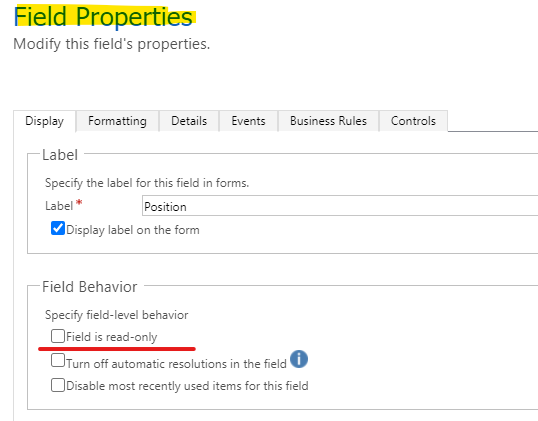
    1.You can check the field is read-only or not.

    Go Settings > Customization > Customize the system > Entities > forms to double-click the position field to open ‘Field Properties’ dialog.
    pastedimage1609311142512v1.png

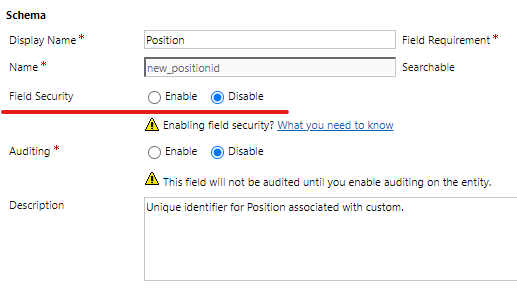
    2.check field security for the field.

    Go Settings > Customization > Customize the system > Entities > fields to click position field.

    Make sure the ‘field security’ is disable.
    pastedimage1609314093075v2.png

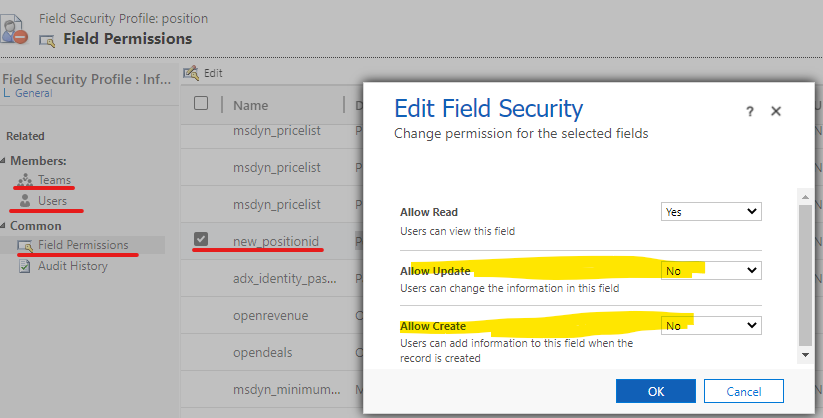
    if not, you need go Settings > Security > Field Security Profiles to check which record can't allow create and update the position field.

    then click teams and users to view who has been added, if they have selected, they can't edit position field.
    pastedimage1609314161829v3.png

    Regards,

    Leah Ju

    Please mark as verified if the answer is helpful. Welcome to join hot discussions in Dynamics 365 Forums.

  • onurizgi Profile Picture
    360 on at

    Hi Leah,

    Thanks for your support. The problem is not about privileges. I'm system administrator. I checked all areas as you described. Believe it still didn't happen :) I found same issue at this forum.

    You can follow : community.dynamics.com/.../site-entity-not-available-in-uci

    Thanks.

Under review

Thank you for your reply! To ensure a great experience for everyone, your content is awaiting approval by our Community Managers. Please check back later.

Helpful resources

Quick Links

Season of Sharing Community Challenge Launch!

Jump in, show your community spirit, and win prizes!

Women in Power Builds Momentum

Expanding mentorship, skilling, and AI innovation

Congratulations to the April Top 10 Community Leaders

These are the community rock stars!

Leaderboard > Service | Customer Service, Contact Center, Field Service, Guides

#1
Abhilash Warrier Profile Picture

Abhilash Warrier 51 Super User 2026 Season 1

#2
Nagaraju_Matta Profile Picture

Nagaraju_Matta 50

#3
James White Profile Picture

James White 19

Last 30 days Overall leaderboard

Featured topics

Product updates

Dynamics 365 release plans



