web
You’re offline. This is a read only version of the page.
close
Skip to main content

Notifications

Announcements

No record found.

Community site session details

Community site session details

Session Id :
Microsoft Dynamics AX (Archived)

Penny difference accounting currency amount exceeds threshold

(0) ShareShare
ReportReport
Posted on by

Hi

i'm facing an error 
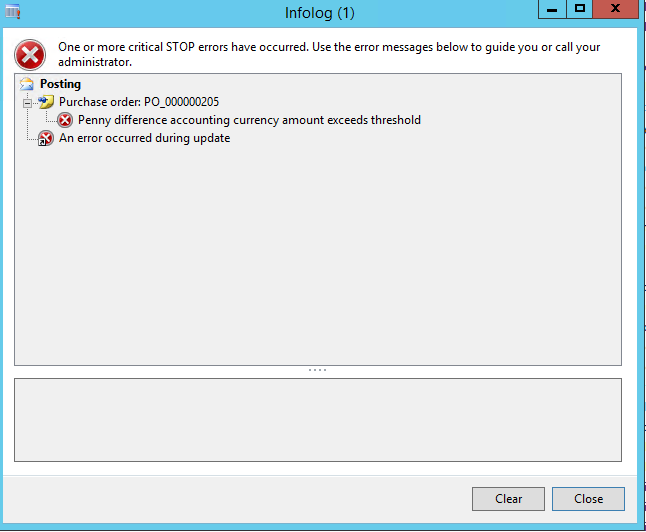
Panny-difference.png

this error shown after post invoice Purchase order and it invoice USD Amount and Exchange Rate 183,816 EGP =10000 USD 

But there is a difference between the total of Debit and the credit, as described thus
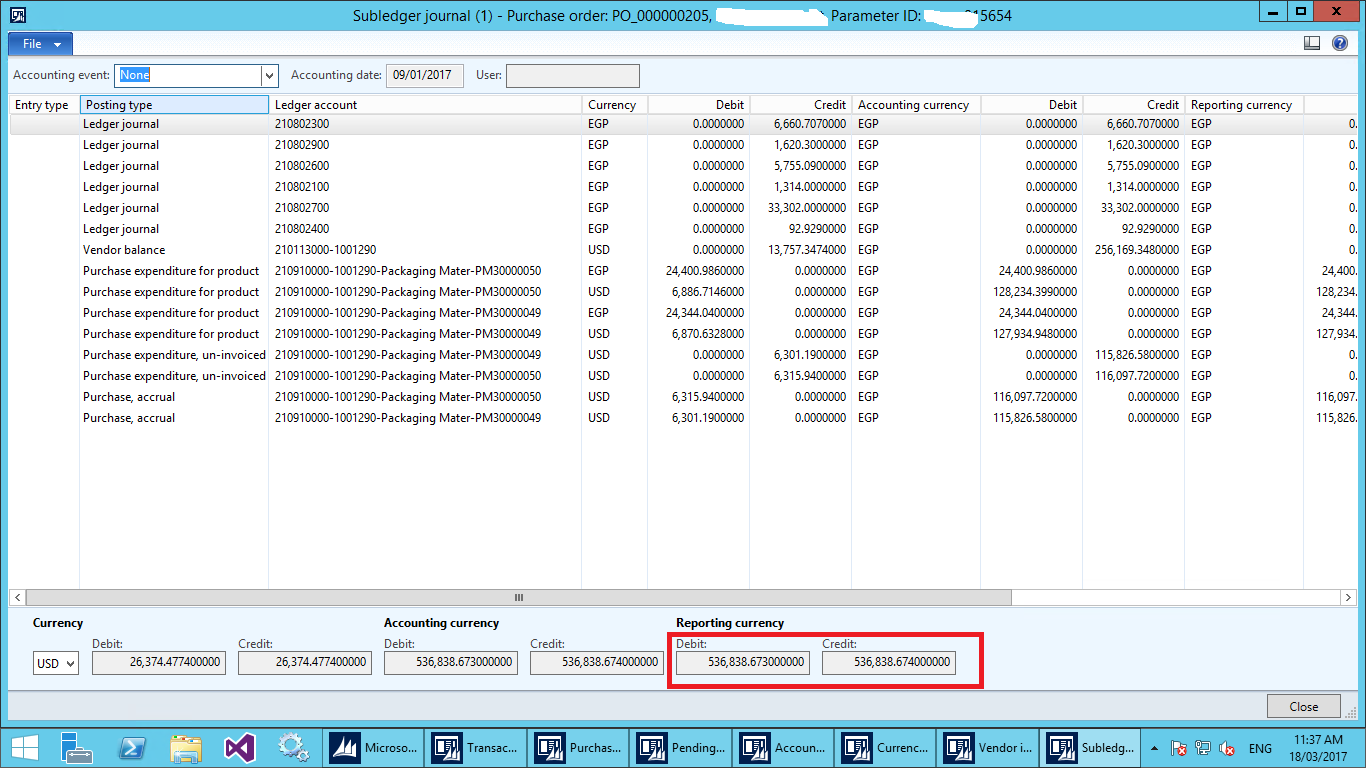
Penity-refrance.png

*This post is locked for comments

I have the same question (0)
  • Suggested answer
    Ludwig Reinhard Profile Picture
    Microsoft Employee on at

    Hi Mohamed Abdallah,

    Can you check your GL parameters and increase the allowed penny difference?

    When doing that also check your currency rounding rules in the currency setup form to ensure that minor variances can be posted without any issue.

    Best regards,

    Ludwig

  • Community Member Profile Picture
    on at

    Hi Dr. Ludwig Reinhard

    i thanks fast support this issue resolved When it was added in GL parameters but i'm add it in AP Parameter But is not the solution I want to know why ?

  • Suggested answer
    Ludwig Reinhard Profile Picture
    Microsoft Employee on at

    Hi Mohamed Abdallah,

    The penny difference in the AP parameters is related to settlements between invoices and vendor payments.

    The penny difference fields in the GL Parameters is for penny-roundings for a voucher. Those GL parameters and the rounding rules setup in the currencies form should fix your issue.

    Best regards,

    Ludwig

  • Yugandhar Profile Picture
    5 on at

    Go to General ledger parameters - Ledger-Maximum penny-rounding in the reporting currency - make it as 0.10

    It is working please try

  • Bakhtiar Hasan Profile Picture
    85 on at

    Yes its working

    Thank you so much for your guidance

  • Bakhtiar Hasan Profile Picture
    85 on at

    Yes its working

    Thank you so much for your guidance

Under review

Thank you for your reply! To ensure a great experience for everyone, your content is awaiting approval by our Community Managers. Please check back later.

Helpful resources

Quick Links

Responsible AI policies

As AI tools become more common, we’re introducing a Responsible AI Use…

Neeraj Kumar – Community Spotlight

We are honored to recognize Neeraj Kumar as our Community Spotlight honoree for…

Leaderboard > 🔒一 Microsoft Dynamics AX (Archived)

#1
Priya_K Profile Picture

Priya_K 4

#1
Martin Dráb Profile Picture

Martin Dráb 4 Most Valuable Professional

#3
MyDynamicsNAV Profile Picture

MyDynamicsNAV 2

Last 30 days Overall leaderboard

Featured topics

Product updates

Dynamics 365 release plans
