web
You’re offline. This is a read only version of the page.
close
Skip to main content

Notifications

Announcements

No record found.

Community site session details

Community site session details

Session Id :
Finance | Project Operations, Human Resources, ...
Answered

Mapping Azure DevOps project to local folders via TFVC & Branching off from Main folder

(0) ShareShare
ReportReport
Posted on by 678

Hi All

I am using the Fleet management case for configuring/managing DevOps source control process 

workspace setting:

pastedimage1600516333578v2.png

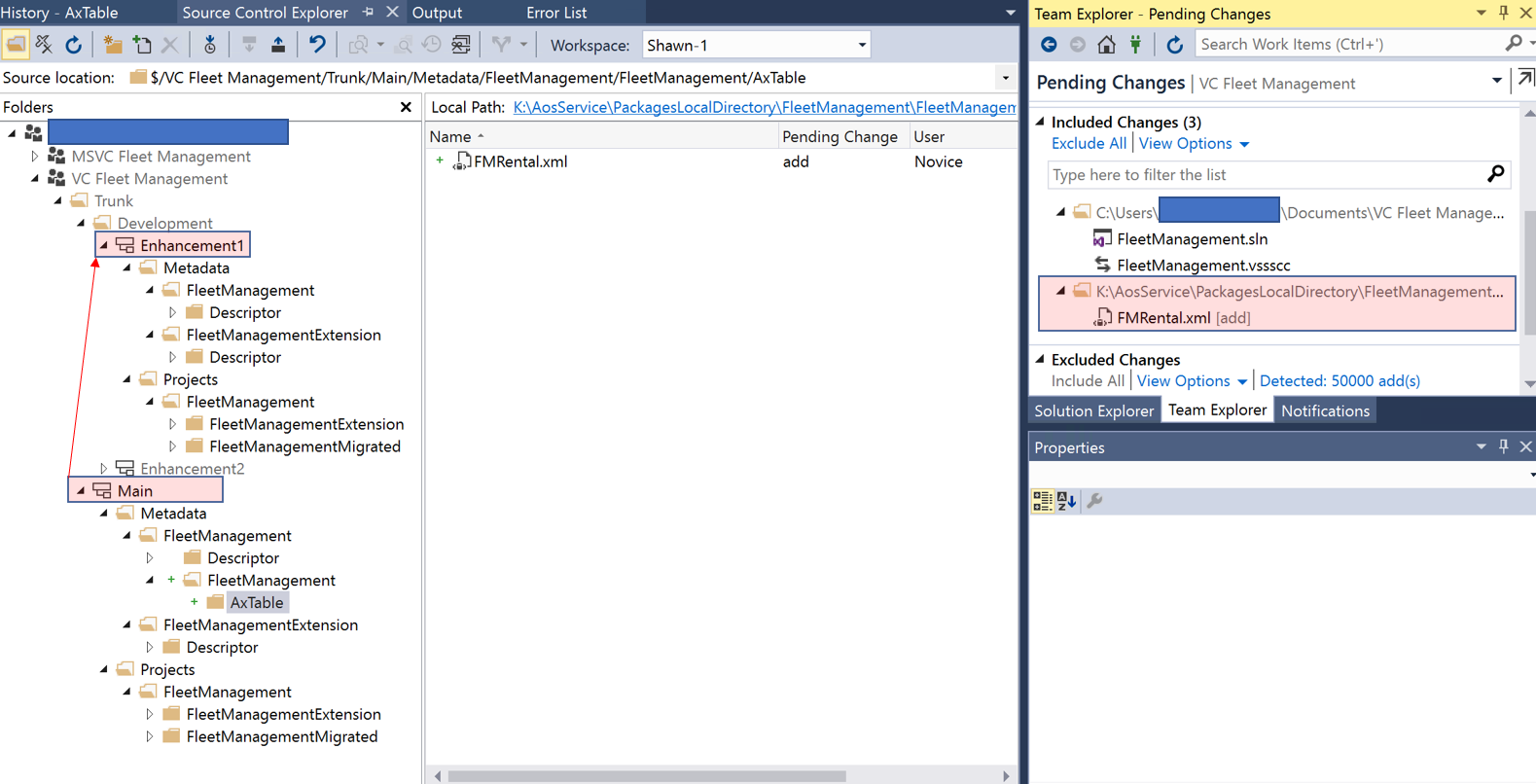
Source Control Explorer after branching off the development version from Main folder to create an enhancement:

Then whilst working under Enhancement1 branch, I added a file to the source control (for example FMRental). Then  the file was added to the Main>Metadata>...  instead of being added under Development>Enhancement1>Metadata. This is, of course, correct because my model store root folder is mapped to the Main/Metadata folder as shown in my workspace setting above.

I only want to make changes in Development>Enhancement1 branch not in Main branch as it will be merged back to the Main branch later knowing that the main trunk should be the latest production version.

How can I structure /map the folder to achieve this? 
pastedimage1600516495771v3.png

Thank you.

I have the same question (0)
  • Gunjan Bhattachayya Profile Picture
    35,423 on at

    Hi Shawn,

    The way we have normally done it before is to map the model store root folder to the Dev branch (Enchancement1 branch in your case).

    We set up another environment (mapping the Metadata to the PackageLocalDirectory)  for merging into Main branch. We merge the change sets from Dev branch to Main branch and then check-in the pending changes.

  • ShawnDEV Profile Picture
    678 on at

    Hi Gunjan,

    When you say 'another environment (mapping the Metadata to the PackageLocalDirectory)' can I think of it as another Team project (MSVC Fleet management in the screenshot above and structure the folder in there and regard it as Main trunk?

    Or completely different cloud-hosted environment..?

    Thank you.

  • Gunjan Bhattachayya Profile Picture
    35,423 on at

    Hi Shawn,

    It could be cloud hosted or local. Why we went for this approach was because we had a lot of developers working on Dev and we merged into Main branch on one Dev server to compile and synchronize before building the package using DevOps.

  • ShawnDEV Profile Picture
    678 on at

    Hi Gunjan,

    If I understood correctly,

    1. We do make changes in a Dev branch in a Dev environment and check in a changeset to a DevOps Team project.

    Each developer has own Dev environment and check in their own changesets to the same Devops Team project.

    2. Then do Get Latest Version in the source control explorer page in a special type of Dev environment and as a consequent, these changesets will be downloaded/merged to the Main branch in the Dev environment. (Question: Then when do you use Branching and merging?)

    pastedimage1600533559867v1.png

    3. Do a build in there and create a deployable package and upload it to LCS asset library and finally deploy it to other environments such as Test, Prod.

    Is this correct? or Did I oversee something in this process?

    Thank you

  • Verified answer
    Gunjan Bhattachayya Profile Picture
    35,423 on at

    Hi Shawn,

    1. Correct. Each developer has his own machine and checks in code into the Dev branch. We normally deploy these into a DevTest environment and do the initial testing there.

    2. We do use a dev environment for merging these changes into Main branch and make sure everything build fine. This machine is linked to the Main branch only and we do not have to do a "get latest" on Dev. We just proceed with merging and checking in pending changes.

    3. You could use this Dev server (used for merging) to create a deployable package for Sandbox and Prod. We use a DevOps Pipeline to the same.

  • Verified answer
    Sukrut Parab Profile Picture
    71,710 Moderator on at

    Hi , regarding your first point , your understanding is correct. Each dev has their own machine and they do check in code in dev branch.

    After that it's up to you if you want another environment which is also connected to dev branch or you want to put that code directly to UAT environment through build pipeline which is connected to dev branch .

    You can use merging process to merge changesets by features /stories whatever you use from dev branch to main branch .

  • ShawnDEV Profile Picture
    678 on at

    Hi Gunjan,

    In 2., do you mean "We do use a dev environment for merging these changes into Main branch in the same Devops Team project used by other developers or another Team project with the main branch specified only?"

    Also in either case, someone in the Dev server should be able to see Dev branches of each developers so that he/she can merge them to the main branch in the Dev server (used for merging). Am I right?

    In 3., when you say you use a DevOps Pipeline to do the same, does this mean that all merged changesets to the main branch in Dev server will be checked in to the DevOps Team project and then a deployable package will be created using pipelines and deployed to an environment which is a feature in DevOps?

    Thank you.

  • Verified answer
    Gunjan Bhattachayya Profile Picture
    35,423 on at

    Hi Shawn,

    For #2, yes. we have a few people who merge the change sets into the Main branch. They merge the changes by the change set number into Main. The Dev branch is the same for all developers. Only their Dev workstations are different. In your case, for an example, all developers will connect to the "Enhancement 1" branch from their individual workstations and will check-in their changes into this branch. these individual check-ins are then merged into the Main branch.

    For #3, after the everything is merged into the Main branch, we start a build using a pipeline. On a successful build, a deployable package is generated which is then applied to the environments.

    You can look at these links for some more information regarding the build here.

    I think you can setup build automation using Microsoft hosted agents and Azure pipelines. You can find information regarding the same here. I haven't worked on setting this up as yet, hence can't give you any more information on this than what is provided here

  • ShawnDEV Profile Picture
    678 on at

    Hi Gunjan,

    so, there are 2 DevOps Team project needed, right?

    One DevOps Team project with Dev branch only for all developers to check in their change sets

    The other DevOps Team project with Main branch only for a few people who merge all change sets into that Main branch. In this environment, merging all change sets are done on Source control explorer page by clicking Merging and branching > Merge.. of Dev branch of each developer's workstation which must be listed on the left-hand side of the page.

    Thank you.

  • Verified answer
    Gunjan Bhattachayya Profile Picture
    35,423 on at

    Hi Shawn,

    Only one DevOps project and two branches. Same as your setup here.

    First branch is for Developers and the main branch is for merging the change sets.

    From the project perspective I don't think you need any change.

Under review

Thank you for your reply! To ensure a great experience for everyone, your content is awaiting approval by our Community Managers. Please check back later.

Helpful resources

Quick Links

Responsible AI policies

As AI tools become more common, we’re introducing a Responsible AI Use…

Neeraj Kumar – Community Spotlight

We are honored to recognize Neeraj Kumar as our Community Spotlight honoree for…

Leaderboard > Finance | Project Operations, Human Resources, AX, GP, SL

#1
Martin Dráb Profile Picture

Martin Dráb 646 Most Valuable Professional

#2
André Arnaud de Calavon Profile Picture

André Arnaud de Cal... 529 Super User 2025 Season 2

#3
Sohaib Cheema Profile Picture

Sohaib Cheema 285 User Group Leader

Last 30 days Overall leaderboard

Product updates

Dynamics 365 release plans
