web
You’re offline. This is a read only version of the page.
close
Skip to main content

Notifications

Announcements

No record found.

Community site session details

Community site session details

Session Id :
Microsoft Dynamics AX (Archived)

Cannot install Reporting Services Extensions error: Microsoft SQL Server Reporting Services web service error

(0) ShareShare
ReportReport
Posted on by 40

I am using: Microsoft Dynamics AX 2012 R3 CU11

This is a weird one. I am installing the Reporting Services Extensions. I have already installed the SQL Reporting Services Web Service and have it working:

ReportWebServiceRunning.PNG

Now I have started the install and get to the first validation check:
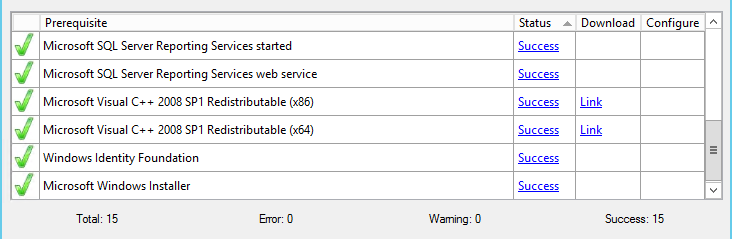
WebServiceWorking.PNG

Everything passed.

A few more screens and I get to the second validation check:

WebServiceNotWorking.PNG

and not the Microsoft SQL Server Reporting Web Service is in error?

I checked the log and it doesn't give me much to work with:


Checking for the existence of the registry key 'HKEY_LOCAL_MACHINE\SOFTWARE\Microsoft\Microsoft Sql Server\MSRS12.@Sharepoint'.
Success
11.0.0.0
@Sharepoint
Check failed.

The key is there:
RegKey.PNG
But I don't know what is actually failing?

*This post is locked for comments

I have the same question (0)
  • Sohaib Cheema Profile Picture
    49,438 User Group Leader on at

    I dont have system in hand, but i can guess that sometimes it tries to read specific version of a pre-requisite that it needs and sometimes you need to modify the values of RegEdit to bypass checks. Things depend upon what version of SQL you have installed and is that supported directly with you AX version or you may need a KB.

    usually the log file of installation has all failure messages.

  • Mike in IT Profile Picture
    40 on at

    Sorry, should have specified that in the question as well.

    I am using SQL 2014:

           Microsoft SQL Server 2014 - 12.0.4100.1 (X64)

           Apr 20 2015 17:29:27

           Copyright (c) Microsoft Corporation

           Enterprise Edition (64-bit) on Windows NT 6.3 <X64> (Build 9600: ) (Hypervisor)

    The error that I receive in the question. There really isn't much information in the error. Just that check failed.

    I compared what is in that key to the same key on my Test server and they match, so I don't know what the problem is that the second validation is not finding.

  • Sohaib Cheema Profile Picture
    49,438 User Group Leader on at

    did you checked the log of the installation where you might find more information inside a text file?

    If you have not changed the log location you can find in user profile.

    docs.microsoft.com/.../change-the-log-location

  • Mike in IT Profile Picture
    40 on at

    Yes, I checked the log, there isn't any information there. I posted the relevant lines in my question. Since I've not finished running the install the link you sent me takes me to an empty folder.

    The log that I am checking is here: C:\Program Files\Microsoft Dynamics AX\60\Setup Logs\2019-04-08 09-41-30

    And as I have already said there isn't anything there that is helpful. If you would like to see what is next it looks like this:

    2019-04-08 14:35:20Z	Checking for the existence of the registry key 'HKEY_LOCAL_MACHINE\SOFTWARE\Microsoft\Microsoft Sql Server\MSRS12.@Sharepoint'.
    2019-04-08 14:35:20Z	Success
    2019-04-08 14:35:20Z	11.0.0.0
    2019-04-08 14:35:20Z	@Sharepoint
    2019-04-08 14:35:20Z	Check failed.
    2019-04-08 14:35:20Z	Resolution: 1. Verify that a supported version of Microsoft SQL Server Reporting Services is installed. For more information about which versions are supported, see the System Requirements at go.microsoft.com/fwlink. 
    
    2019-04-08 14:35:20Z	2. Open your browser and verify that you can access the Reporting Services web service URL http://ServerName:port/ReportServer. 
    
    2019-04-08 14:35:20Z	Note: When you use the standalone prerequisite utility, prerequisite checks are run on the current computer only. If you are checking prerequisites for the business intelligence components of Microsoft Dynamics AX, and Analysis Services and Reporting Services are installed on separate computers, the Reporting Services checks will fail on the Analysis Services computer and vice versa. Make sure that you run the prerequisite utility on each computer to make sure that the appropriate prerequisites pass.
    
    2019-04-08 14:35:20Z	For information about how the prerequisite was validated, click the View log file link. For detailed troubleshooting steps, see the troubleshooting section of the Installation Guide at go.microsoft.com/fwlink.


    After that, it just has "Adding prerequisite" and then lists the prerequisites.

  • Sohaib Cheema Profile Picture
    49,438 User Group Leader on at

    It is hard to say,  since nothing much seems doubtful.

    I can think you SSRS is deployed in Sharepoint mode. Is that the same case for your TEST Server?

    I expect that you can browse two URL(s) 1 for reporting services and other for web services of the reporting, both successfully?

    The URL is compliant is http://YourServerName:port/ReportServer , Default port is 80, which you can make sure in firewall by Telnet

  • Mike in IT Profile Picture
    40 on at

    Yes, I am able to get to both sites. The firewall is turned off so it's not a problem.

    The server I'm working in Dev is a mirror of Test, so yes the SSRS is deployed in SharePoint Mode.

  • Suggested answer
    Mike in IT Profile Picture
    40 on at

    I finally got this figured out. It ended up being user error. On the selection of the DB, I was choosing the ReportServer DB instead of the MSSQLServer DB. When I switched that it installed.

  • Sohaib Cheema Profile Picture
    49,438 User Group Leader on at

    I am happy that you figured out where it is getting wrong. Well done.

Under review

Thank you for your reply! To ensure a great experience for everyone, your content is awaiting approval by our Community Managers. Please check back later.

Helpful resources

Quick Links

Responsible AI policies

As AI tools become more common, we’re introducing a Responsible AI Use…

Neeraj Kumar – Community Spotlight

We are honored to recognize Neeraj Kumar as our Community Spotlight honoree for…

Leaderboard > 🔒一 Microsoft Dynamics AX (Archived)

#1
Martin Dráb Profile Picture

Martin Dráb 4 Most Valuable Professional

#1
Priya_K Profile Picture

Priya_K 4

#3
MyDynamicsNAV Profile Picture

MyDynamicsNAV 2

Last 30 days Overall leaderboard

Featured topics

Product updates

Dynamics 365 release plans



