web
You’re offline. This is a read only version of the page.
close
Skip to main content

Announcements

News and Announcements icon
Community site session details

Community site session details

Session Id :
Microsoft Dynamics AX (Archived)

changing form label on form for reports

(0) ShareShare
ReportReport
Posted on by 495

Ho do I change the labels on this form to say "From Date", "To date", ">Trans Date" insteal od what is higlighted in red? 

Any help would be greatly appreciated... I need to close this project.
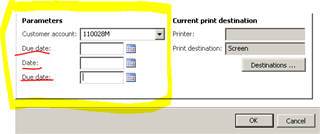
pastedimage1569517672525v1.png

*This post is locked for comments

I have the same question (0)
  • Suggested answer
    nmaenpaa Profile Picture
    101,172 Moderator on at

    The label comes from the Extended data type that you use on the field.

    Just use types FromDate and TransDate and you should be good to go. You can also change the label itself but without knowing how you created this dialog, it's not possible to tell how you need to change your code. Is it possible to get some more information on how you implemented it, and see the code where you define the dialog fields?

  • Lionel07 Profile Picture
    495 on at

    This is my code

    Class declaration:

    [ DataContractAttribute ]
    Class AdtpContract
    {
        CustInvoiceAccountName    invoiceacccount;
        DueDate       fromdate;
        DueDate       todate;
        TransDate     tdate;
    }

    Class method

    [DataMemberAttribute('FromDate')]
    public duedate paramfromdate(DueDate _fromdate = fromdate)
    {
        fromdate = _fromdate;
        return fromdate;
    }

    Similar method are used for the other parameters to be passed. ie. "today", "transaction date" customer account

    Appreciate of you could help.

  • Verified answer
    nmaenpaa Profile Picture
    101,172 Moderator on at

    You can use the SysOperationLabelAttribute: community.dynamics.com/.../ax2012-sysoperation-part-1-data-contracts-and-service-operations

  • Suggested answer
    Pedro Tornich Profile Picture
    955 on at

    Hi Lionel07,

    As mentioned before, just change the fromDate and toDate variable types to FromDate and ToDate EDTs respectively, instead of using DueDate on both.

  • Suggested answer
    Khushhal Garg Profile Picture
    1,514 on at

    Don't use TransDate EDT and just use FromDate and ToDate for these fields or specify labels where you are adding these fields.

  • nmaenpaa Profile Picture
    101,172 Moderator on at

    Hi Lionel07, do you still have some open questions? If not, could you please mark the helpful answer(s) as verified. Thanks!

  • Lionel07 Profile Picture
    495 on at

    Hello Nikilaos,

    I really appreciate your help... For someone who is learning how to programming in morphX this is reallly what he wanted.

    Your suggestion about SysOperationLabelAttribute works perfectly. Thanks again

Under review

Thank you for your reply! To ensure a great experience for everyone, your content is awaiting approval by our Community Managers. Please check back later.

Helpful resources

Quick Links

Season of Sharing Community Challenge Launch!

Jump in, show your community spirit, and win prizes!

Women in Power Builds Momentum

Expanding mentorship, skilling, and AI innovation

Congratulations to the May Top 10 Community Leaders

These are the community rock stars!

Leaderboard > 🔒一 Microsoft Dynamics AX (Archived)

#1
CP04-islander Profile Picture

CP04-islander 10

#2
Harisgillani Profile Picture

Harisgillani 4

#2
dserp Profile Picture

dserp 4

Last 30 days Overall leaderboard

Featured topics

Product updates

Dynamics 365 release plans



