web
You’re offline. This is a read only version of the page.
close
Skip to main content

Notifications

Announcements

No record found.

Community site session details

Community site session details

Session Id :
Service | Customer Service, Contact Center, Fie...
Suggested Answer

Getting a report by Agent

(0) ShareShare
ReportReport
Posted on by 157

Hi there,

I'm trying to get a report for my manager to show how the platform, agents and the report of the conversations said, but seems like there is something really wrong happening.

As a supervisor, I supposed to get all the details of each agent and specify a date range for my reports.

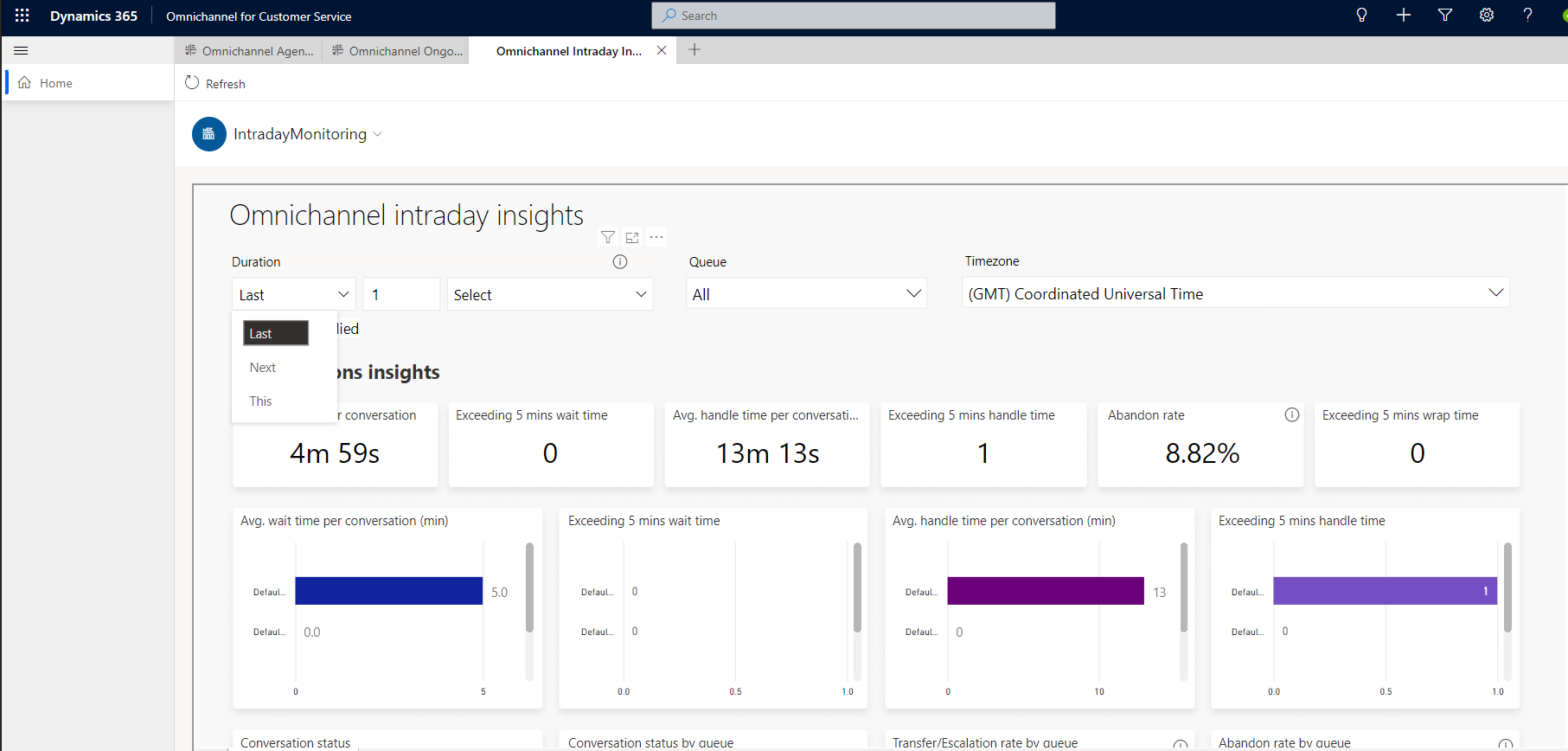
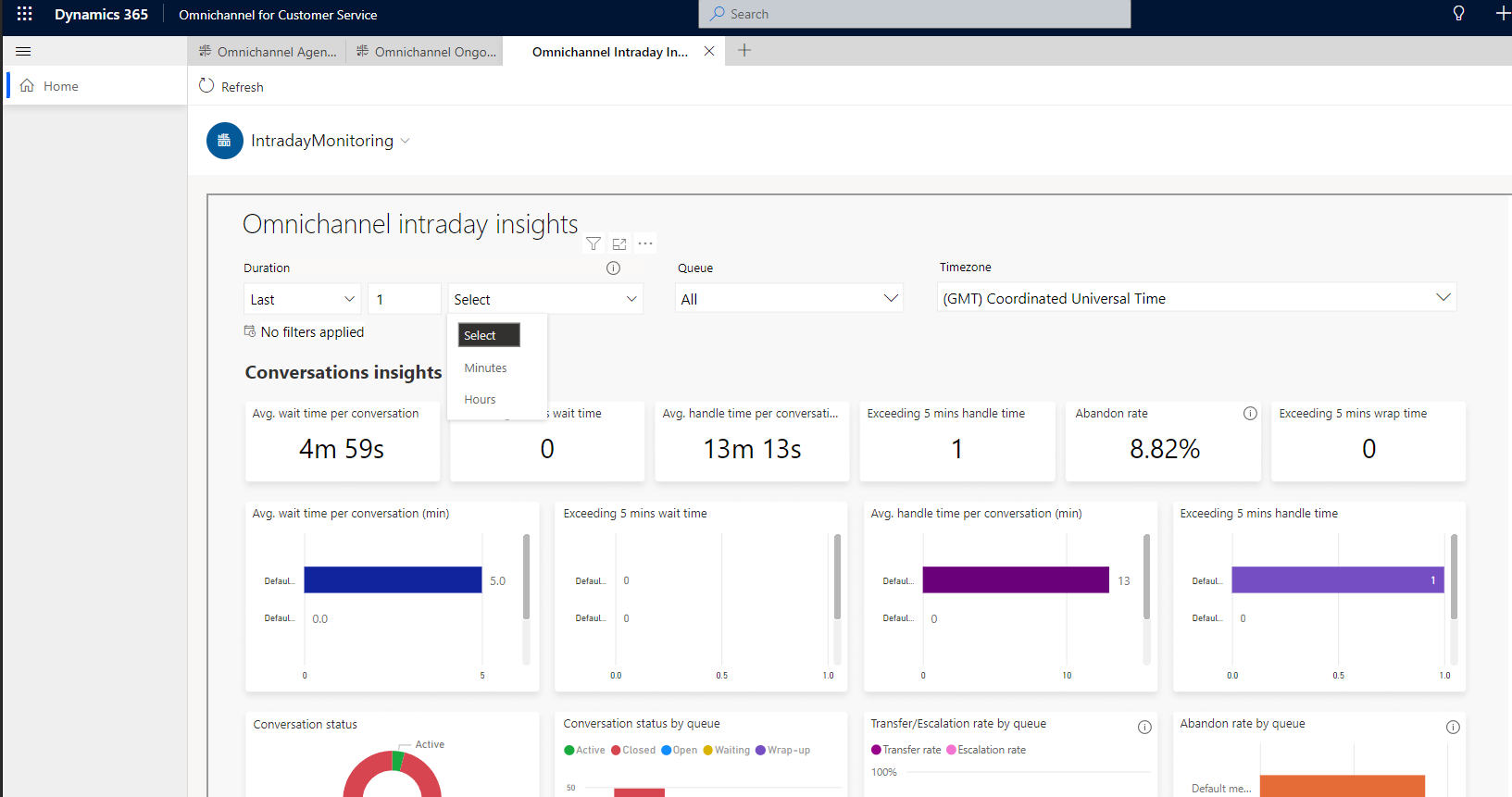
This is what I see when trying to select a range for my reports:
2022_2D00_07_2D00_04-15.02.58-orga5092ec3.crm11.dynamics.com-68c3d8bfdbbe.png

2022_2D00_07_2D00_04-15.03.12-orga5092ec3.crm11.dynamics.com-05f2afc5422a.png

So, what you see here is the dropdowns with the range available.

To be honest, a simple date picker would be great instead.

Could any of the Microsoft Customer Service Devs Team look into this matter please.

Also, reports are kind of all over the place and a bit of CSS to make things looking better would be great as well.

This is not a cheap platform to work with and primary features are missing.

I would like to print my reports as well.

Any help would be great.

Kind regards,

Fernando

I have the same question (0)
  • Suggested answer
    Community Member Profile Picture
    on at

    Hi ffas,

    The screenshot you provided is the insights. If you want to create a report, please follow this doc:

    Create a report using the Report Wizard - Power Apps | Microsoft Docs

  • Suggested answer
    dian74 Profile Picture
    2,477 Most Valuable Professional on at

    If you click on the arrow down next to the report name you'll notice you can change the report you are viewing. There is an 'Agent' report available which you can access.

    pastedimage1657139012527v1.png

    PLEASE MARK AS VERIFIED IF HELPFUL

  • ffas Profile Picture
    157 on at

    My point is, I can just select "minutes" and "hours" and "last", "next" and "this" which doesn't make sense if I want the insights for the whole month.

  • ffas Profile Picture
    157 on at

    Hi Stephen Zhao,

    I can't access the page you pointed out to get a report as it's not a model driven app.

    Also, I can't see any Omnichannel linked app on it.

    Perhaps a how to guide how to do it would be great.

    Cheers.

Under review

Thank you for your reply! To ensure a great experience for everyone, your content is awaiting approval by our Community Managers. Please check back later.

Helpful resources

Quick Links

Responsible AI policies

As AI tools become more common, we’re introducing a Responsible AI Use…

Neeraj Kumar – Community Spotlight

We are honored to recognize Neeraj Kumar as our Community Spotlight honoree for…

Leaderboard > Service | Customer Service, Contact Center, Field Service, Guides

#1
Tom_Gioielli Profile Picture

Tom_Gioielli 61 Super User 2025 Season 2

#2
Siv Sagar Profile Picture

Siv Sagar 52 Super User 2025 Season 2

#3
Daniyal Khaleel Profile Picture

Daniyal Khaleel 31 Most Valuable Professional

Last 30 days Overall leaderboard

Featured topics

Product updates

Dynamics 365 release plans