web
You’re offline. This is a read only version of the page.
close
Skip to main content

Notifications

Announcements

No record found.

Community site session details

Community site session details

Session Id :
Customer experience | Sales, Customer Insights,...
Suggested Answer

MS Flow won't pick up right ''created by'' when creating a new record

(0) ShareShare
ReportReport
Posted on by 5

Hi all,

I was recently required to create a flow that triggers the creation of a new record. (when filling in a field on the opportunity form, upon saving Flow creates this new record which we call CDM).

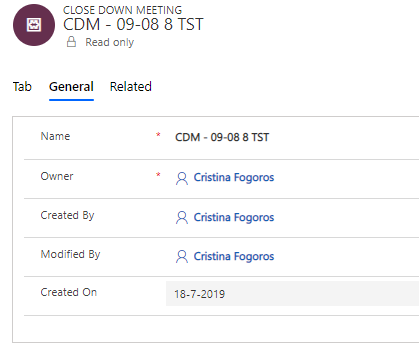
I was expecting, upon creation the field ''created by'' on the newly created form to hold the name of the person who clicked ''save'' on the Opportunity form. However, it is always populated with my name (I am an admin and the owner of the workflow in Flow). 

Basically, all records have me as the owner, me as modified by (until somebody else edits the record) and me as ''Created by''. This is also an issue because nobody sees any record under their view ''My CDMs'' simply cause it appears as it has not been created by them.

Any idea why this might happen? owner I understand, because I own the Flow yet can you please guide me on how I can fix the ''created by'' field to pick up the right user closing the opportunity and therefore creating this new record?
pastedimage1570781368806v1.png

Thanks,

Cristina

I have the same question (0)
  • Suggested answer
    Kipetcoff Profile Picture
    1,037 on at

    I think you have 2 ways. 1 create new record in CRM workfow, in this case enduser will be in Created By field. 2. Reset views to filter by Owner  field for example and copy this field in flow from parent entity during creation.

  • Community Member Profile Picture
    on at

    Hi Andrey,

    Thanks for your reply. Unfortunately the first option won't work because we are trying to streamline all the workflows towards Flow as we slowly want to phase out CRM workflows.

    The second option does not seem to pick up the right value as I already tried. Is it possible that it always picks up me as ''owner'' because I am the owner of the workflow in Flow itself?

    Also if I try to map the field ''owner'' to pick up either ''created by'' or ''modified by'' from the parent entity the workflow gives an error upon triggering and the new record won't be created.

    pastedimage1570791585765v1.png

    This error is being shown when trying to add content in the field ''Owner'' such as created by or modified by

    pastedimage1570792037198v1.png

    The rest of the fields get mapped correctly from the parent entity.

    Thanks,

    Cristina

  • Kipetcoff Profile Picture
    1,037 on at

    As i can see you use CDS connectors. Why don't you try standard Dynamics connection?

  • Suggested answer
    Kipetcoff Profile Picture
    1,037 on at

    Try to set OWNER TYPE

    2019_2D00_10_2D00_11_5F00_15_2D00_16_2D00_05.png

    2019_2D00_10_2D00_11_5F00_15_2D00_16_2D00_11.png

    2019_2D00_10_2D00_11_5F00_15_2D00_15_2D00_41.png

  • CristinaF Profile Picture
    5 on at

    Hi Andrey,

    Thanks for your reply yet I am still encountering issues.

    We were recommended to use CDM so all our Flow workflows run on CDM.

    I tried your suggestion and now my ''owner'' field is populated with a non-interactive user which is used to trigger workflows.

    pastedimage1570799753745v1.png

    pastedimage1570799790901v2.png

  • Suggested answer
    Kipetcoff Profile Picture
    1,037 on at

    You doing something wrong, you need to pass GIUD ID there.

    In my sample have simple CreatedBy. It works for me

    2019_2D00_10_2D00_11_5F00_17_2D00_02_2D00_36.png

    2019_2D00_10_2D00_11_5F00_17_2D00_02_2D00_52.png

  • Community Member Profile Picture
    on at

    Hi Andrey,

    I understand and I followed the same steps, the only difference is I am creating a record and not updating one. However, I do not have ''Created by'' only as the unique ID. I only get these values:

    created-by.PNG

  • Kipetcoff Profile Picture
    1,037 on at

    Can I have a look on the liist of Close Meeting Row entity in CDS? I've just create my custom entity and create a relationship with account and update account owner after CMR creation. Everything works fine.

  • Community Member Profile Picture
    on at

    Hi Andrey,

    Sure. Below please find my Flow workflow in this specific order:

    cdm1.PNG  cdm2.PNG  cdm3.PNG      cdm4.PNG  

    And after generating this new record in the Admin tab of the CDM I get the following results:

    cdm5.PNG

    Thanks,

    Cristina

  • Kipetcoff Profile Picture
    1,037 on at

    As I see everything works fine, isn't it? You update Close Down Meeting owner from Opp Created By.

Under review

Thank you for your reply! To ensure a great experience for everyone, your content is awaiting approval by our Community Managers. Please check back later.

Helpful resources

Quick Links

Responsible AI policies

As AI tools become more common, we’re introducing a Responsible AI Use…

Neeraj Kumar – Community Spotlight

We are honored to recognize Neeraj Kumar as our Community Spotlight honoree for…

Leaderboard > Customer experience | Sales, Customer Insights, CRM

#1
Tom_Gioielli Profile Picture

Tom_Gioielli 137 Super User 2025 Season 2

#2
#ManoVerse Profile Picture

#ManoVerse 57

#3
Jimmy Passeti Profile Picture

Jimmy Passeti 50 Most Valuable Professional

Last 30 days Overall leaderboard

Product updates

Dynamics 365 release plans



