web
You’re offline. This is a read only version of the page.
close
Skip to main content

Announcements

News and Announcements icon
Community site session details

Community site session details

Session Id :
Field Service forum

Not able to set the 'Share Type' to Everyone for 'Initial Public View' for Schedule Board

(0) ShareShare
ReportReport
Posted on by 20

Hi Everyone!

Hope you all are doing well.

My query is here that How can I set the 'Share Type' to "Everyone" of Initial Public View on Schedule Board Setting so that I can see 'Initial Public View' tab on Schedule Board.

By mistakenly I changed the Share Type to System, and for this reason I'm not able to see the Initial Public View tab on the Schedule Board.

I followed as below:

1. Opened Advanced Find

2. Set Look for as 'Schedule Board Setting'

3. Clicked Results

4. Opened Initial Public View record

5. Then Changed the Share Type field value to 'System' from 'Everyone'

6. Saved it

7. Opened Scheduled Board & now 'Initial Public View' tab is hidden

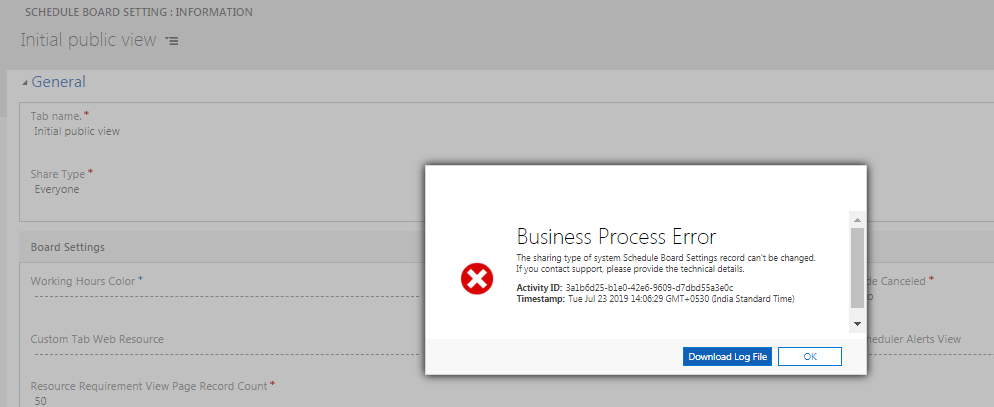
then to see it again on Schedule Board I tried to change the Share Type value from System to Everyone but getting Business Process Error as below;

The sharing type of system Schedule Board Settings record can't be changed.
If you contact support, please provide the technical details.

Activity ID: 3a1b6d25-b1e0-42e6-9609-d7dbd55a3e0c
Timestamp: Tue Jul 23 2019 14:06:29 GMT+0530 (India Standard Time)
pastedimage1563871061381v1.png

I have the same question (0)
  • Suggested answer
    moko33 Profile Picture
    1,788 on at

    Just an idea, don't know if it helps: have you tried updating this via excel import?

  • Sumeet_Satapathy Profile Picture
    20 on at

    No, I did not try importing.

    Let me try & get back here. Thanks Moko.

  • Sumeet_Satapathy Profile Picture
    20 on at

    Hi,

    I tried with importing using excel with value as Everyone, but no luck. Still 'Initial Public View' is hidden.

    Is there any other way to resolve this or this could be a potential bug as I have necessary roles assigned to it.

    Thanks.

  • Suggested answer
    Priyesh Profile Picture
    7,396 User Group Leader on at

    Hi Sumeet,

    Have you have your tries from the User Interface itself?

    I think that's the right way to do it.

    Double click on the Tab and try changing to this
    initialPublicView.png

  • Sumeet_Satapathy Profile Picture
    20 on at

    But the problem is that I’m not able to see this tab as I have hidden it already.

  • Suggested answer
    Priyesh Profile Picture
    7,396 User Group Leader on at

    Hi Sumeet,

    Even I get the same error even thought I'm a Sys Admin. Looks like it has to be done from the UI.

    Can you ask the owner of the record/Sys Admin to do the same?

  • Sumeet_Satapathy Profile Picture
    20 on at

    Even I’m the system admin plus all field service roles. And i tried assigned the record to myself also still same error.

  • Suggested answer
    Priyesh Profile Picture
    7,396 User Group Leader on at

    Are you also the owner of the record?

    If yes and you still can't see it (i.e. it should be visible to you at least).

    Finally, open a ticket with MS.

  • Sumeet_Satapathy Profile Picture
    20 on at

    Yes, I'm the owner now. still no luck. seems it's a bug. What do you say?

  • Priyesh Profile Picture
    7,396 User Group Leader on at

    I think so.

    Also, can you paste a screenshot of what you see on the Schedule Board?

Under review

Thank you for your reply! To ensure a great experience for everyone, your content is awaiting approval by our Community Managers. Please check back later.

Helpful resources

Quick Links

November Spotlight Star - Khushbu Rajvi

Congratulations to a top community star!

Forum Structure Changes Coming on 11/8!

In our never-ending quest to help the Dynamics 365 Community members get answers faster …

Dynamics 365 Community Platform update – Oct 28

Welcome to the next edition of the Community Platform Update. This is a status …

Leaderboard > Field Service

Last 30 days Overall leaderboard

Featured topics

Product updates

Dynamics 365 release plans
