web
You’re offline. This is a read only version of the page.
close
Skip to main content

Notifications

Announcements

No record found.

Community site session details

Community site session details

Session Id :
Microsoft Dynamics AX (Archived)

Insufficient memory to run script

(0) ShareShare
ReportReport
Posted on by

Hi experts,

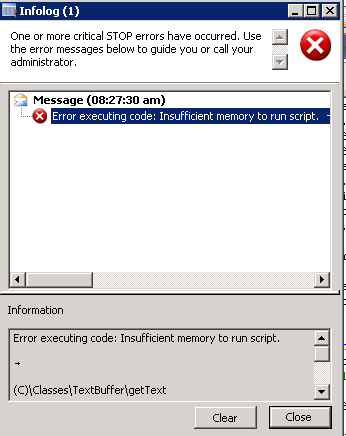
I am trying to create a .txt file from Dynamics ax table using batch class and save it in a FTP.It works fine for limited number of records but when my records are 300000 or something it throws Insufficient memory to run script error.
 

bYTE-ARRAY.png


When i debugged error comes in following line,

bytes   = utf8.GetBytes (Class::getText() );

getText() is where i am writing select statement for selecting all the records from my table.

How can i solve this issue.


*This post is locked for comments

I have the same question (0)
  • Verified answer
    Vilmos Kintera Profile Picture
    46,149 on at

    It is probably a memory allocation issue, I can see you are using TextBuffer.

    Maybe you could try it instead with .NET Reflection using the System.IO.StreamWriter:

    stackoverflow.com/.../how-do-i-write-a-txt-file-using-microsoft-dynamics-ax

  • Community Member Profile Picture
    on at

    TextBuffer i could write the file in much faster way that's why i used that!!Is there any way to solve it using textbuffer!!

  • Suggested answer
    Vilmos Kintera Profile Picture
    46,149 on at

    Without seeing your code on what and how are you doing, I could only suggest to do the writes in smaller chunks. Try to calculate that with how many record rows or string size it is stable, and write your textbuffer to the file in multiple chunks with appending the content at the end.

  • Community Member Profile Picture
    on at

    Thanks Below is my Basic code for FTP Convesion

    void ToFTP()
    {
    System.Object ftpo;
    System.Object ftpResponse;
    System.Net.FtpWebRequest request;
    System.IO.StreamReader reader;
    System.IO.Stream requestStream;
    System.Byte[] bytes,bytes1,bytes2;
    System.Net.NetworkCredential credential;
    System.String xmlContent;
    System.Text.Encoding utf8;
    System.Net.FtpWebResponse response;

    InterOpPermission perm;

    str userName = VendParameters::find().UsernameofFTP;
    str passWord = VendParameters::find().PasswordofFTP;
    ;

    perm = new InterOpPermission(InterOpKind::ClrInterop);
    perm.assert();
    utf8 = System.Text.Encoding::get_UTF8();

    bytes = utf8 .GetBytes (PRS_KOR_CASOVendorPaymentExport::I get the Table Values Method ());

    ftpo = System.Net.WebRequest::Create(VendParameters::find().FTPPath + Filename);
    request = ftpo;

    credential = new System.Net.NetworkCredential(userName, passWord);
    request.set_Credentials(credential);
    request.set_ContentLength(bytes.get_Length());
    request.set_Method("STOR");

    try
    {
    requestStream = request.GetRequestStream();
    requestStream.Write(bytes,0,bytes.get_Length());
    requestStream.Close();

    ftpResponse = request.GetResponse();
    response = ftpResponse;
    CodeAccessPermission::revertAssert();
    }
    Catch
    {
    throw Error("Error in accessing FTP");
    }

    }

  • Vilmos Kintera Profile Picture
    46,149 on at

    The code you have pasted is not using TextBuffer, where you are getting the error. You must modify your "get the table values method" as per the suggestion above, to retrieve it in smaller chunks, and write it out in smaller chunks as well.

  • Community Member Profile Picture
    on at

    bytes = utf8 .GetBytes (PRS_KOR_CASOVendorPaymentExport::I get the Table Values Method ()); 


    this is where i am getting that error..thanks will try to break down the number of data i get and insert..

  • Community Member Profile Picture
    on at

    Hi vilmos,

    I used System.IO.StreamWriter,now its working thanks

  • Vilmos Kintera Profile Picture
    46,149 on at

    No problem, please mark the answer that helped on the right hand side as correct for other people to know, if they face the same issue.

Under review

Thank you for your reply! To ensure a great experience for everyone, your content is awaiting approval by our Community Managers. Please check back later.

Helpful resources

Quick Links

Responsible AI policies

As AI tools become more common, we’re introducing a Responsible AI Use…

Neeraj Kumar – Community Spotlight

We are honored to recognize Neeraj Kumar as our Community Spotlight honoree for…

Leaderboard > 🔒一 Microsoft Dynamics AX (Archived)

#1
Priya_K Profile Picture

Priya_K 4

#1
Martin Dráb Profile Picture

Martin Dráb 4 Most Valuable Professional

#3
Scott_itD Profile Picture

Scott_itD 2 Community Manager

Last 30 days Overall leaderboard

Featured topics

Product updates

Dynamics 365 release plans



