web
You’re offline. This is a read only version of the page.
close
Skip to main content

Notifications

Announcements

No record found.

Community site session details

Community site session details

Session Id :
Finance | Project Operations, Human Resources, ...
Suggested Answer

No active period for the selected date

(0) ShareShare
ReportReport
Posted on by 65

Dear AX users,

I'm working with AX 2012 R3. The company setup for the periods is Monthly currently. We'd like to change to Weekly, but I'm facing a problem.

I've already generated the periods for Weekly:
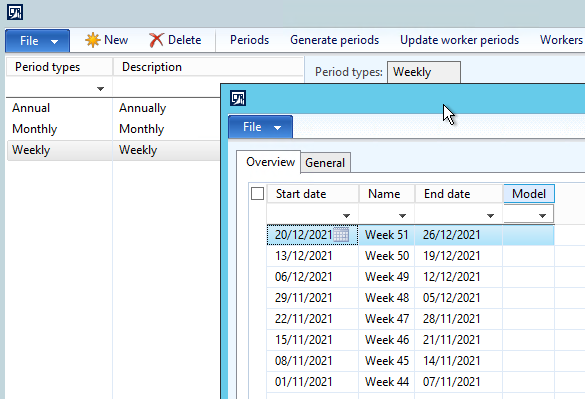
pastedimage1634740504201v1.png

I've also updated the timesheet periods:

pastedimage1634740579652v2.png

and the worker periods: (+ I deleted the monthly periods for the same time of the year)
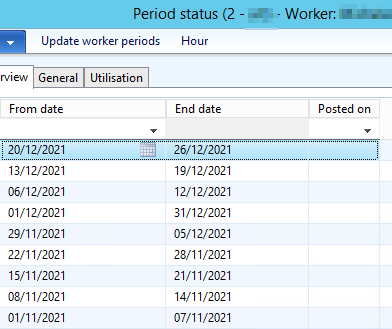
pastedimage1634740720285v3.png

However, when I try creating a timesheet, I'm facing the error : "No active period for the selected date"

pastedimage1634740898247v4.png

Would someone have an idea which parameter is missing?

Thanks in advance for your help!

Best regards,

Nelly

I have the same question (0)
  • Suggested answer
    Ludwig Reinhard Profile Picture
    Microsoft Employee on at

    Hello Nelly,

    Have you updated the timesheet periods that are assigned to your workers?

    Please test creating a 'fresh' and new employee, assign the weekly timesheet period type and see if you can record a timesheet for that one.

    Best regards,

    Ludwig

  • Suggested answer
    André Arnaud de Calavon Profile Picture
    301,075 Super User 2025 Season 2 on at

    HI Nelly,

    As the screenshot with worker periods shows a weekly schedule, I do assume you already updated the timesheet period at the worker settings. You selected Mondays as start of the week, I guess.

    The setup forms looks OK as there is a period starting at November 1. Have you already tried another future date or another worker?

    It might be related to caching of data. In that case you can flush the cache and eventually restart the AOS machines.

  • NellyG Profile Picture
    65 on at

    Hi André,

    Thanks for your answer.

    The IT has flushed the cache and restarted the AOS but it's not working any better afterwards. I still get "No active period for the selected date". And I've tried with another worker, same result.

    Could there be some step that I missed when changing the setup from monthly to weekly?

    I've modified the worker's project setup to Weekly. + deleted the previous Monthly worker period...

    Any other tip ?

    Thanks in advance!

    Best regards

    Nelly

  • Ryan L Profile Picture
    on at

    Hi Nelly,

    It would probably be best to log a ticket with Microsoft to troubleshoot this further.

    Best

Under review

Thank you for your reply! To ensure a great experience for everyone, your content is awaiting approval by our Community Managers. Please check back later.

Helpful resources

Quick Links

Responsible AI policies

As AI tools become more common, we’re introducing a Responsible AI Use…

Neeraj Kumar – Community Spotlight

We are honored to recognize Neeraj Kumar as our Community Spotlight honoree for…

Leaderboard > Finance | Project Operations, Human Resources, AX, GP, SL

#1
Martin Dráb Profile Picture

Martin Dráb 551 Most Valuable Professional

#2
André Arnaud de Calavon Profile Picture

André Arnaud de Cal... 450 Super User 2025 Season 2

#3
BillurSamdancioglu Profile Picture

BillurSamdancioglu 278 Most Valuable Professional

Last 30 days Overall leaderboard

Product updates

Dynamics 365 release plans
