web
You’re offline. This is a read only version of the page.
close
Skip to main content

Notifications

Announcements

No record found.

Community site session details

Community site session details

Session Id :
Customer experience | Sales, Customer Insights,...
Answered

How to Multiply with Currency Column using Power Automate

(0) ShareShare
ReportReport
Posted on by 425

Hi,

I have MS flow, through that I want to update a currency field on change of that field only.

I need to multiply the currency field by 1000000 and then want to update the currency field.

First of all can I do this without any recurring error ??

And how to multiply the currency field with 1000000 any syntax formula??
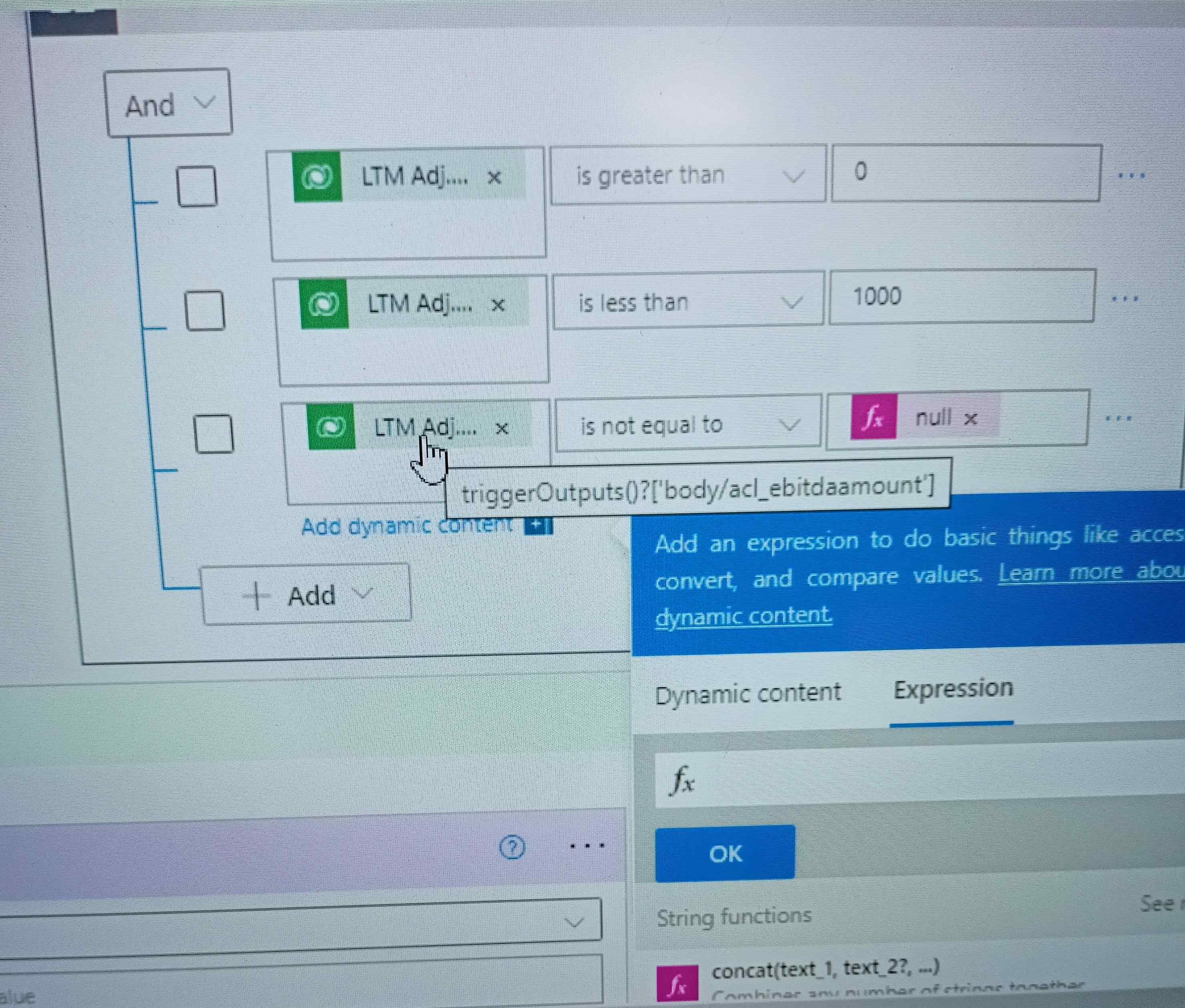
IMG20220817211048.jpg

Like above SS, I have already added few conditions, after these I need to multiply this currency field with 100000 and update the same currency filed in opportunity entity.

And I need to run this ms flow on change of this currency field only.

I have the same question (0)
  • Verified answer
    Community Member Profile Picture
    on at

    Hi Himanshu Kamboj,

    Since you set the condition that the value of Currency field should be less than 1000, so the flow would not have recurring error. The flow would only be triggered twice, first time is when you modify the field. Another is after the first time executed, the flow would be triggered again. However, its value would be greater than 1000.

    Here is the steps(I used the Budget Amount on the Opportunity entity as sample):

    First, create only Modified trigger and type the logical name of your currency field in the Select setting:

    pastedimage1660793058887v1.png

    Then create the same condition as your screenshot:

    pastedimage1660793149054v2.png

    Finally, update the record is ok.

    The expression of the Budget Amount is mul(triggerOutputs()?['body/budgetamount'],1000000)

    Note: Change this logical name ‘budgetamount’ to yours.

    pastedimage1660793194781v3.png

    Result:

    pastedimage1660793315638v4.png

  • Suggested answer
    KK-365 Profile Picture
    1,010 on at

    I agree with Steve answers.

    However, I would recommend you to initialize a floating number variable and then set the calculated value.

    Use this variable to assign on the Currency field.

Under review

Thank you for your reply! To ensure a great experience for everyone, your content is awaiting approval by our Community Managers. Please check back later.

Helpful resources

Quick Links

Responsible AI policies

As AI tools become more common, we’re introducing a Responsible AI Use…

Neeraj Kumar – Community Spotlight

We are honored to recognize Neeraj Kumar as our Community Spotlight honoree for…

Leaderboard > Customer experience | Sales, Customer Insights, CRM

#1
Tom_Gioielli Profile Picture

Tom_Gioielli 73 Super User 2025 Season 2

#2
Gerardo Rentería García Profile Picture

Gerardo Rentería Ga... 43 Most Valuable Professional

#3
Daniyal Khaleel Profile Picture

Daniyal Khaleel 32 Most Valuable Professional

Last 30 days Overall leaderboard

Product updates

Dynamics 365 release plans



