web
You’re offline. This is a read only version of the page.
close
Skip to main content

Notifications

Announcements

No record found.

Community site session details

Community site session details

Session Id :
Microsoft Dynamics AX (Archived)

"Index was outside the bounds of array" error on receipt format designer

(0) ShareShare
ReportReport
Posted on by 6,533 Moderator

Hi,

I got this error message in the middle of designing a receipt. It is not letting me add any new fields to the receipt. I tried deleting the existing fields on receipt to check if there is a limit on the number of fields one can use. It didn't work. Please see the screenshot. 
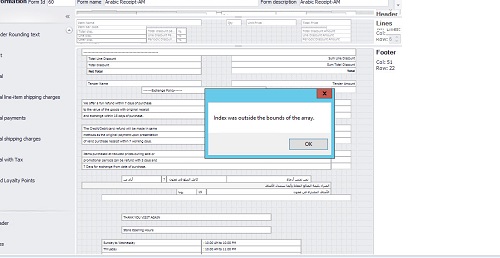
2015_2D00_06_2D00_23_5F00_17_2D00_20_2D00_14.jpg

Environment: AX2012 R2 CU8

*This post is locked for comments

I have the same question (0)
  • Faisal Fareed Profile Picture
    10,796 User Group Leader on at

    hi, What do you mean by designing a receipt, can you explain it more? Is this error coming when you open a form or running a report. You can try restarting you SQL server to see how it goes

  • Shafeeque P. Profile Picture
    6,533 Moderator on at

    The receipt format (AX-->Retail --> Setup--> Receipt Formats) designer inside retail is throwing this error. SQL restart resolved the problem twice. Now it isn't helping.

    Is there any limit on the maximum number of fields one can use in a layout ?

  • Community Member Profile Picture
    on at

    Hi, try to save the receipt format first and add again.

  • Shafeeque P. Profile Picture
    6,533 Moderator on at

    Tried multiple times. It doesn't work

  • Ayush Jain Profile Picture
    120 on at

    No it is not related to number of fields you can have in recipte, but it can be related to length of particular field, please explain at what time it is coming. can you tell the recipt name?

  • Wajahat Mirza Profile Picture
    254 on at

    Hi Shafeeque,

    I am facing the same issue. Were you able to resolve it???

    Regards,

    Wajahat

  • Suggested answer
    Community Member Profile Picture
    on at

    Hi,

    Save the changes. Come out from the receipt designer screen and open it again. it works.

    Sometimes you have to do couple of times. It happens when we try to add more text controls.

    Sridharan J

  • Community Member Profile Picture
    on at

    I have the same issue. any idea[quote user="Shafeeque"]

    Hi,

    I got this error message in the middle of designing a receipt. It is not letting me add any new fields to the receipt. I tried deleting the existing fields on receipt to check if there is a limit on the number of fields one can use. It didn't work. Please see the screenshot. 

    2015_2D00_06_2D00_23_5F00_17_2D00_20_2D00_14.jpg

    Environment: AX2012 R2 CU8

    [/quote] to resolve it???

    Regards,

  • Shafeeque P. Profile Picture
    6,533 Moderator on at

    I couldn't find a permanent solution for the issue. As many people recommended above, I was able to add new fields after multiple attempts. 

  • Community Member Profile Picture
    on at

    i found the reason why this happens this error, the designer has a maximun of 50 elements in each section, so if you try to insert more than 50 gives you the error. This es for the version 2009

Under review

Thank you for your reply! To ensure a great experience for everyone, your content is awaiting approval by our Community Managers. Please check back later.

Helpful resources

Quick Links

Responsible AI policies

As AI tools become more common, we’re introducing a Responsible AI Use…

Neeraj Kumar – Community Spotlight

We are honored to recognize Neeraj Kumar as our Community Spotlight honoree for…

Leaderboard > 🔒一 Microsoft Dynamics AX (Archived)

#1
Priya_K Profile Picture

Priya_K 4

#1
Martin Dráb Profile Picture

Martin Dráb 4 Most Valuable Professional

#3
Scott_itD Profile Picture

Scott_itD 2 Community Manager

Last 30 days Overall leaderboard

Featured topics

Product updates

Dynamics 365 release plans



