web
You’re offline. This is a read only version of the page.
close
Skip to main content

Notifications

Announcements

No record found.

Community site session details

Community site session details

Session Id :
Microsoft Dynamics NAV (Archived)

The Length of string is 46 and it must be less than or equal to 26 characters. ?

(0) ShareShare
ReportReport
Posted on by 172

Hi all,

When is was posting the purchase invoices i am getting the below error. can any one help me to clear this error

The Length of the string is 46, but it must be  less than or equal to 25 characters 
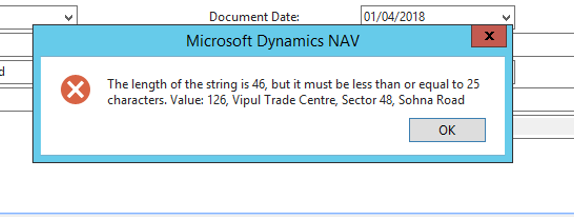
8468.Capture.PNG

Thanks,

Mahesh

*This post is locked for comments

I have the same question (0)
  • Suggested answer
    Paras mehan Profile Picture
    3,518 on at

    Hi Mahesh,

    You should not change the length of the tables without checking other relations. It will might cause system issues on the run.

    To resolve the above issue, you can simply change the length of the variable to 25.

    (If you want to change the table field length, I suggest you to consult your NAV partner)

    6683.1.png

    Best Regards,

    Paras Mehan

  • Suggested answer
    Andrey Baludin Profile Picture
    3,941 on at

    To post this order you have to reduce this value to 25 characters. For example: 126, VTC, S48, Sohna rd

    But for normal work, as Paras said, you need to ask your partner to investigate this issue and increase variable or field length.

  • FA write off process Profile Picture
    172 on at

    Hi Andrey,

    Thanks for you replay, where can change the values mentioned above?.

    Thanks,

    Mahesh

  • Suggested answer
    Paras mehan Profile Picture
    3,518 on at

    In Purchase document you have to find out in which field you have mentioned this address.

  • FA write off process Profile Picture
    172 on at

    Hi Paras Mehan,

    I didn't mentioned the address on purchase invoice. That is my company registered office address and it is showing automatically.

    Thanks,

    Mahesh

  • Suggested answer
    Paras mehan Profile Picture
    3,518 on at

    May be on shipping address it will show.

    Please consult to your NAV Partner. It need some changes from backend.

  • Suggested answer
    Alexander Ermakov Profile Picture
    28,096 on at

    As other members suggested, you most likely have a customization where some fields on the Vendor card table were expanded, but corresponding fields in the posted purchase invoice table were not. Quick solution is to manually decrease the value in this field (just make the text shorter). Better solution is to anyway streamline all the corresponding fields in the posting tables. Also note that when you increase the length of some fields in the card, you might face issues with printforms of the reports, as the layout might suffer.

Under review

Thank you for your reply! To ensure a great experience for everyone, your content is awaiting approval by our Community Managers. Please check back later.

Helpful resources

Quick Links

Responsible AI policies

As AI tools become more common, we’re introducing a Responsible AI Use…

Neeraj Kumar – Community Spotlight

We are honored to recognize Neeraj Kumar as our Community Spotlight honoree for…

Leaderboard > 🔒一 Microsoft Dynamics NAV (Archived)

Last 30 days Overall leaderboard

Featured topics

Product updates

Dynamics 365 release plans
