web
You’re offline. This is a read only version of the page.
close
Skip to main content

Notifications

Announcements

No record found.

Community site session details

Community site session details

Session Id :
Finance | Project Operations, Human Resources, ...
Answered

How to add 2 values in Query range in Query range

(0) ShareShare
ReportReport
Posted on by 668

Hi 

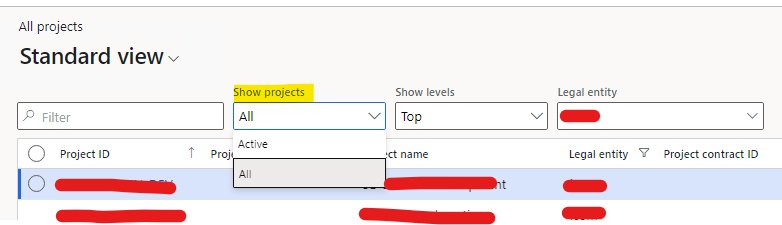
This is a method for filtering finish status records in project table, When Show project is Active - All records will come except finished one. When Show project is All - All projects will come.


public static void applyProjectStateFilter(FormDataSource _formDataSource, int selection)
    {
        QueryBuildRange qbr = SysQuery::findOrCreateRange(_formDataSource.query().dataSourceTable(tableNum(ProjTable)), fieldNum(ProjTable, Status));

        if (ProjProjectsListCustomFilterHelper::checkProjActiveAll(selection))
        {
            qbr.value(SysQuery::valueUnlimited());
        }
        else
        {
            // Active = all non-completed projects
            qbr.value(SysQuery::valueNot(ProjStatus::Completed));
        }

		_formDataSource.executeQuery();
    }
pastedimage1677657875289v1.png

so as per the code, I want to add one more value , so that with Active status-  all records should come except finish and user1 status.

  qbr.value(SysQuery::valueNot(ProjStatus::User1));

public static void applyProjectStateFilter(FormDataSource _formDataSource, int selection)
    {
        QueryBuildRange qbr = SysQuery::findOrCreateRange(_formDataSource.query().dataSourceTable(tableNum(ProjTable)), fieldNum(ProjTable, Status));

        if (ProjProjectsListCustomFilterHelper::checkProjActiveAll(selection))
        {
            qbr.value(SysQuery::valueUnlimited());
        }
        else
        {
            // Active = all non-completed projects
            qbr.value(SysQuery::valueNot(ProjStatus::Completed));
            qbr.value(SysQuery::valueNot(ProjStatus::User1));

            
        }

		_formDataSource.executeQuery();
    }

I have the same question (0)
  • GirishS Profile Picture
    27,827 Moderator on at

    Hi D365FO Avatar,

    You have already written code for adding range.

    You can write COC for the class method applyProjectStateFilter and add the same code after next call. On the else part you can add Completed and User1 as a range. After adding check whether its working for your scenario.

    Thanks,

    Girish S.

  • Martin Dráb Profile Picture
    237,817 Most Valuable Professional on at

    Let's focus on this part:

    qbr.value(SysQuery::valueNot(ProjStatus::Completed));
    qbr.value(SysQuery::valueNot(ProjStatus::User1));

    Your second line overwrites the value set by the first line, therefore the first line has no effect at all. You can add two ranges for the same field, each with its own value. Or use a single range with comma-separated values.

  • D365FO Avatar Profile Picture
    668 on at

    Yes, I have added this code, which overwrite the first one. If I try to do like this -

    qbr.value(strFmt('((Status != "%1") && (Status != "%2"))',

               queryValue(ProjStatus::Completed),

               queryValue(ProjStatus::User1)));

    Than also it is not working as in form projProjectsListPage, method queryFiltersChanged the value is not matching and it is only showing ALL.

     protected internal void queryFiltersChanged()
        {
            #define.companyId(1)
            #define.isSelected(2)
    
            super();
    
            Query savedQuery = projTable_ds.queryRun().query();
            QueryBuildDataSource qbdsProject = savedQuery.dataSourceTable(tableNum(ProjTable));
            QueryBuildRange qbrStatus = qbdsProject.findRange(fieldNum(ProjTable, Status));
            if (qbrStatus)
            {
                if (qbrStatus.enabled() && qbrStatus.value() == SysQuery::valueNot(ProjStatus::Completed))
                {
                    CtrlActiveAll.selection(enum2int(ProjActiveAll::Active));
                }
                else
                {
                    CtrlActiveAll.selection(enum2int(ProjActiveAll::All));
                }
            }

  • Martin Dráb Profile Picture
    237,817 Most Valuable Professional on at

    I recommend those two solutions I suggested. Your approach is error-prone, as you found.

    Of course that queryFiltersChanged() won't work correctly if you change the value to something that it doesn't expect. You'll need either need to change this logic too, or re-consider your approach.

  • D365FO Avatar Profile Picture
    668 on at

    As you suggested -

    "You can add two ranges for the same field, each with its own value. Or use a single range with comma-separated values."

    For your first suggestion, If I do so than will it not only let the last one ?

    For second suggestion, I have use single range with comma separated value like below-

    qbr.value(strFmt('((Status != "%1") && (Status != "%2"))',

              queryValue(ProjStatus::Completed),

              queryValue(ProjStatus::User1)));

    Could you please help me to get it more better

  • Verified answer
    Martin Dráb Profile Picture
    237,817 Most Valuable Professional on at

    If you add two ranges for the field, both ranges are applied (with OR condition). For example:

    qbds.addRange(fieldNum(ProjTable, Status)).value(queryValue(ProjStatus::Completed));
    qbds.addRange(fieldNum(ProjTable, Status)).value(queryValue(ProjStatus::User1));

    Regarding your code, it's a completely different thing. You're trying to build a SQL expression, not using two values separated with comma.

  • Suggested answer
    Mohit Rampal Profile Picture
    12,565 Moderator on at

    Hi, As Martin mentioned you need AND in the query not OR.

    Check out this article.

    https://wp.me/p8Z27u-U

    Also, you can debug the code and find the query being generated from your code either by passing into a string variable or using info(query.toString()).

  • Suggested answer
    D365FO Avatar Profile Picture
    668 on at

    I have implemented this by using this below line.

    qbr.value(SysQuery::valueNot(ProjStatus::Completed) + ',' + SysQuery::valueNot(ProjStatus::User1));

    Thanks Martin , for your support.

Under review

Thank you for your reply! To ensure a great experience for everyone, your content is awaiting approval by our Community Managers. Please check back later.

Helpful resources

Quick Links

Responsible AI policies

As AI tools become more common, we’re introducing a Responsible AI Use…

Neeraj Kumar – Community Spotlight

We are honored to recognize Neeraj Kumar as our Community Spotlight honoree for…

Leaderboard > Finance | Project Operations, Human Resources, AX, GP, SL

#1
Martin Dráb Profile Picture

Martin Dráb 660 Most Valuable Professional

#2
André Arnaud de Calavon Profile Picture

André Arnaud de Cal... 512 Super User 2025 Season 2

#3
Sohaib Cheema Profile Picture

Sohaib Cheema 291 User Group Leader

Last 30 days Overall leaderboard

Product updates

Dynamics 365 release plans



