web
You’re offline. This is a read only version of the page.
close
Skip to main content
Community site session details

Community site session details

Session Id :
Microsoft Dynamics AX (Archived)

Getting error while installing Report server extension

(0) ShareShare
ReportReport
Posted on by

Hi All,

Getting the below error while installing the Reporting services extension in SQL server, we have installed AX in one server and SQL in another server, to configure/insatll SSRS reporting we are installing Reporting services extension and getting the below error :
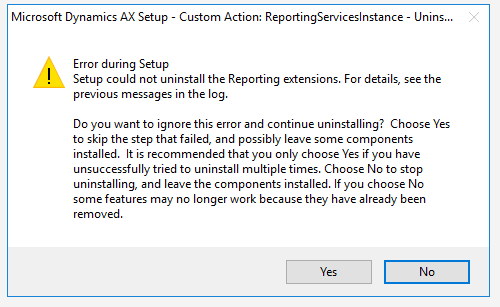
Reporting_5F00_services_5F00_extension_5F00_error.png

Please advise us how to proceed with this.

Regards,

Akbar

*This post is locked for comments

I have the same question (0)
  • Jie G Profile Picture
    on at
    RE: Getting error while installing Report server extension

    Hi Akbar,

    You need to install and configure Reporting services for SQL on machine where you want to install Reporting Extension of AX/AOS.
    SQL reporting services are prerequisites for AX reporting extension.
    Please refer https://docs.microsoft.com/en-us/dynamicsax-2012/appuser-itpro/install-reporting-services-extensions-for-microsoft-dynamics-ax for a complete checklist.

    If it still cannot be resolved, would you please paste the previous messages in the log here?

  • Akbarpasha Profile Picture
    on at
    RE: Getting error while installing Report server extension

    Hi Ada,

    We have installed Reporting services in SQL server , there is no error while validating the Reporting services extension from the setup file, below is the log file error :

    We have checked the path mentioned in the log file, some of he folders are missing.

    Do we need to re-install Reporting services or any other option to proceed.

    Please advise us.

    Log_5F00_file_5F00_error.png

    Regards,

    Akbar

  • Jie G Profile Picture
    on at
    RE: Getting error while installing Report server extension

    Hi Akbar,

    If you are installing AX2012 R3 reporting extensions with SQL 2016, try KB3184496: fix.lcs.dynamics.com/.../Details

  • Verified answer
    Hassan_rulz Profile Picture
    3,801 on at
    RE: Getting error while installing Report server extension

    You need to install AX Reporting extensions on SQL Server Reporting services.

    On which server you are installing reporting extensions AX or SQL?

  • Suggested answer
    nmaenpaa Profile Picture
    101,160 Moderator on at
    RE: Getting error while installing Report server extension

    After SSRS installation you need to run Reporting Services Configuration Manager to finalize the installation.

  • Akbarpasha Profile Picture
    on at
    RE: Getting error while installing Report server extension

    Hi Hassan/Nikolaos,

    We are trying to install Reporting services extension on SQL server 2016 (AX2012 R3), we have already installed SSRS reporting services on SQL server, and we have configured the Reporting manager configuration on SQL server, while trying to install Reporting services extension getting that error ,

    Does t required any kind of service packs to be applied on SQL server as suggested by Ada.

    Please advise to proced.

    Regards,

    Akbar

  • Akbarpasha Profile Picture
    on at
    RE: Getting error while installing Report server extension

    Hi Ada,

    I try to follow the link ( fix.lcs.dynamics.com/.../Details) provided by you  to download the hot fix, but it showing as "This hot fix no longer available".

    Is there any other option to proceed in this case. Please let us know.

    Regards,

    Akbar

  • Verified answer
    Jie G Profile Picture
    on at
    RE: Getting error while installing Report server extension

    Hi Akbar,

    According to https://blogs.technet.microsoft.com/dynamicsaxse/2016/08/02/announcing-support-for-office-2016-and-sql-server-2016-with-ax-2012-r3-and-r2/, SQL Server 2016 is supported with cumulative update 9 for AX 2012 R3 with hotfix KB 3184496.
    But it is always recommended that we should use the latest CU. So what's the version of your AX 2012 R3? According to the AX 2012 System Requirement, the following table lists the supported versions of SQL Server for the Microsoft Dynamics AX databases:
    72811.1.PNG
  • Akbarpasha Profile Picture
    on at
    RE: Getting error while installing Report server extension

    Thanks Ada,

    Our Ax version is AX2012 R3 , Application version : 6.3.2000.326 and it is Cumulative Update 9 , so which hot fix i need to download in SQL server , Please advise.

  • Verified answer
    nmaenpaa Profile Picture
    101,160 Moderator on at
    RE: Getting error while installing Report server extension

    AX2012 R3 CU9 is not compatible with SQL Server 2016 as you can see from the system requirements. You need minimum CU11 and the kb mentioned in AX system requirements.

    If you have SQL Server 2016 SP 1 you need AX2012 R3 CU12 or higher.

Under review

Thank you for your reply! To ensure a great experience for everyone, your content is awaiting approval by our Community Managers. Please check back later.

Helpful resources

Quick Links

Responsible AI policies

As AI tools become more common, we’re introducing a Responsible AI Use…

Neeraj Kumar – Community Spotlight

We are honored to recognize Neeraj Kumar as our Community Spotlight honoree for…

Leaderboard > 🔒一 Microsoft Dynamics AX (Archived)

#1
Priya_K Profile Picture

Priya_K 4

#2
Alexey Lekanov Profile Picture

Alexey Lekanov 3

#3
Scott_itD Profile Picture

Scott_itD 2 Community Manager

Last 30 days Overall leaderboard

Featured topics

Product updates

Dynamics 365 release plans
