web
You’re offline. This is a read only version of the page.
close
Skip to main content

Notifications

Announcements

No record found.

Community site session details

Community site session details

Session Id :
Microsoft Dynamics AX (Archived)

Warehouse management of Ax 2012, Error of during making outbound transportation Planning

(0) ShareShare
ReportReport
Posted on by

Hi All Gems,

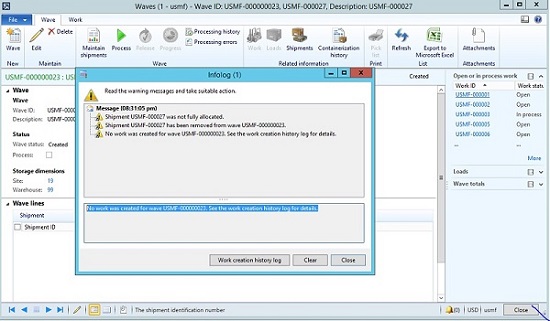
Have a Nice Day! In warehouse management of  Microsoft Dynamics AX 2012 R3. When i created wave Id and got infolog. Message was

Shipment USMF-000027 was not fully allocated

Shipment USMF-00027 has been removed from wave USMF-000000023

No work was created for wave USMF-000023.

Please experts of AX 2012 R3.please suggest me which step i have missed and what will be good step for resolve this mention Issue..:(
*This post is locked for comments

I have the same question (0)
  • André Arnaud de Calavon Profile Picture
    300,911 Super User 2025 Season 2 on at

    Hi Kundan,

    First I would like to note that I have changed the tags you used. please don't use names of community members. That will be of no help.

    I will try to provide you some insights, but as I will enjoy some days off, I don't use a test environment to really check the error.

    Please check if the goods are reserved or that you have the correct parameters to have the goods reserved. This might be the problem.

  • André Arnaud de Calavon Profile Picture
    300,911 Super User 2025 Season 2 on at

    Please note you can find a Warehouse management implementation guide using this link: www.microsoft.com/.../details.aspx

  • Community Member Profile Picture
    on at

    Thank you Andre sir for reply.

  • Verified answer
    Jefry Then Profile Picture
    1,982 on at

    I'm no expert but maybe can be a help.

    Check your location directive pick work type. See whether your edit query in location directive actions fast tab specify to specific location. If yes, make sure you are point to location which on-hand is there.

  • Suggested answer
    Community Member Profile Picture
    on at

    Hi,

    In my case the solution for the same warning infolog looks as follow:

    1. In 'Warehouse Management -> Setup -> Location directives' I had setup several interesting me 'Location directives'

    2. Unfortunately i have forgotten about seting up also at least one Sequence under 'Lines' fast tab and one (generic) sequence under 'Location Directive Actions' fast tab by clicking 'New' button.

    All intresting information about the issue may be also found in
    Microsoft Dynamics AX 2012 R3 - Outbound transportation planning and execution document.

    Sorry guys for all misspellings but I hope for some of you, it might be an additional problem solution.

Under review

Thank you for your reply! To ensure a great experience for everyone, your content is awaiting approval by our Community Managers. Please check back later.

Helpful resources

Quick Links

Responsible AI policies

As AI tools become more common, we’re introducing a Responsible AI Use…

Neeraj Kumar – Community Spotlight

We are honored to recognize Neeraj Kumar as our Community Spotlight honoree for…

Leaderboard > 🔒一 Microsoft Dynamics AX (Archived)

#1
Martin Dráb Profile Picture

Martin Dráb 4 Most Valuable Professional

#1
Priya_K Profile Picture

Priya_K 4

#3
MyDynamicsNAV Profile Picture

MyDynamicsNAV 2

Last 30 days Overall leaderboard

Featured topics

Product updates

Dynamics 365 release plans



