web
You’re offline. This is a read only version of the page.
close
Skip to main content

Notifications

Announcements

No record found.

Community site session details

Community site session details

Session Id :
Microsoft Dynamics AX (Archived)

Error "The transactions on voucher XXXX do not balance as per <date>" while posting vendor payment journals.

(0) ShareShare
ReportReport
Posted on by 3,006

Hi all,

While posting vendor payment journals getting error "The transactions on voucher XXXX do not balance as per <date>" .

This journal is related to bank payment transfer.

While validating journal getting message "journal is ok".

I found some journal lines with Bank account didn't have posting profile account. will it cause the error?
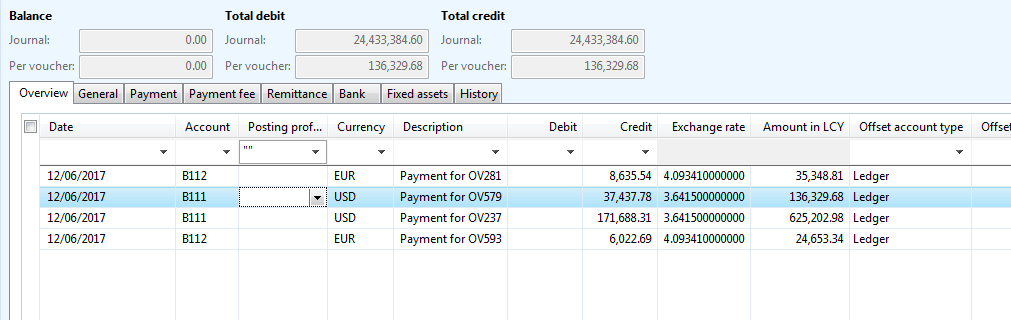
VoucherNotBalance_5F00_VPJournal.PNG

*This post is locked for comments

I have the same question (0)
  • Suggested answer
    Ludwig Reinhard Profile Picture
    Microsoft Employee on at

    Hi Krishna,

    Can you check if a default posting profile has been specified in the AP parameters form?

    If this is not the case then I suspect that this is the underlying reason why you can't identify it in your journal lines.

    Have you tried entering the posting profile manually and posted the journal already?

    Best regards,

    Ludwig

  • krishna.rao@dax Profile Picture
    3,006 on at

    Hi Ludwig,

    Default posting profile has been setup in AP Parameters.

    1) System by default take automatically posting profile from AP Parameters in all Vendor payment journals?

    2)Can I enter the posting profile which mentioned in AP parameters manually and do posting?

    VoucherNotBalance_5F00_APParameters.PNG

  • Verified answer
    Ludwig Reinhard Profile Picture
    Microsoft Employee on at

    Hi Krishna,

    For 1)

    Yes, the journal lines that you create should have the posting profile from the AP parameters automatically filled. If this is not the case, then I would expect that a system modification has been made.

    Can you test what happens if you create a new journal line? Does the Profile automatically default?

    If it does not, please clarify with the system admins as this might either be the result of a system modification or related to a bug.

    For 2) I would try to do that. If you are unsure, test it first in a demo environment.

    Best regards,

    Ludwig

  • krishna.rao@dax Profile Picture
    3,006 on at

    manually entered posting profile and did posting. still the same error coming

  • Suggested answer
    Ludwig Reinhard Profile Picture
    Microsoft Employee on at

    Hi Krishna,

    What you can check out in addition is whether a summary account is setup in the posting profile?

    If this is the case, can you double check that each journal line has a ledger account / bank account specified as the offset account? I can't identify this from your screenprint.

    Best regards,

    Ludwig

  • krishna.rao@dax Profile Picture
    3,006 on at

    I have checked that too.each vendor is assigned with group & all the groups assigned to posting profile
    with summary accounts.
    while validating journal it's showing "journal is ok". Journal has multiple lines with different vouchers

    VoucherNotBalance_5F00_sampleErrorMessage.PNG

    Is there way to figure out which voucher causing the error by error message

    VoucherNotBalance_5F00_sampleErrorMessage.PNG

  • Suggested answer
    Ludwig Reinhard Profile Picture
    Microsoft Employee on at

    Hi Krishna,

    You could make use of the post and transfer posting option.

    All vouchers that are ok will be posted and every 'defective/incomplete' ones will be transferred to a new journal.

    Best regards,

    Ludwig

  • Suggested answer
    Vamsi Pranith Profile Picture
    682 on at

    I do not see debit entries balancing your credit entries and your offset account seems to be blank. Have you tried entering the offset account for each line and post them?

  • Vamsi Pranith Profile Picture
    682 on at

    Do you have the exchange rate gain or loss accounts specified under your ledger setup? Also can you verify if you have configured your settlement penny difference in Accounts Payable parameters and also the penny difference account in Accounts for Automatic posting under General Ledger. Most probably there could be a penny difference during the settlement and hence you may be running into that issue.

  • Suggested answer
    Muthusamy Profile Picture
    4 on at

    Hi Krishna,

    Check all the journal lines whether currency is mapped or not.

    In Debit side, if you are booking the project cost? then check the Sales currency field in Project tab.

    In each line, just edit the account and amount fields (debit/credit). then try to post  the journal. Sometimes, it will refresh the journal data.

    Thanks,

Under review

Thank you for your reply! To ensure a great experience for everyone, your content is awaiting approval by our Community Managers. Please check back later.

Helpful resources

Quick Links

Responsible AI policies

As AI tools become more common, we’re introducing a Responsible AI Use…

Neeraj Kumar – Community Spotlight

We are honored to recognize Neeraj Kumar as our Community Spotlight honoree for…

Leaderboard > 🔒一 Microsoft Dynamics AX (Archived)

#1
Martin Dráb Profile Picture

Martin Dráb 4 Most Valuable Professional

#1
Priya_K Profile Picture

Priya_K 4

#3
MyDynamicsNAV Profile Picture

MyDynamicsNAV 2

Last 30 days Overall leaderboard

Featured topics

Product updates

Dynamics 365 release plans



