web
You’re offline. This is a read only version of the page.
close
Skip to main content

Notifications

Announcements

No record found.

Community site session details

Community site session details

Session Id :
Microsoft Dynamics AX (Archived)

RunBaseForm (query) Value

(0) ShareShare
ReportReport
Posted on by 275

Hi All,

I have used AX standard Tutorial_RunbaseForm as inspiration.

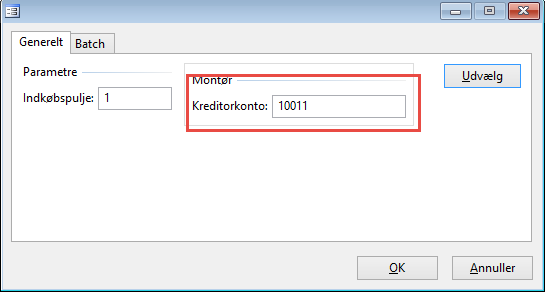
But i can't retrive the query value, can anybody help. I don't really understand the logic behind Tutorial_RunbaseForm (class and form).
7242.1.png

*This post is locked for comments

I have the same question (0)
  • Suggested answer
    Denis Macchinetti Profile Picture
    16,444 on at

    Hi

    Can you clarify better ?

    Through the method "initQuery" you are able to check the query initialization.

    If you want to retrieve a field range value, you have to use the findOrCreateRange Static method of the SysQuery Class.

    Take a look at msdn.microsoft.com/.../sysquery.findorcreaterange.aspx

  • Ashein Profile Picture
    275 on at

    I am trying to get the value from the red frame. But i don't know how. I don't understand where the field is stored in the Tutorial_runbaseform (class)

  • Denis Macchinetti Profile Picture
    16,444 on at

    Hi Ashein

    Please, move here the code that you write in order to retrieve the range value

  • Verified answer
    Martin Dráb Profile Picture
    237,976 Most Valuable Professional on at

    First of all, note that extracting filter values is quite unusual. You usually simply run the query and process what it returns. If you have to extract the range, you may have designed something incorrectly. Maybe you need a dialog field instead of a query range…

    Anyway, there should be a variable called queryRun or so. If you followed the usual approach, you would simply iterate the query (queryRun.next(), queryRun.get()) and you wouldn't have to dig into its definition. If you really want it, you have to get the query definition, find your datasource and then the individual range. For example:

    Query query = queryRun.query();
    QueryBuildDataSource ds = query.dataSourceTable(tableNum(YourTable));
    QueryBuildRange range = ds.findRange(fieldNum(YourTable, YourField));
    
    if (range)
    {
        range.value(); // Here you go
    }

    But it can actually be quite complex. There may be more then one range, the value can contain several IDs ("10110,10111") and wildcards ("10*") and so on. Therefore it's usually useful only for query execution, which you could have done on the beginning. :)

  • Ashein Profile Picture
    275 on at

    I don't know where the class i getting its range values. I tried debugging it, but it never goes through my initQuery. the only thing i my mainMethod is:

      SerRunBaseEmplPurch   serRunBaseEmplPurch = SerRunBaseEmplPurch::construct();

       if (serRunBaseEmplPurch.prompt())

           serRunBaseE

  • Ashein Profile Picture
    275 on at

    serRunBaseEmplPurch.run(); (last sentence)

  • Ashein Profile Picture
    275 on at

    But my class is'nt using a query ? that's the part of the class i don't understand. It should use one to get the query search form ?

  • Martin Dráb Profile Picture
    237,976 Most Valuable Professional on at

    You want to add your business logic (whatever it is) into the run() method. It's explained in RunBase Framework on MSDN, for example.

  • Ashein Profile Picture
    275 on at

    Ok, But it worked, Thanks.

  • Martin Dráb Profile Picture
    237,976 Most Valuable Professional on at

    If your class isn't using a query, why did you create this thread "RunBaseForm (query) Value", why did you ask how to "retrieve the query value", why do you have initQuery() method in your class, why does your dialog have a button for selecting query ranges?

    It seems to me that is a query...

Under review

Thank you for your reply! To ensure a great experience for everyone, your content is awaiting approval by our Community Managers. Please check back later.

Helpful resources

Quick Links

Responsible AI policies

As AI tools become more common, we’re introducing a Responsible AI Use…

Neeraj Kumar – Community Spotlight

We are honored to recognize Neeraj Kumar as our Community Spotlight honoree for…

Leaderboard > 🔒一 Microsoft Dynamics AX (Archived)

#1
Martin Dráb Profile Picture

Martin Dráb 4 Most Valuable Professional

#1
Priya_K Profile Picture

Priya_K 4

#3
MyDynamicsNAV Profile Picture

MyDynamicsNAV 2

Last 30 days Overall leaderboard

Featured topics

Product updates

Dynamics 365 release plans



