web
You’re offline. This is a read only version of the page.
close
Skip to main content

Announcements

No record found.

News and Announcements icon
Community site session details

Community site session details

Session Id :
Finance | Project Operations, Human Resources, ...
Suggested Answer

New feature to create a periodic vendor payment proposal -> Process automation in accounts payable

(0) ShareShare
ReportReport
Posted on by

Hi,
We are moving into PU-35, 10.0.11 and we enabled an interesting new feature (in CRP environment), vendor payment proposal automation. The setup was successfully but the payment journal was never been created.

Scenario:
Monday at 10: Canadian vendor payment proposal is created
Tuesday at 10 : US vendor payment proposal is created
Wednesday at 10: Europe payment proposal is created.
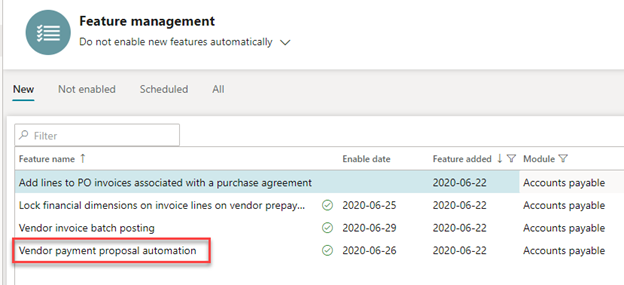
pastedimage1593480966742v1.png

I've configured the Process automation
Path: Accounts payable > Payment setup > Process automation

pastedimage1593481057714v2.png

Select the entity

pastedimage1593481078467v3.png

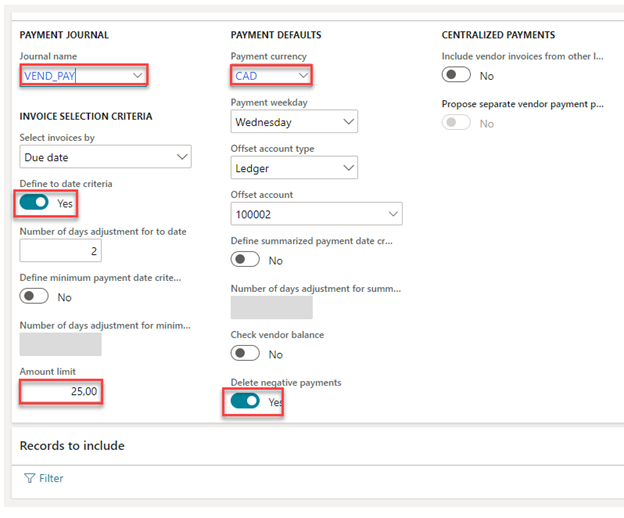
Same criteria as a regular payment proposal

pastedimage1593481099082v4.png

pastedimage1593481106676v5.png

Click on Finish
The record is created (similar to a batch)
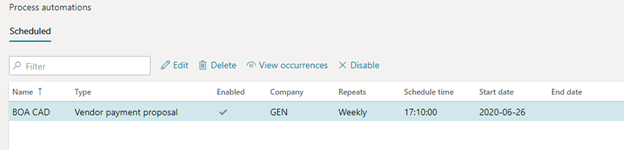
pastedimage1593481123810v6.png

Display the occurrence

pastedimage1593481147576v7.png

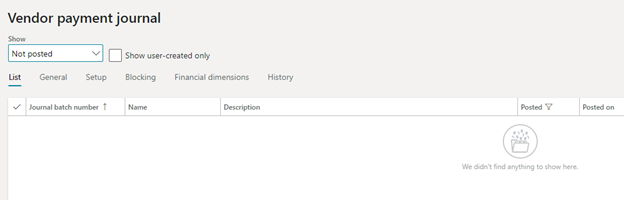
Display the payment journal for approvals then Post

AP > Payments > Vendor payment journal
pastedimage1593481190328v8.png

After many tries, the journal was never been created

Thank you !

Kamel.

  • Suggested answer
    Ludwig Reinhard Profile Picture
    Microsoft Employee on at

    Hi Kamel,

    Is the batch running that creates the proposals?

    Also, can you check whether removing the limit of 25.00 helps overcoming the problem?

    Best regards,

    Ludwig

  • Suggested answer
    saurabh bharti Profile Picture
    15,059 Moderator on at

    Hi Kamel,

    Did you check the batch job:

    Sys Admin > Batch job inquiry, you should have following job scheduled, if not then check "Batch group" are selected for job run or not

    pastedimage1593501614367v2.png

    Once this executes status will be :

    pastedimage1593501591020v1.png

    Once it gets executed , it shows the status accordingly, in my case it was error:

    pastedimage1593501677926v3.png

    but if all fine it will execute

  • Ranie Profile Picture
    5 on at

    Did you resolve this? I also enable new feature Vendor payment proposal but It doesn't work. I checked batch job  Vendor payment proposal automation and It did not run.

  • Suggested answer
    saurabh bharti Profile Picture
    15,059 Moderator on at
  • Suggested answer
    Community Member Profile Picture
    on at

    Hi Kamel,

    I had the same issue.

    I found out this batch job "Process automation background processes system job" status was 'withhold'

    Once I've changed it into waiting, executed and ended.

    I can see automation payment journal status has changed from scheduled into executing.

    pastedimage1605055387659v3.png

    Best Regards,

    David Santoso

Under review

Thank you for your reply! To ensure a great experience for everyone, your content is awaiting approval by our Community Managers. Please check back later.

Helpful resources

Quick Links

Season of Sharing Community Challenge Winners!

Congratulations to our community stars!

Women in Power Builds Momentum

Expanding mentorship, skilling, and AI innovation

Congratulations to the August Top 10 Community Leaders

These are the community rock stars!

Leaderboard > Finance | Project Operations, Human Resources, AX, GP, SL

#1
Martin Dráb Profile Picture

Martin Dráb 528 Most Valuable Professional

#2
André Arnaud de Calavon Profile Picture

André Arnaud de Cal... 455 Super User 2026 Season 2

#3
CU10121822-0 Profile Picture

CU10121822-0 376

Last 30 days Overall leaderboard

Product updates

Dynamics 365 release plans