web
You’re offline. This is a read only version of the page.
close
Skip to main content

Notifications

Announcements

No record found.

Community site session details

Community site session details

Session Id :
Customer experience | Sales, Customer Insights,...
Answered

Ribbon Workbench value rule on grid only work if column is on grid

(0) ShareShare
ReportReport
Posted on by 40

Hello,

I am trying to enable/display a smart button on the main gird (view)  of a table (entity).

I want it to be enabled if the selected row has certain criteria met.

I found that when using the value rule in the ribbon workbench this only works if the grid (view) has all the columns (fields) in the condition.

I tried to use a custom enable rule using the following code but it will not return the true value back to ribbon workbench to enable the button
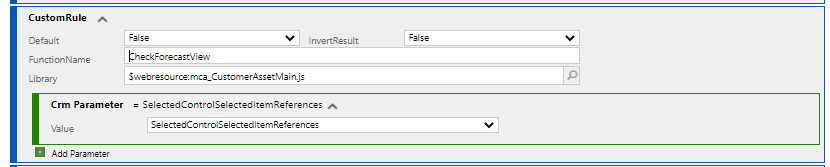

pastedimage1645714410235v1.png

pastedimage1645714448834v2.png

CheckForecastView: function (selectedItems) {
  var gridContext = selectedItems[0].Id;
  var retVal = false;
  Xrm.WebApi.retrieveRecord("msdyn_customerasset", gridContext, "?$select=a, b, c").then(
  function success(result) {
    var a = result.a;
    var b = result.b;
    var c = result.c;
    if(a !== 809700000 && b !== 1 && (c === "SA" || c === "SA13")) {
      retVal = true;
    }
    else {
      retVal = false;
    }
  return retVal;
  });
},

I have the same question (0)
  • Verified answer
    Bipin D365 Profile Picture
    28,983 Moderator on at

    Hi,

    Your code is working but it is not returning the correct result because XRM.WebApi.retrieveRecord executes as async process. You will need to use promise to evaluate the ribbon rule. Please see below blog -

    debajmecrm.com/.../

    Please mark my answer verified if this is helpful!

    Regards,

    Bipin Kumar

    Follow my Blog: xrmdynamicscrm.wordpress.com/

  • anavrin Profile Picture
    40 on at

    Bipin,

    This worked.

    Thank you very much!

    Regards,

    Patrick Nielsen

Under review

Thank you for your reply! To ensure a great experience for everyone, your content is awaiting approval by our Community Managers. Please check back later.

Helpful resources

Quick Links

Responsible AI policies

As AI tools become more common, we’re introducing a Responsible AI Use…

Neeraj Kumar – Community Spotlight

We are honored to recognize Neeraj Kumar as our Community Spotlight honoree for…

Leaderboard > Customer experience | Sales, Customer Insights, CRM

#1
Tom_Gioielli Profile Picture

Tom_Gioielli 146 Super User 2025 Season 2

#2
#ManoVerse Profile Picture

#ManoVerse 59

#3
Gerardo Rentería García Profile Picture

Gerardo Rentería Ga... 52 Most Valuable Professional

Last 30 days Overall leaderboard

Product updates

Dynamics 365 release plans



