web
You’re offline. This is a read only version of the page.
close
Skip to main content

Notifications

Announcements

No record found.

Community site session details

Community site session details

Session Id :
Microsoft Dynamics AX (Archived)

New field not shown in report dataset

(0) ShareShare
ReportReport
Posted on by

Hi all,

i want to customize the CustVendPaymProposal report. My goal is to add a Field to the RDP Table.

Here are my steps i have done so far:

1. On Table "CustVendPaymProposal": Add Field "DocumentNum" ==> EDT: DocumentNum

2. On Class "CustVendPaymProposalController" (Method: "insertCustVendPaymProposalTmp"): 

Add the line: "custVendPaymProposalTmp.DocumentNum = LedgerJournalTable.DocumentNum;"

3. Switch to Visual Studio and open the SSRS Report

4. Expand Datasets => Right click on "CustVendPaymProposalDS" => Refresh

And now there is my problem, the Field "DocumentNum" isn't here after the refresh.

- I didn't change the query: "Select * from ..."

- I also checked the design of the Table "CustVendPaymProposal" in SQL Server, where the field is added too.

- I noticed that if i open the report in VS i got this message: " : message AX1053: The model file was saved with an old version of the Dynamics AX Reporting Tools. Saving the file will also update its version to the current version."

I added some Screenshots here:
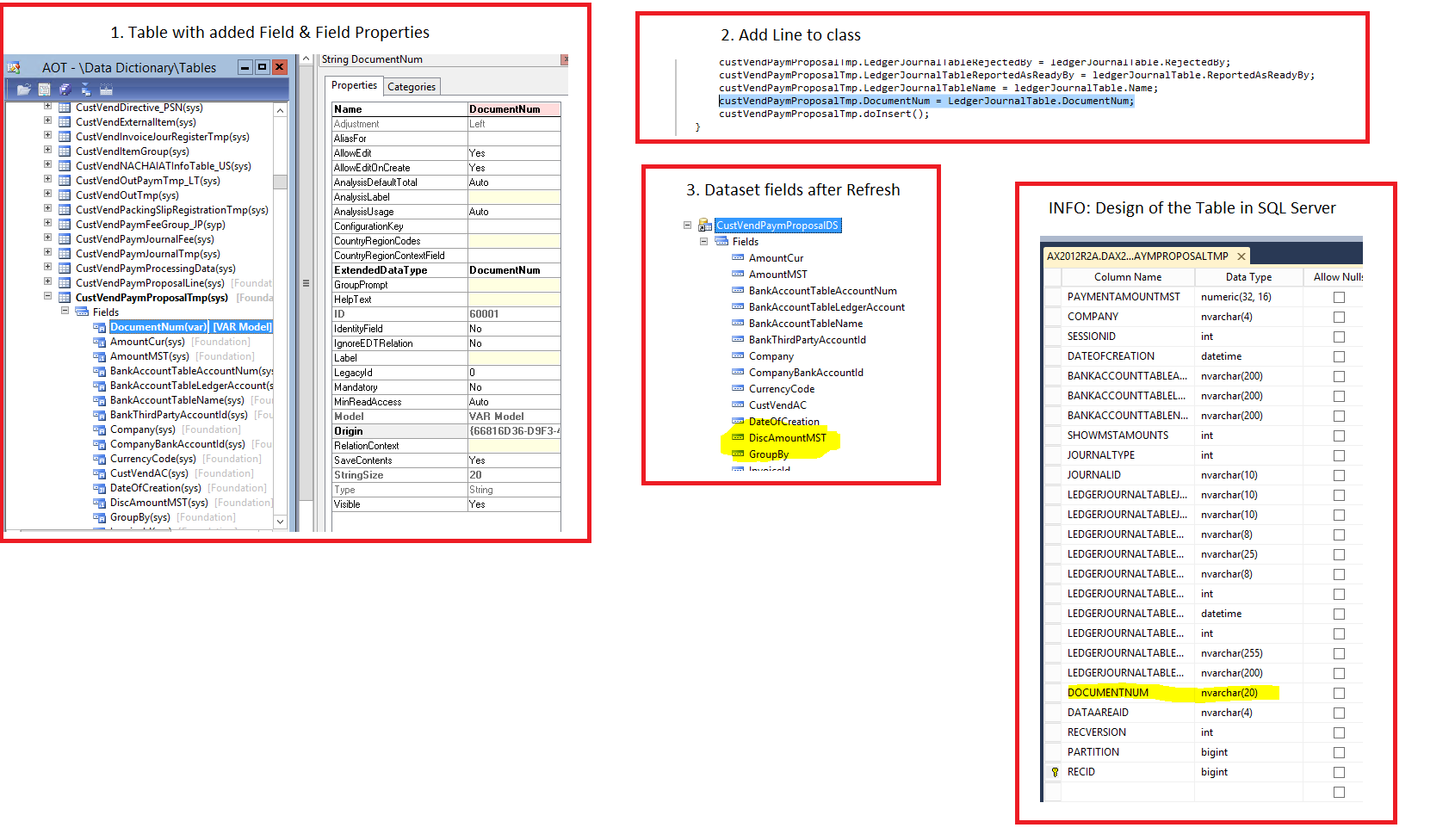
0636.screen.png

What i am missing? 

Thanks for every help!

*This post is locked for comments

I have the same question (0)
  • Suggested answer
    Zain Bokhari Profile Picture
    3,208 Moderator on at

    Hello James,

    Did you run an incremental CIL after this?

  • Community Member Profile Picture
    on at

    Hi Zain,

    yes i do. I tried also a Full CIL.

  • Suggested answer
    Community Member Profile Picture
    on at

    Hi,

       Please find below screenshot, you need to write code as shown in screenshot.

    8512.Cust.JPG

    Then only you will able to see the DocumentNum  in visual studio.

    And you should add your DocumentNum  field in CustVendPaymProposalTmp because the report dataset get the fields from CustVendPaymProposalTmp.

    You missed to add field in CustVendPaymProposalTmp.

    Thanks

    Suersh

  • Suggested answer
    Community Member Profile Picture
    on at

    Hi,

        Incremental CIL/Full CIL is different and report dataset refresh is different!

    Thanks

    Suresh

  • Suggested answer
    Zain Bokhari Profile Picture
    3,208 Moderator on at

    Hi James,

    I don't think there was anything that you missed. The steps you followed all seem correct. Please try to restart reporting services and AOS as well. Then try to refresh the dataset in VS and deploy your report.

    Suresh is right these are two different things but last time strangely the CIL alone resolved this for  me.

    Thanks.

  • Community Member Profile Picture
    on at

    Hi Zain,

    i tried also to restart the SSRS service and AOS and nothing has happend.

    Best regards

    James

  • Suggested answer
    Community Member Profile Picture
    on at

    Hi,

        Just delete your report from report server and deploy again in AOT. then you open visual studio, you will able to see that DocumentNum.

    Thanks

    Suresh

  • Community Member Profile Picture
    on at

    Hi Suresh,

    thanks for your help. I deleted the report and deployed it without any change. I also tried a Refresh in VS after that procedure.

  • Suggested answer
    Community Member Profile Picture
    on at

    Hi,

         Better to Restart,

         1. AOS

         2.SQL server reporting services

         3.Clear report server cache

    Thanks

    Suresh

  • Verified answer
    Community Member Profile Picture
    on at

    Thanks all for your help.

    But the solution of the problem was, to add the field also to a query namend "CustVendPaymProposal" and not only to the table.

    Best regards

    James

Under review

Thank you for your reply! To ensure a great experience for everyone, your content is awaiting approval by our Community Managers. Please check back later.

Helpful resources

Quick Links

Responsible AI policies

As AI tools become more common, we’re introducing a Responsible AI Use…

Neeraj Kumar – Community Spotlight

We are honored to recognize Neeraj Kumar as our Community Spotlight honoree for…

Leaderboard > 🔒一 Microsoft Dynamics AX (Archived)

#1
Martin Dráb Profile Picture

Martin Dráb 4 Most Valuable Professional

#1
Priya_K Profile Picture

Priya_K 4

#3
MyDynamicsNAV Profile Picture

MyDynamicsNAV 2

Last 30 days Overall leaderboard

Featured topics

Product updates

Dynamics 365 release plans
