web
You’re offline. This is a read only version of the page.
close
Skip to main content

Notifications

Announcements

No record found.

Community site session details

Community site session details

Session Id :
Customer experience | Sales, Customer Insights,...
Answered

Easiest way to customize Quote Clos dialog ("Create a Revised Quote")

(0) ShareShare
ReportReport
Posted on by 659

Hi,

as there is a "Revise" and a "Create Order" Button on the Quote entity.

pastedimage1582709814288v1.png

The only reasonable default for the "Close Quote" Button would be to close the quote as lost.

Unfortunately the defaults are this for the dialog:
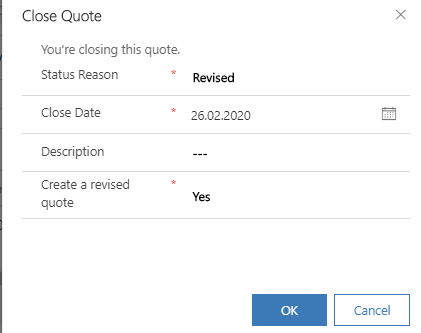
pastedimage1582709857622v2.png

This is very questionable and just makes you think noone at Microsoft actually uses their own product.

What is the easiest way to change the default to another option set value and the "Create a revised quote" to "No"? 

I've looked into old tpoics (2011, 2013, 2015, ..) and it seems the only way is to create a new dialog?

Is there a better way available now?

This must be a joke. 

Thanks.

I have the same question (0)
  • Verified answer
    a33ik Profile Picture
    84,331 Most Valuable Professional on at

    Hello,

    Unfortunately that's not a joke. At the moment it's possible to customize only Close Opportunity and Close Case dialogs.

  • FLombardo Profile Picture
    15 on at

    Hello,

    Same request here. The default value Yes on "Create a revised quote" is creating a lot of problems to people while closing offers.

    Any news on that?

    Regards

Under review

Thank you for your reply! To ensure a great experience for everyone, your content is awaiting approval by our Community Managers. Please check back later.

Helpful resources

Quick Links

Responsible AI policies

As AI tools become more common, we’re introducing a Responsible AI Use…

Neeraj Kumar – Community Spotlight

We are honored to recognize Neeraj Kumar as our Community Spotlight honoree for…

Leaderboard > Customer experience | Sales, Customer Insights, CRM

#1
Tom_Gioielli Profile Picture

Tom_Gioielli 170 Super User 2025 Season 2

#2
#ManoVerse Profile Picture

#ManoVerse 70

#3
Jimmy Passeti Profile Picture

Jimmy Passeti 50 Most Valuable Professional

Last 30 days Overall leaderboard

Product updates

Dynamics 365 release plans



