web
You’re offline. This is a read only version of the page.
close
Skip to main content

Notifications

Announcements

No record found.

Community site session details

Community site session details

Session Id :
Microsoft Dynamics AX (Archived)

Field based security privilege

(0) ShareShare
ReportReport
Posted on by

Hello everybody ,

I am working on  D365O update 3, and trying to set up a field based security privilege,  the concerned form is CustTrans(Customer Transactions), First i used the standard MS privilege CustTransMaintain to test so i created a security role (TestRole) and assigned to it the two privileges (CustTableView) and (CustTransMaintain).

The user i used to test has only standard system user and TestRole assigned, when i press edit on a customer transaction i can modify some fields and some others not. 

The requierement is to remove the ability to update some of the updatable fields . 
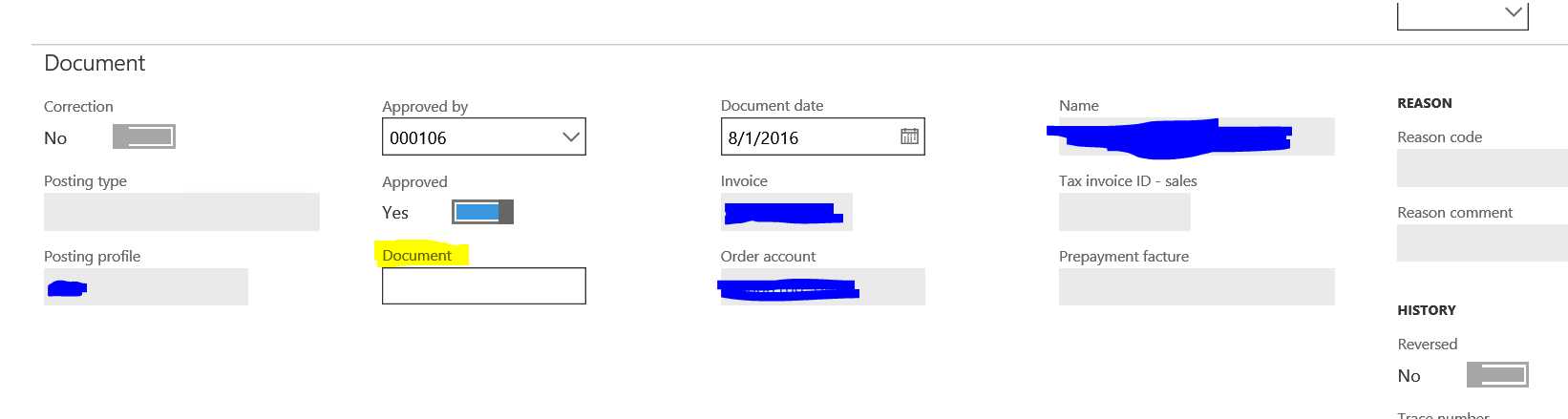
1881.Unbenannt.PNG

Lets take the Document field(CustTransTable_DocumentNum) for example, in order the achieve that and based on the this MSDN documentation for AX 2012. i just customized the CustTransMaintain privilege as the following:

Effictive acces on CustTrans Entry point from delete to update:

Direct access permission created for Table CustTrans with EffictiveAccess set to update and under it added the field DocumentNum with EffictiveAccess to read.

Unbenannt2.PNG

I restarted all the server due to data cash conflicting possibility, but i still can modity the field.

Play on AllowEdit value for me is not an option.

Thank you for your time.

*This post is locked for comments

I have the same question (0)
  • Suggested answer
    André Arnaud de Calavon Profile Picture
    301,037 Super User 2025 Season 2 on at

    Hi Haythem,

    Can you indicate if you did make changes in the Dynamics UI or in Visual Studio? At least it would be recommended to copy the standard privilege and then make your changes.

    If you used the Security Configuration form, note that you should publish the changes.

    If you used Visual Studio, then make sure you synchronize the database. During this task, the security metadata is synchronized.

  • Community Member Profile Picture
    on at

    Hi André,

    I am using visual studio in a local VM with a local system, and yes i sync the md with the data base for every test.

    Kind regards,

    Haythem.

  • André Arnaud de Calavon Profile Picture
    301,037 Super User 2025 Season 2 on at

    Hi Haythem,

    Can you make a summary which duties and/or privileges are used and modified or not? You stated the user has only the new test role and the system user role. If you used multiple privileges on a role which do have both access rights on the table(s), you have to change all of them or try to implement the table permissions on role level as this will override privilege permissions.

  • Community Member Profile Picture
    on at

    Hello André,

    Sorry for this late response, so after a lot of tests i finally decided to cut all doubts to simply create my own form and with just a 3 fields just like in MSDN doc https://msdn.microsoft.com/en-us/library/hh272122.aspx 
    So i created the following objects :

    2746.ADMIN.PNG

    The Table FieldBasedTable contains 3 fields(READ/UPDATE/DENY)

    5670.Table.PNG

    The i created a test role called Field Based rRole in which i added only the single provilege FieldBasedPrivilege as following :
    8304.MI.PNGREAD.PNG1460.UPDATE.PNGDENY.PNG

    Assigned the role to a user who has only system user and Field based Role assigned to him :

    8132.ROLE.PNG

    What i see with sys admin role : 

    2746.ADMIN.PNG

    I am able to change and see all three fields(Which is normal)

    But if login with the other user with the based field role assigned :

    5460.TST.PNG

    As you can see i am still able to edit the value of the READ field which is not working as the msdn blog explains.

    I hope the issue is clear now.

    Thank you !

  • André Arnaud de Calavon Profile Picture
    301,037 Super User 2025 Season 2 on at

    The process seems to be OK. Having security as permissions on the fields. Ccan you review from the security configuration form is really all security has been synchronized correctly? Did you perform database synchronization after building the solution?

    You are still on platform update 3? Or did you update this in the meantime?

  • Community Member Profile Picture
    on at

    Hello Andre thank you for your fast reply,

    Yes i do sync after every change. l am running the last update 10.

    Seccfg.PNG

    Am i missing something?

  • Community Member Profile Picture
    on at

    Hello again, i am still not able to solve this issue, should i raise a ticket to Microsoft? Do you thing it's a bug?
    Thank you!

  • André Arnaud de Calavon Profile Picture
    301,037 Super User 2025 Season 2 on at

    Hi Haythem,

    From what I have seen, you did it correctly. So I would suggest to create a support ticket to Microsoft. Please keep this post updated once you know more. I was not able (yet) to reproduce this.

  • Sakar Profile Picture
    on at

    Hi!

    Did you manage to solve the problem?

    Kind regards

    Sakar Osman

Under review

Thank you for your reply! To ensure a great experience for everyone, your content is awaiting approval by our Community Managers. Please check back later.

Helpful resources

Quick Links

Responsible AI policies

As AI tools become more common, we’re introducing a Responsible AI Use…

Neeraj Kumar – Community Spotlight

We are honored to recognize Neeraj Kumar as our Community Spotlight honoree for…

Leaderboard > 🔒一 Microsoft Dynamics AX (Archived)

#1
Martin Dráb Profile Picture

Martin Dráb 4 Most Valuable Professional

#1
Priya_K Profile Picture

Priya_K 4

#3
MyDynamicsNAV Profile Picture

MyDynamicsNAV 2

Last 30 days Overall leaderboard

Featured topics

Product updates

Dynamics 365 release plans
