web
You’re offline. This is a read only version of the page.
close
Skip to main content

Notifications

Announcements

No record found.

Community site session details

Community site session details

Session Id :
Microsoft Dynamics CRM (Archived)

Run Workflow under Marketing List to send out emails

(0) ShareShare
ReportReport
Posted on by

As Dynamics CRM doesn't support the embedded image, I come to use Workflow(Process) to send out emails. I can select several records under Contact Entity View and Run Workflow to send out emails without any problems.

Now I want to send emails to all Members under a Marketing List.
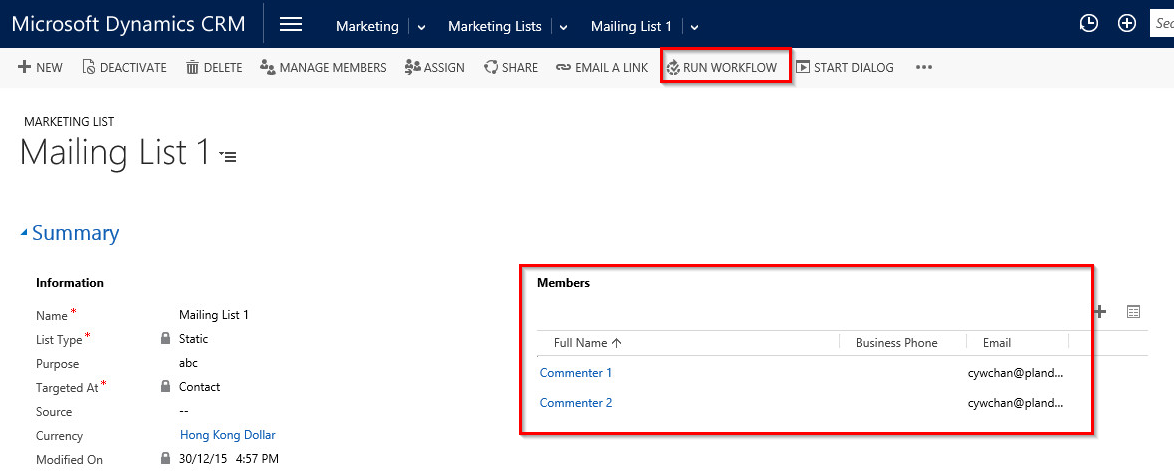
Run-Workflow-under-Marketing-List-to-send-out-emails.png

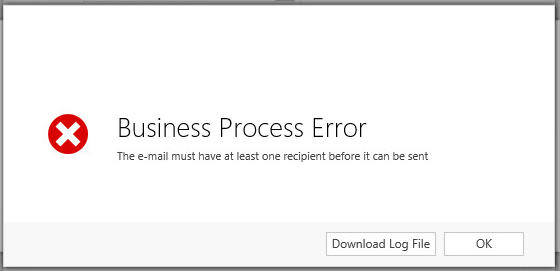
But for this time, I did it with no luck and an error message of Business Process Error prompted. Business-Process-Error.png
Can anyone please advise how I perform it? Many thanks in advance.

*This post is locked for comments

I have the same question (0)
  • Suggested answer
    Community Member Profile Picture
    on at

    This error states that you have added a member without an email address in the marketing list. However you can use quick campaign feature of CRM to send out emails to a marketing list.

  • Community Member Profile Picture
    on at

    Hi Vikas, thank you for your reply. My clarifications are as follows:

    1. All members already have the email addresses (Please refer to the previous captured screen). I found that when running Workflow(Process) it gets the email variable from the "Marketing List" rather than the embedded "Members" list. However, I could not find the email variable under the drop-down menu of dynamic values when preparing "Send Mail" (refer to the screen below).  Is there anything I should do to enable it?  

    Workflow-via-Marketing-List.png

    2. Quick Campaign can use the either options of Email Template or Direct Email to send emails. However, both options do not support embedded image. Hence, the only way to send emails with embedded image is Workflow(Process)+Send Email. I have read other posts that someone suggested to place the image in Internet website and include its hyperlink in email as a workaround solution. But we could not adopt this approach as we don't have a dedicate website. 

  • Verified answer
    Community Member Profile Picture
    on at

    Hi Chris,

    I assume you are running the workflow on the Marketinglist entity. But I doubt you can send email to all members of the marketinglist using an OOB workflow alone.

    What you can do is to create a custom workflow which reads the members of the marketing list and then add to the to list of the email in your workflow.

    You create an OOB workflow for marketinglist, and add a step to create a record of type email. After this step, call the custom workflow and pass the marketing list id and email as parameter. The custom workflow will add the to list to the email. After the custom workflow step, you can call the send email. Hope this will work for you.

  • Community Member Profile Picture
    on at

    Thanks Ratheesh, I am going to try your suggested solution.

    BTW, what do you mean "to create a record of type email"?

  • Community Member Profile Picture
    on at

    In the out of the box workflow, like send email, you also have a step for create record.So the first step in your workflow will be to Create Record. Select Email as the entity and then set the properties. Leave the To list blank. To list has to be populated using the custom workflow activity. Once the to list is populated, you can call the send email step.

    Create-Email.PNG

Thank you for your reply! To ensure a great experience for everyone, your content is awaiting approval by our Community Managers. Please check back later.

Helpful resources

Quick Links

Responsible AI policies

As AI tools become more common, we’re introducing a Responsible AI Use…

Neeraj Kumar – Community Spotlight

We are honored to recognize Neeraj Kumar as our Community Spotlight honoree for…

Leaderboard > 🔒一 Microsoft Dynamics CRM (Archived)

#1
SA-08121319-0 Profile Picture

SA-08121319-0 4

#1
Calum MacFarlane Profile Picture

Calum MacFarlane 4

#3
Alex Fun Wei Jie Profile Picture

Alex Fun Wei Jie 2

Last 30 days Overall leaderboard

Featured topics

Product updates

Dynamics 365 release plans



