web
You’re offline. This is a read only version of the page.
close
Skip to main content

Announcements

No record found.

News and Announcements icon
Community site session details

Community site session details

Session Id :
Finance | Project Operations, Human Resources, ...
Suggested Answer

multiple records select in grid (not manual) through code in AX 2009

(0) ShareShare
ReportReport
Posted on by 56

hi All,

AX 2009

In ledger settlement form, when user select multiple records MANUALLY and clicked on Include button then as per standard functionality those line appeared in BELOW GRID as below
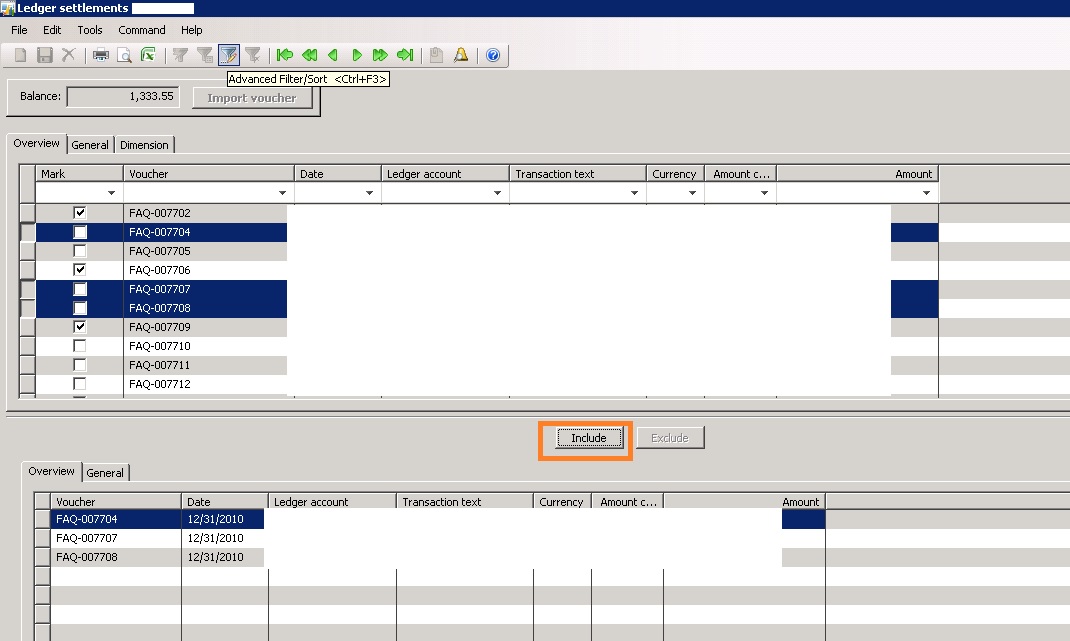
5126.a1.jpg

But user wants this process to AUTOMATE. So, i have added MARK check box in Ledger Trans table and marked the voucher based on excel template. That i have done through Import  voucher button clicked. Which voucher is matched with excel that voucher get mark = YES. It's working fine.

But when i clicked on INCLUDE button it's only insert SINGLE VOUCHER (FAQ-007702) in BELOW GRID as below. I expect to get voucher FAQ-007702, FAQ-007706, FAQ-007709
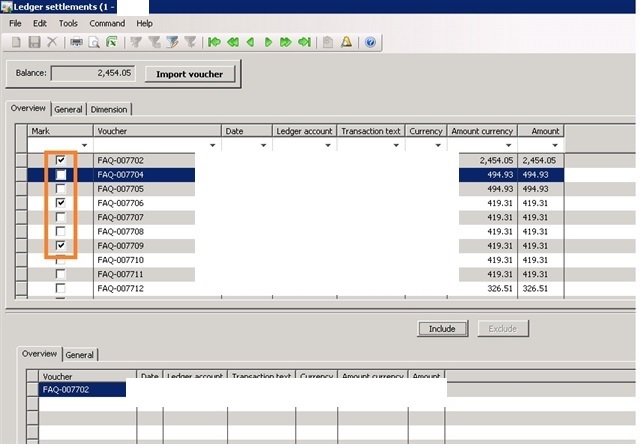
8551.a3.jpg

CODE : Include button > Clicked method >

void clicked()
{
    LedgerTrans ledgerTransLocal;
    ;
    
    ttsbegin;
    ledgerTransLocal.recordLevelSecurity(true);
    for (ledgerTransLocal = ledgerTrans_ds.getFirst(true) ? ledgerTrans_ds.getFirst(true) : ledgerTrans;
         ledgerTransLocal;
         ledgerTransLocal = ledgerTrans_ds.getNext())
    {
        element.includeTrans(ledgerTransLocal);
    }
    ttscommit;

    tmpLedgerTrans_ds.research();
    ledgerTrans_ds.next();
}


IncludeTrans() --

void includeTrans(LedgerTrans   _ledgerTrans)
{
    ;
    if (!mapTrans2TmpTrans.exists(_ledgerTrans.RecId))
    {
        tmpLedgerTrans.data(_ledgerTrans);
        tmpLedgerTrans.doInsert();

        mapTrans2TmpTrans.insert(_ledgerTrans.RecId,    tmpLedgerTrans.RecId);
        mapTmpTrans2Trans.insert(tmpLedgerTrans.RecId,  _ledgerTrans.RecId);

        balanceAmountMST  = _ledgerTrans.AmountMST;
    }
}

Kindly let me know how will achieve this ?

Please give me more shed on this.

I have the same question (0)
  • Suggested answer
    Gunjan Bhattachayya Profile Picture
    35,423 on at

    Hi Arpan,

    You can replace the for block in your code \with this and see if that works for you -

    ledgerTransLocal = ledgerTrans_ds.getFirst(1);
        
    while (ledgerTransLocal)
    {
        element.includeTrans(ledgerTransLocal);
        ledgerTransLocal = ledgerTrans_ds.getNext();
    }


    Another option would be to use MultiSelectionHelper class. But I am not sure if it is available in AX 2009. You can check this post for an example of the same.

  • @rp@n Profile Picture
    56 on at

    Thanks Gunjan,

    You mean to say in include button 》Clicked method - entire code need to comment and use the code which you post earlier.

    Am I right ?

  • Suggested answer
    Gunjan Bhattachayya Profile Picture
    35,423 on at

    Hi Arpan,

    No. you can replace only the for block. I believe your final code should look like this.

    oid clicked()
    {
        LedgerTrans ledgerTransLocal;
        ;
        
        ttsbegin;
        
        ledgerTransLocal = ledgerTrans_ds.getFirst(1);
        
        while (ledgerTransLocal)
        {
            element.includeTrans(ledgerTransLocal);
            ledgerTransLocal = ledgerTrans_ds.getNext();
        }
        ttscommit;
    
        tmpLedgerTrans_ds.research();
    }

  • @rp@n Profile Picture
    56 on at

    Thanks Gunjan,

    How the above code will identify mark = yes vouchers only?

    Please give me more shed on this

  • Gunjan Bhattachayya Profile Picture
    35,423 on at

    Sorry Arpan, I was only looking at your code and not at the entire question.

    The logic you had before was to loop through all the records that are selected in the form. Since you already have a checkbox added to LedgerjournalTrans table, You can loop through all the records that are marked and then transfer them using a while select statement.

    I am still not sure how this is automated. The users were selecting multiple records before and now they will mark the records.

  • @rp@n Profile Picture
    56 on at

    Gunjan,

    Step 1 - Ledger settlement form we have 2 grids. Upper and Bottom.

    Step 2 - In Upper grid, we having multiple Vouchers

    Step 3 - Before , user select one by one vouchers MANUALLY from Upper grid  and clicked on INCLUDE BUTTON

    Step 4 - Then those selected vouchers insert in to BOTTOM GRID.

    *** Step 5 - Now user dont wants select vouchers MANUALLY one by one. Becuse it took lot of times. So, they ask for Automate.

    Step 6 - for this, I have added new button, Import vouchers. When user clicked on import vouches button, it will browse for excel file.

    Suppose in excel file,  I have 5 vouchers.

    If I clicked ok, then it will pick one by one vouchers from excel and matched with ledger trans ( UPPER GRID).

    If the voucher matched, then MARK YES for those vouchers.  I have added new field mark in ledger trans table.

    Step 7 - up to marked record (Mark = Yea) through excel is working good in UPPER GRID.

    My question is

    Those marked records ( MARK = YES) in UPPER GRID, that I want to insert in BOTTOM GRID as well , when user clicked on INCLUDE BUTTON.

    This is not happening asof now...

    Please give me more shed on this

  • Suggested answer
    Gunjan Bhattachayya Profile Picture
    35,423 on at

    Hi Arpan,

    You can try this code -

    void clicked()
    {
        LedgerTrans ledgerTransLocal;
        ;
        
        ttsbegin;
        ledgerTransLocal.recordLevelSecurity(true);
        while select ledgerJournalTransLocal
            where ledgerJournalTransLocal.Marked == NoYes::Yes
        {
            element.includeTrans(ledgerTransLocal);
        }
        ttscommit;
    
        tmpLedgerTrans_ds.research();
    }

  • @rp@n Profile Picture
    56 on at

    Gunjan,

    Thanks for your support...

    I have tried the above code and as expected , when i clicked on INCLUDE BUTTON, it's display Marked records from UPPER GRID to  BOTTOM GRID . 

    But two things as of now i have noticed.

    1. In BOTTOM GRID, records are not inserted in proper order.

    2. In BOTTOM GRID , it will take little bit time to get insert after clicked on Include button.

    For testing i have tested with only 5 vouchers. In real scenario, they might be import 200-300 vouchers at a time. 

    Note - Earlier it was happend very fast before my customization in Include button. 

    Include button code

    void clicked()
    {
        LedgerTrans ledgerTransLocal;
        ;
    
        /*ttsbegin;
        ledgerTransLocal.recordLevelSecurity(true);
        for (ledgerTransLocal = ledgerTrans_ds.getFirst(true) ? ledgerTrans_ds.getFirst(true) : ledgerTrans;
             ledgerTransLocal;
             ledgerTransLocal = ledgerTrans_ds.getNext())
        {
            element.includeTrans(ledgerTransLocal);
        }
        ttscommit;
    
        tmpLedgerTrans_ds.research();
        ledgerTrans_ds.next();*/
    
        ttsbegin;
        ledgerTransLocal.recordLevelSecurity(true);
    
        while select ledgerTransLocal
        where ledgerTransLocal.HCL_Mark == noyes::Yes
        {
            element.includeTrans(ledgerTransLocal);
        }
        ttscommit;
        tmpLedgerTrans_ds.research();
    }

    8168.a5.jpg

    Kindly let me know how will do record quick inserting in BOTTOM GRID?

    Please give me more shed on this

  • Gunjan Bhattachayya Profile Picture
    35,423 on at

    Hi Arpan,

    1. What do you mean by proper order?

    2. I don't know how we can make it faster. How is the performance compared to the standard process?

  • @rp@n Profile Picture
    56 on at

    Gunjan,

    1. Proper order means in proper sequence like for example

    PV001

    PV001

    PV005

    PV005 

    2. I guess, previously it was fast inserting data in BOTTOM grid  because of the code like  table_ds.getfirst(), table _ds.getnext()

    Please give me more shed on this 

Under review

Thank you for your reply! To ensure a great experience for everyone, your content is awaiting approval by our Community Managers. Please check back later.

Helpful resources

Quick Links

Introducing the 2026 Season 1 community Super Users

Congratulations to our 2026 Super Stars!

Meet the Microsoft Dynamics 365 Contact Center Champions

We are thrilled to have these Champions in our Community!

Congratulations to the April Top 10 Community Leaders

These are the community rock stars!

Leaderboard > Finance | Project Operations, Human Resources, AX, GP, SL

#1
Giorgio Bonacorsi Profile Picture

Giorgio Bonacorsi 608

#2
André Arnaud de Calavon Profile Picture

André Arnaud de Cal... 591 Super User 2026 Season 1

#3
CP04-islander Profile Picture

CP04-islander 430

Last 30 days Overall leaderboard

Product updates

Dynamics 365 release plans
